
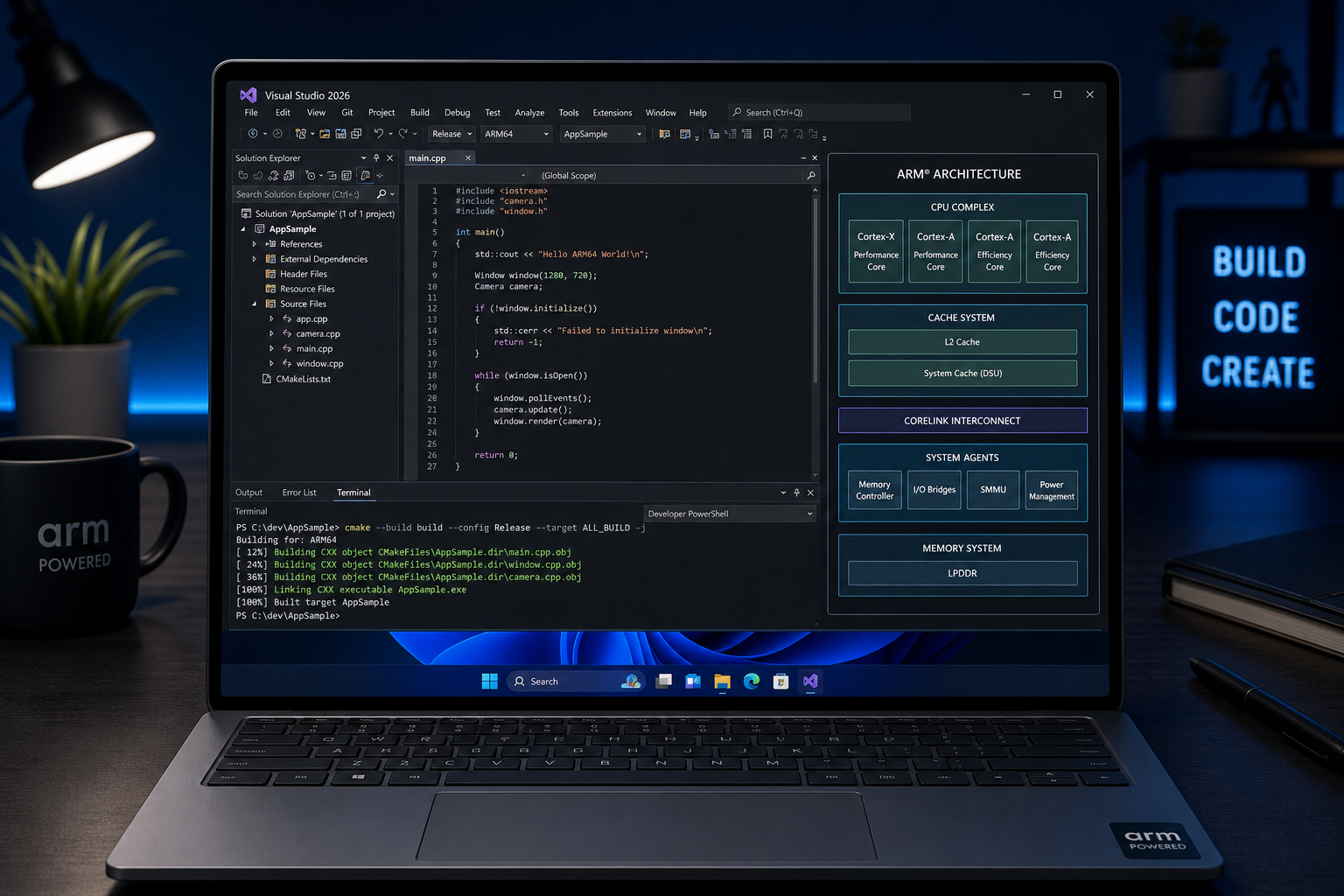
ARM64 development on Windows 11 has reached a genuine inflection point. With Microsoft’s announcement on 20 August 2026 that the Windows 11 ARM64 Visual Studio 2026 image is now generally available, developers finally have a production-ready, fully native toolchain for ARM-based hardware — no emulation layers, no performance compromises, no workarounds. If you build software for a living, this matters right now.
What Is the Windows 11 ARM64 VS2026 Image?
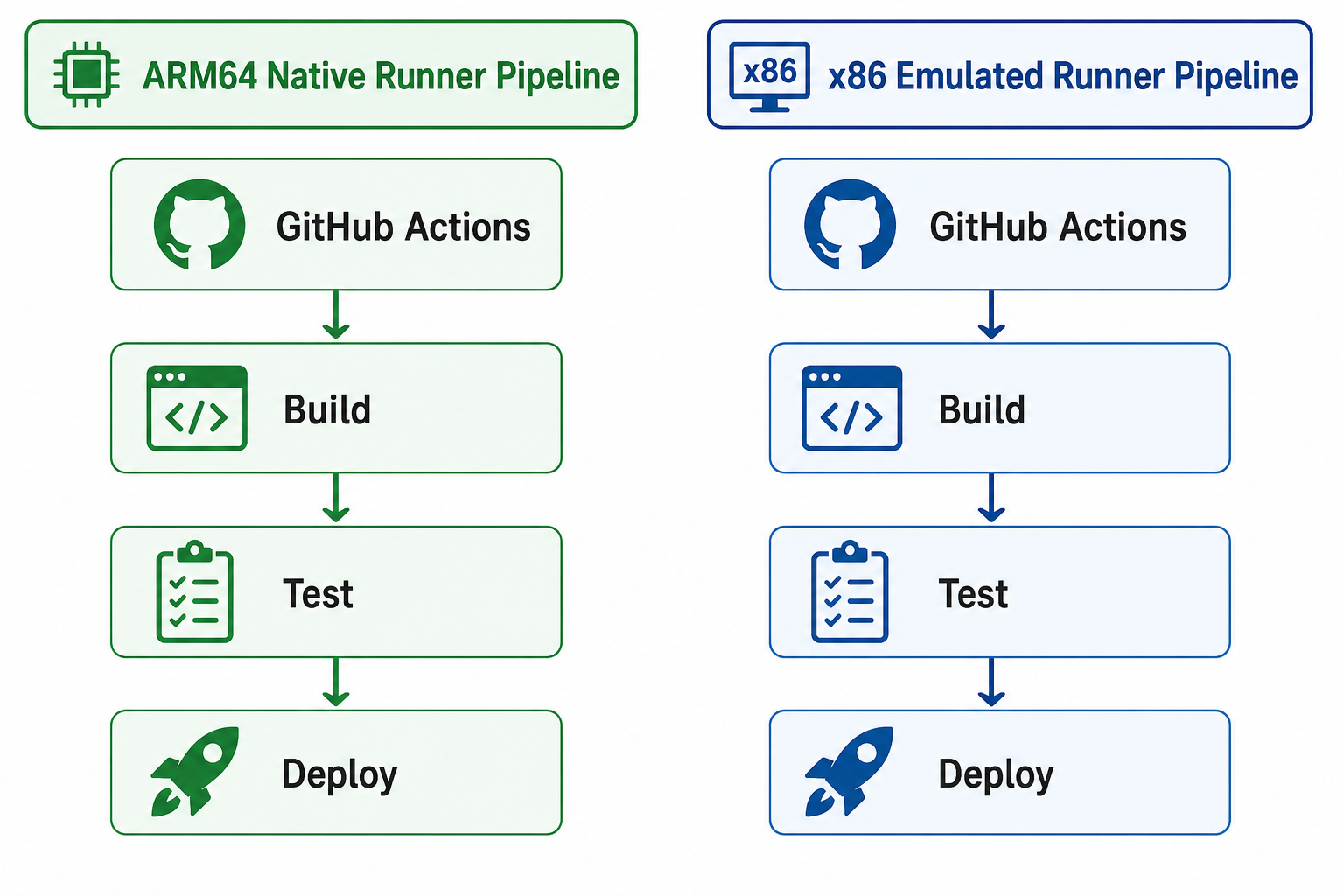
The newly released image is a pre-configured GitHub Actions runner environment — windows-11-vs2026-arm — that bundles Windows 11 on ARM64 with Visual Studio 2026 installed natively. Previously, CI/CD pipelines targeting ARM architecture had to rely on x86-emulated runners or cross-compile on non-ARM hosts. That workaround added latency, masked real-world bugs, and produced binaries that weren’t truly optimised for the target hardware.
General availability (GA) means the image is now production-grade, supported, and ready to be dropped into professional workflows without caveats. Developers can reference it in their GitHub Actions YAML with a single line and get a runner that natively executes ARM64 code from the first instruction.
Why Native ARM Development Changes the Game
Windows ARM development under emulation was a bit like test-driving a car with the handbrake half on. The app would run, but performance profiling was misleading, ARM-specific bugs could hide until production, and build times were noticeably slower on emulated pipelines. Going native eliminates all three problems at once.
- Real performance numbers: Benchmarks and profiling reflect what end-users actually experience on ARM hardware, not an x86 approximation.
- Catch ARM-specific bugs early: Issues tied to ARM’s memory model, calling conventions, or SIMD instruction sets surface during CI — not post-deployment.
- Faster build pipelines: Native ARM64 runners execute compiled code directly, removing the overhead of the x86-on-ARM translation layer and cutting build times substantially.
- Accurate dependency validation: Third-party libraries and NuGet packages are resolved and linked against real ARM64 binaries, exposing compatibility gaps before they reach users.
- Consistent developer experience: Developers on Snapdragon- or Apple Silicon-based machines running Windows can now match their local environment to CI — finally closing the “works on my machine” gap for ARM.
ARM Native Development: The Broader Context
This launch doesn’t exist in a vacuum. ARM-based Windows devices have been steadily gaining ground since the Snapdragon X Elite and X Plus chips landed in 2024, delivering battery life measured in full working days and performance figures that compete directly with x86 counterparts. According to Microsoft’s Windows on ARM documentation, ARM architecture is specifically designed to offer longer battery life while maintaining the performance expected of modern desktop-class hardware.
By mid-2026, Windows on ARM is no longer a niche experiment. Major apps — including Visual Studio itself since version 17.4 — ship as native ARM64 binaries. The VS2026 GitHub Actions image is the logical next step: bringing the CI/CD layer in line with the development environment that millions of developers already use daily. Windows ARM development is entering the mainstream, and your pipelines need to reflect that.
How to Get Started with ARM64 Development on GitHub Actions
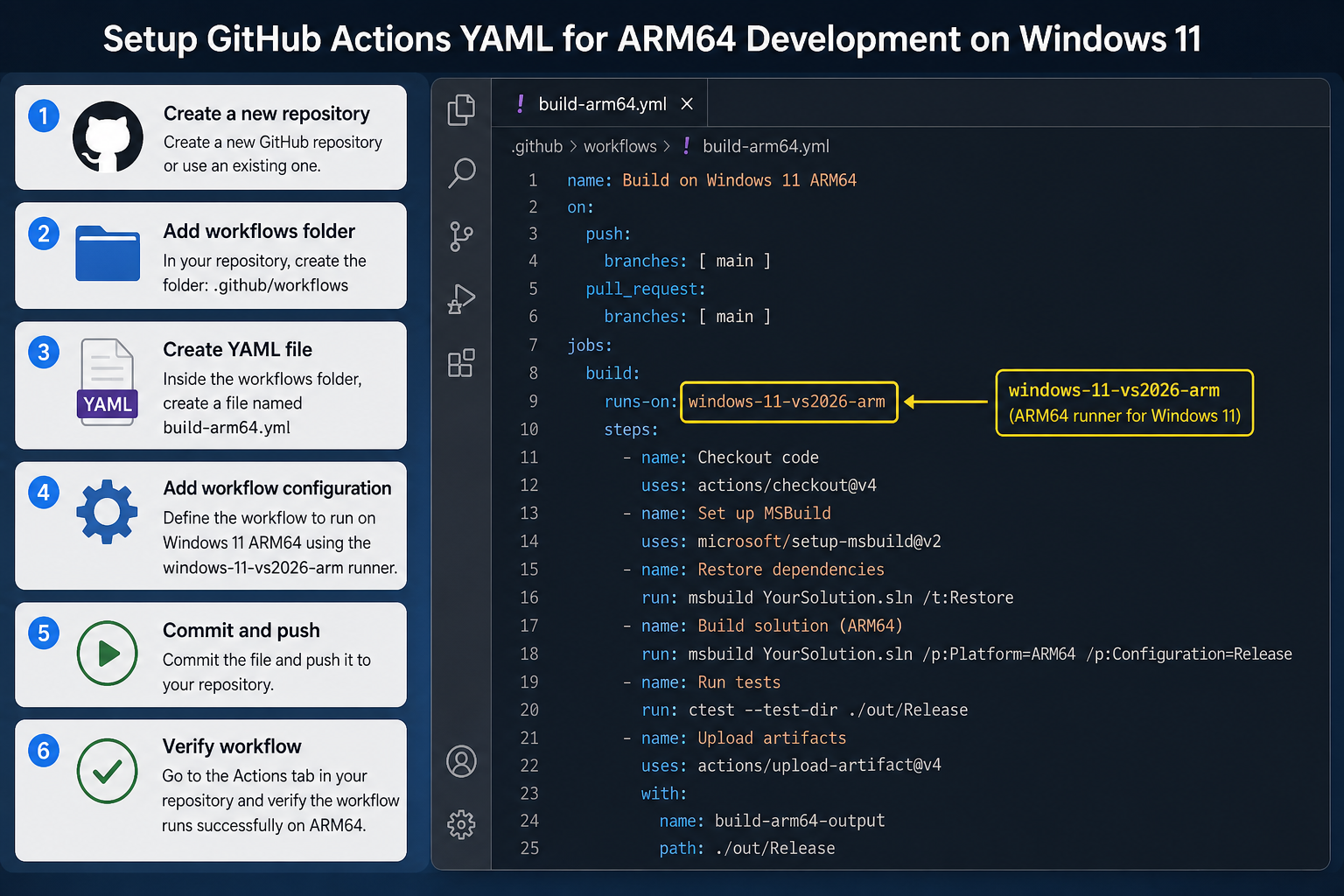
Switching your pipeline to use the new image is straightforward. The key change is the runs-on label in your workflow YAML file.
- Update your workflow file: Replace your existing
runs-onvalue withwindows-11-vs2026-armin any job that builds or tests ARM64 targets. - Verify your project architecture settings: In Visual Studio 2026, confirm your build configuration targets
ARM64— notx64orAnyCPUwhere ARM64 is the intended output. - Audit your NuGet and third-party dependencies: Check that every package you use ships an ARM64-compatible binary. The native runner will flag incompatible dependencies that previously slipped through on emulated runners.
- Run a parallel build initially: For the first few sprints, run both your existing x64 runner and the new ARM64 runner in parallel. Compare test results and build artefacts before removing the x64 job entirely.
- Update deployment scripts: Ensure any post-build steps — signing, packaging, uploading artefacts — are also ARM64-aware and don’t inadvertently call x86-only tools.
Windows on ARM: What the OS Foundation Looks Like
A great developer image is only as good as the OS underneath it. Windows 11 on ARM64 ships with the full Windows 11 feature set — including DirectX 12, WSL 2, Hyper-V, and the complete Windows App SDK — all running natively. There’s no stripped-down or “lite” version of the OS lurking beneath the CI runner. The same Windows 11 that powers Copilot+ PCs is what your build jobs run on.
For developers who want to replicate the runner environment locally, a genuine Windows 11 licence is the starting point. Whether you’re spinning up a fresh ARM device or setting up a VM for testing, having an activated copy of Windows 11 ensures you get every security update and feature parity with the GA runner image. You can pick up a Windows 11 Pro Retail licence from Top Key Shop from just €9.10 — one of the most cost-effective ways to keep your development environment properly licensed.
ARM64 Development Tools: What Comes with VS2026
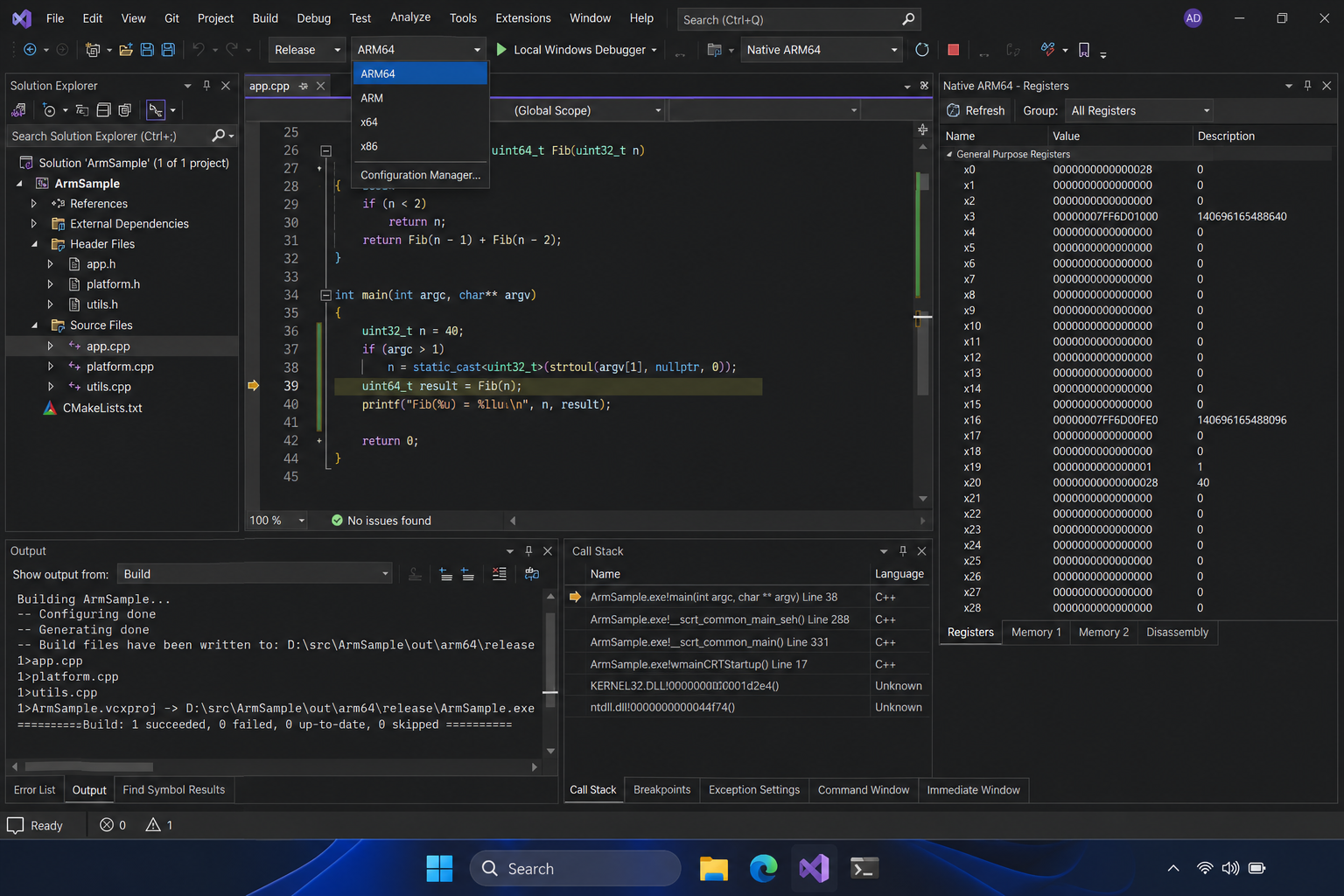
Visual Studio 2026 on ARM is not just a port — it’s a full-featured IDE rebuilt around the ARM64 instruction set. Key capabilities baked into the VS2026 ARM64 image include:
- Native ARM64 debugger: Set breakpoints, inspect ARM registers, and step through ARM64 assembly without any emulation overhead.
- MSVC ARM64 compiler toolchain: The C++ build tools for ARM64 are included, with the latest MSVC version supporting modern C++23 features on ARM.
- Integrated .NET 9 ARM64 runtime: .NET apps compile and run natively without requiring cross-architecture shims.
- Windows App SDK ARM64 support: WinUI 3 applications build and test against real ARM64 runtime APIs.
- ARM Performance Advisor integration: Identify ARM-specific hotspots and optimise SIMD usage directly from within the IDE.
Windows ARM development has never had tooling this complete or this tightly integrated. The VS2026 release notes confirm this marks a new era for Visual Studio, with AI-assisted coding features and stronger platform fundamentals layered on top of the native ARM64 foundation.
What This Means for Teams Still on x86 Pipelines
If your team hasn’t started thinking about ARM-native CI/CD yet, the GA of this image is the clearest possible signal that the time is now. ARM device market share in the Windows ecosystem is growing — Qualcomm, Microsoft, and a growing list of OEMs are shipping ARM-first hardware — and user expectations are forming around the performance and battery life those devices deliver.
Continuing to build exclusively on x86 runners means your ARM users are getting binaries assembled without ARM in mind. That translates to missed optimisation opportunities, potential emulation-related bugs, and a longer debugging cycle when ARM-specific issues inevitably surface. The Windows ARM development path is no longer experimental — it’s production infrastructure.
For development teams who also want to upgrade their underlying Windows environment, the Windows Developer Tools 2026 Build Announcements post covers the broader platform improvements announced at Microsoft Build 2026, including WSL containers and the Intelligent Terminal — context that rounds out the picture of where Windows development is headed.
Frequently Asked Questions
What is the windows-11-vs2026-arm GitHub Actions image?
It is a generally available GitHub Actions runner image that combines Windows 11 on ARM64 with a native installation of Visual Studio 2026. Developers reference it via the windows-11-vs2026-arm label in their workflow YAML. It replaces emulated ARM runners and gives CI/CD pipelines a true ARM64 execution environment from build to test.
Do I need special hardware to use ARM64 development tools locally?
For local development you need a Windows on ARM device — such as a Snapdragon X Elite or X Plus laptop, or a virtual machine running Windows 11 ARM64. For cloud-based CI/CD via GitHub Actions, no special hardware is required on your end; Microsoft provisions the ARM64 runners. A valid Windows 11 licence is needed for local environments.
Is Windows ARM development stable enough for production CI/CD?
Yes. The GA designation means Microsoft considers the image production-ready. GA images in the GitHub Actions runner library go through extensive validation before release and receive the same support SLAs as other generally available runners. Teams running mission-critical pipelines can adopt it with confidence.
Will my existing x86 Visual Studio projects work on the ARM64 runner?
x86/x64 build configurations will still compile on the ARM64 runner via MSVC’s cross-compilation support, but you won’t get native ARM64 binaries that way. To produce proper ARM64 output, your project configuration needs an ARM64 platform target. Most .NET and C++ projects require only a configuration change; some third-party native dependencies may need ARM64 versions.
How does Windows on ARM compare to x86 for developer workloads?
Native ARM64 workloads — compilation, test execution, IDE responsiveness — run at full speed on ARM hardware, with no emulation tax. Battery life is a significant practical benefit for developers on laptops: ARM devices regularly deliver 15–20 hours of real-world use. The trade-off historically was software compatibility, but with VS2026, the .NET 9 runtime, and the Windows App SDK all shipping ARM64 natively, that gap has effectively closed for mainstream development stacks.
Can I mix ARM64 and x64 jobs in the same GitHub Actions workflow?
Absolutely. GitHub Actions allows you to define multiple jobs with different runs-on values in a single workflow file. A common pattern is to run ARM64 and x64 build jobs in parallel, compare artefacts, and gate deployment on both passing. This approach is especially useful during the transition period when you’re validating ARM64 output against an established x64 baseline.
