

Microsoft’s new cloud recovery tool for Windows 11 — officially called Cloud Rebuild — can restore a completely unbootable PC to a clean, working state entirely over the internet, with no USB drive, no installation media, and no advanced technical knowledge required. For anyone who has ever faced the dreaded blank screen or boot loop at 11 PM before an important deadline, this is the fix that should have existed years ago.
What Is the Windows Cloud Recovery Tool?
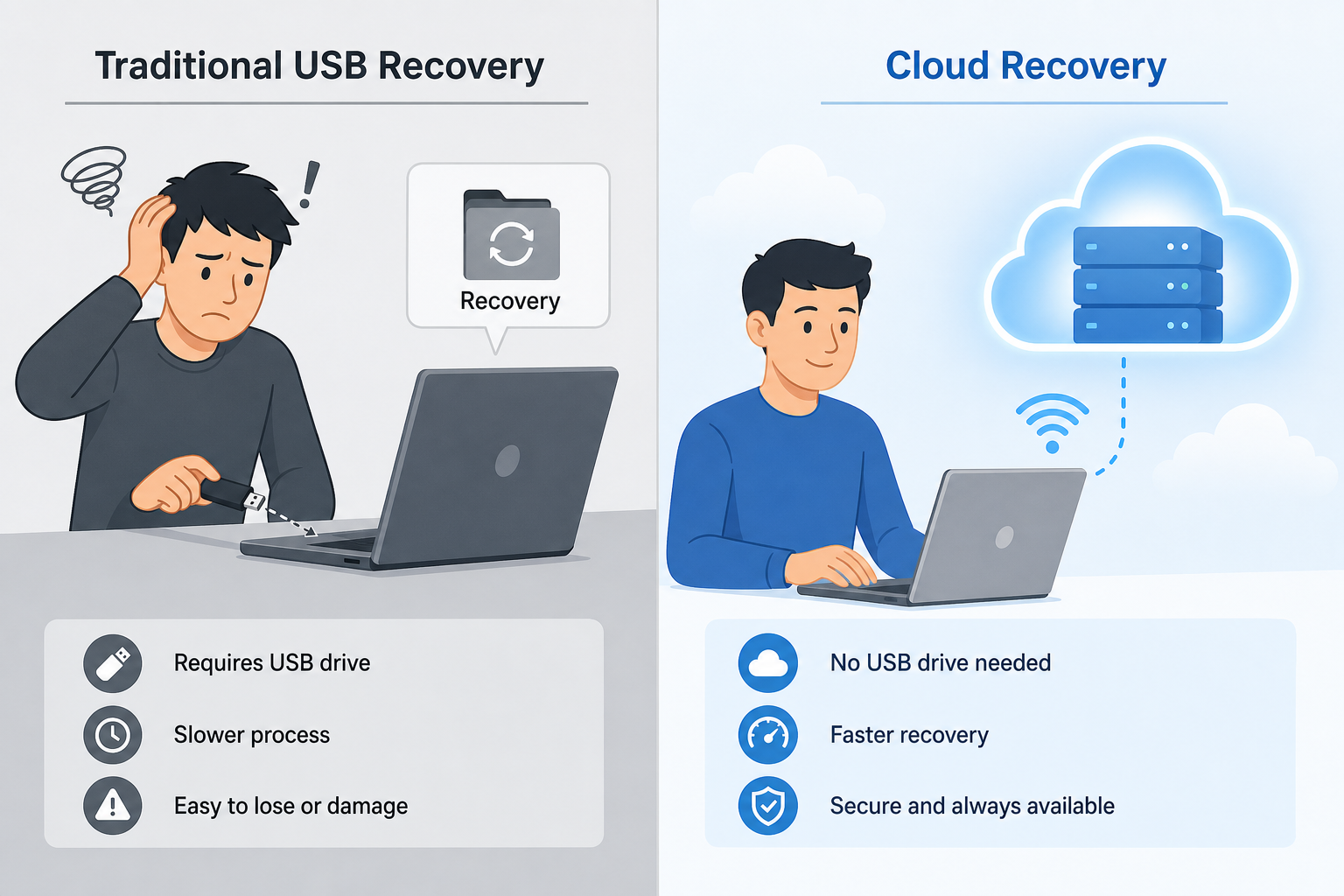
Cloud Rebuild is Microsoft’s answer to one of Windows’ longest-standing pain points: recovering a system that simply won’t start. Traditional recovery methods — creating bootable USB drives, hunting for ISO files, entering BIOS settings — have always demanded a level of technical confidence that most everyday users don’t have. The new PC cloud recovery feature strips all of that away. According to Microsoft’s official Cloud Rebuild documentation, the tool performs a full operating system reinstall by pulling a clean Windows 11 image directly from Microsoft’s servers, restoring the PC to a known-good state without any physical media whatsoever.
This is distinct from the existing “Reset this PC” option you may already know. A standard reset uses locally cached files or a recovery partition that can itself become corrupted. Cloud Rebuild bypasses local storage entirely, downloading a verified, untampered OS image from the cloud — making it far more reliable in worst-case scenarios where the local partition is damaged or missing.
Cloud Rebuild vs. Traditional Recovery: What’s Different?
Understanding what sets this cloud recovery tool apart from older approaches helps clarify why it matters so much.
- No USB required: Classic recovery demanded a bootable USB with at least 8 GB of free space, prepared in advance on a working computer. Cloud Rebuild works from the Windows Recovery Environment (WinRE) with just a network connection.
- No corrupted local files: Traditional “Reset this PC” relies on files stored on your own drive — files that are often damaged in the very scenarios where you need recovery most. Cloud Rebuild downloads a fresh image every time.
- Driver restoration: Cloud Rebuild can also restore device-specific drivers automatically, reducing post-recovery setup time significantly.
- Remote triggering for IT admins: IT professionals can trigger a Windows cloud reset remotely on managed devices — a huge time-saver for enterprise help desks managing fleets of machines.
- Targeted remediation first: Before performing a full reinstall, the tool uploads diagnostic data to Microsoft’s servers so a targeted fix can be attempted. A full OS reinstall only occurs if the targeted fix doesn’t resolve the issue.
How Does the PC Cloud Recovery Process Work, Step by Step?
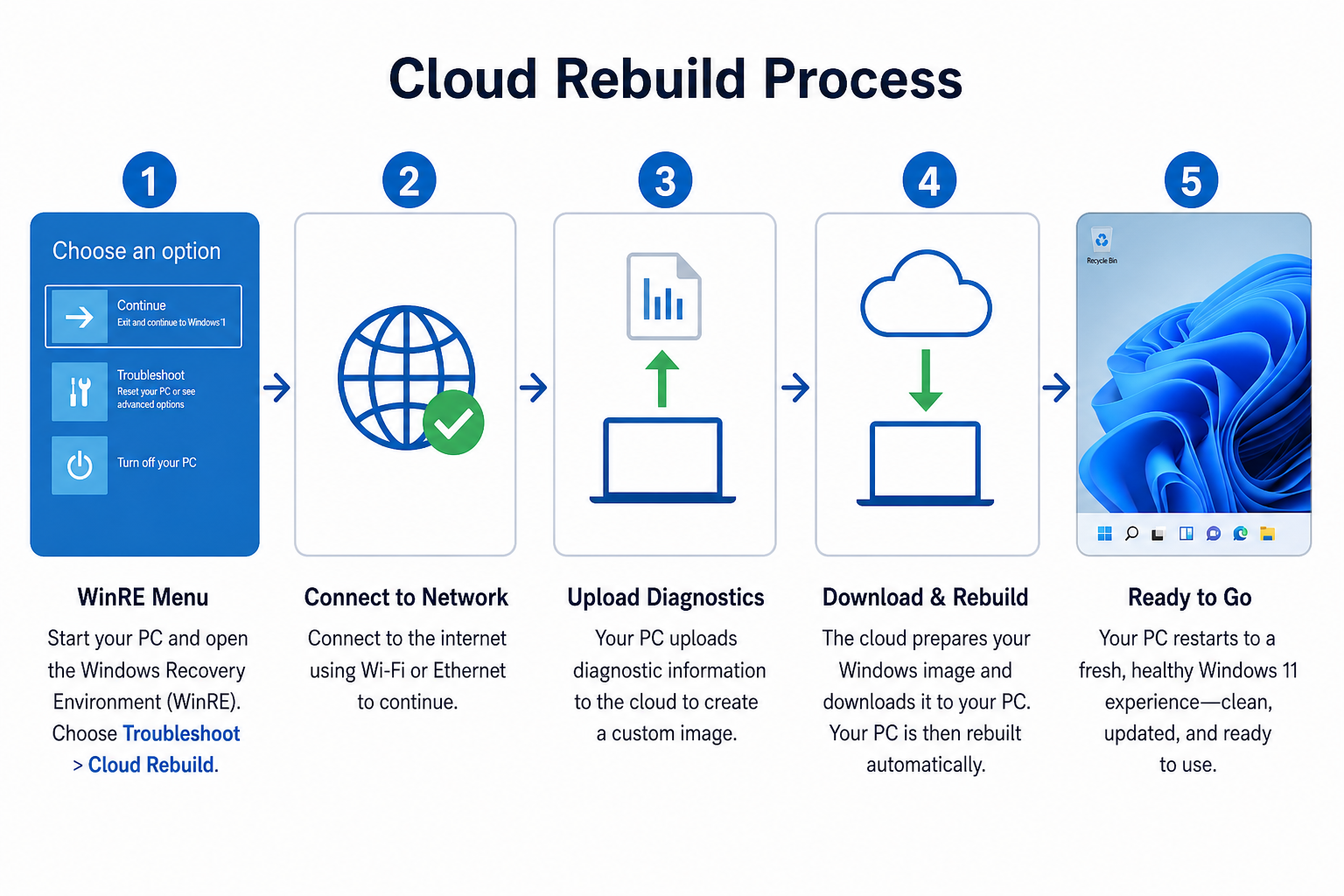
The PC cloud recovery process is designed to be as hands-off as possible. Here’s what happens when you trigger Cloud Rebuild:
- Boot into Windows Recovery Environment (WinRE): Even on an unbootable machine, WinRE is accessible. You reach it by powering on and interrupting the boot process, or by accessing it through Settings > System > Recovery on a partially working system.
- Select Cloud Rebuild: Inside WinRE’s Troubleshoot menu, the Cloud Rebuild option appears (on eligible builds — see requirements below). Select it and connect to a Wi-Fi or wired network.
- Diagnostic upload: The device sends diagnostic telemetry to Microsoft’s servers. Engineers analyse it to determine whether a targeted, lighter-weight fix can be pushed — avoiding a full reinstall when possible.
- Image download and install: If a targeted fix isn’t sufficient, a full, verified Windows 11 image is downloaded and installed. The process is largely automated.
- Driver restore: Device-specific drivers are pulled from the cloud and reinstalled, so your hardware works correctly from the first boot.
- First boot: The PC restarts into a fresh, clean Windows 11 environment — ready to sign in and restore personal files from a backup.
System Requirements for Cloud Rebuild
Cloud Rebuild is currently available on Windows 11 build 26100.4700 or later (Windows 11 24H2), which aligns with the Quick Machine Recovery feature framework Microsoft introduced in the same update cycle. Key requirements include:
- Windows 11 version 24H2 (build 26100.4700 or later)
- A working internet connection accessible from WinRE (Wi-Fi or Ethernet)
- For enterprise/managed devices: Microsoft Intune or equivalent MDM configuration to enable remote triggering
- A Microsoft account or Azure AD account for identity verification during the recovery process
Home users on eligible hardware will find the option natively in WinRE. IT administrators managing corporate devices can configure and trigger the cloud rebuild remotely through management tools, eliminating the need to physically touch a broken device.
Why This Cloud Recovery Tool Matters for Home Users
For the average home user, the biggest barrier to PC recovery has always been the preparation required before disaster strikes. Creating a recovery USB, knowing where to download an ISO, understanding BIOS boot order — these are tasks most people put off indefinitely, which means when a PC fails, they’re left with no good options.
The Windows cloud reset model removes that preparation burden entirely. You don’t need to have done anything in advance. As long as your machine can reach a Wi-Fi network, Cloud Rebuild can rescue it. That’s a genuinely meaningful change for the millions of users who’ve had to pay for a technician visit — or simply buy a new laptop — because their only recovery option was reformatting with a USB they didn’t own.
It also means that Windows 11 becomes a safer long-term investment. Knowing your operating system can recover itself from catastrophic failure without specialist intervention adds real confidence to ownership.
Why This Cloud Recovery Tool Matters for IT Professionals

The enterprise angle is arguably even more compelling. IT support teams regularly deal with remote workers whose laptops won’t boot — machines that would previously require shipping back to the office or a technician dispatched on-site. With the PC cloud recovery feature, an admin can trigger a complete OS reinstall from a management console, and the user’s device heals itself over their home broadband connection.
This directly reduces mean time to resolution (MTTR) for boot-failure incidents — one of the costliest categories of IT support tickets. For organisations running hundreds or thousands of Windows 11 devices, even a modest reduction in on-site visits translates to significant operational savings across the year.
The diagnostic-first approach is also worth highlighting for IT teams: because Microsoft attempts a targeted fix before initiating a full reinstall, smaller issues can be resolved without wiping user data or applications, preserving productivity and reducing reimaging time.
Cloud Rebuild and the Broader Windows 11 Recovery Ecosystem
Cloud Rebuild joins an increasingly capable set of Windows 11 recovery and resilience features. Quick Machine Recovery — introduced to help systems recover from faulty third-party kernel drivers (a direct response to incidents like the CrowdStrike outage of 2024, which took down an estimated 8.5 million Windows devices globally) — similarly uses cloud-delivered fixes to repair unbootable systems without physical intervention.
Together, these features signal a clear strategic direction from Microsoft: Windows 11 should be self-healing. Rather than relying on users or IT staff to manually diagnose and fix failures, the OS should detect problems, communicate with cloud infrastructure, and resolve them automatically. Cloud Rebuild is the most visible consumer-facing expression of that philosophy yet.
Get a Genuine Windows 11 Licence Before You Need It
Cloud Rebuild is a fantastic safety net — but it only works on a genuine, properly activated copy of Windows 11 running build 24H2 or later. If your current installation is ageing, running an older version, or was never properly activated, now is the right time to sort that out before you ever need emergency recovery.
At TopKeyShop, you can grab a fully genuine Windows 11 Pro Retail licence for just €9.10 — delivered digitally within minutes, with official Microsoft download links and free 24/7 customer support. If you want the full productivity bundle, the Windows 11 Pro + Office 2024 Professional Plus bundle is available from €19.10, giving you both a cloud-ready OS and a complete office suite at a fraction of the retail price.
Frequently Asked Questions
Does Cloud Rebuild delete my personal files?
Yes — Cloud Rebuild performs a full OS reinstall, so personal files stored on the system drive will be removed. Microsoft recommends maintaining a current backup via OneDrive, File History, or an external drive before relying on any recovery method. After Cloud Rebuild completes, you can restore your files from backup as normal.
Do I need a USB drive to use the Windows cloud recovery tool?
No. That’s the key advantage of Cloud Rebuild over traditional recovery methods. As long as your device can connect to a Wi-Fi or wired network from within the Windows Recovery Environment, the entire process happens over the internet. No physical media is needed at any point.
Is Cloud Rebuild available on Windows 10?
Cloud Rebuild is currently a Windows 11 exclusive feature, available on build 26100.4700 (Windows 11 24H2) or later. Windows 10 users looking to benefit from this and other modern recovery features should consider upgrading to Windows 11 Pro, which is available from TopKeyShop at very competitive prices.
Can IT admins trigger a cloud rebuild remotely?
Yes. For enterprise-managed devices enrolled in Microsoft Intune or a compatible MDM solution, IT administrators can remotely initiate a Cloud Rebuild without physically accessing the device. This is particularly valuable for remote workers with unbootable laptops, reducing the need for on-site technician visits significantly.
How long does the cloud rebuild process take?
The duration depends primarily on internet connection speed, since a full Windows 11 image needs to be downloaded. On a typical broadband connection, expect the process to take anywhere from 30 minutes to a couple of hours. Faster connections will complete the reinstall more quickly. The diagnostic phase at the start is brief — usually just a few minutes.
Will Cloud Rebuild reinstall my apps and drivers?
Cloud Rebuild can automatically restore device-specific drivers from the cloud, which is a significant improvement over traditional resets. However, third-party applications will need to be reinstalled manually. Microsoft’s goal is to get the core OS and hardware running correctly — user applications and data should be restored from backups separately.
