

A Windows 11 Pro license deal priced under €20 is making headlines — and for good reason. Microsoft’s own retail price sits at $199.99 in the Microsoft Store, so a 95% discount naturally raises eyebrows. The short answer: deals this low are real, but they come with important caveats every buyer must understand before clicking purchase.
Why Is the Windows 11 Pro Key So Cheap Right Now?
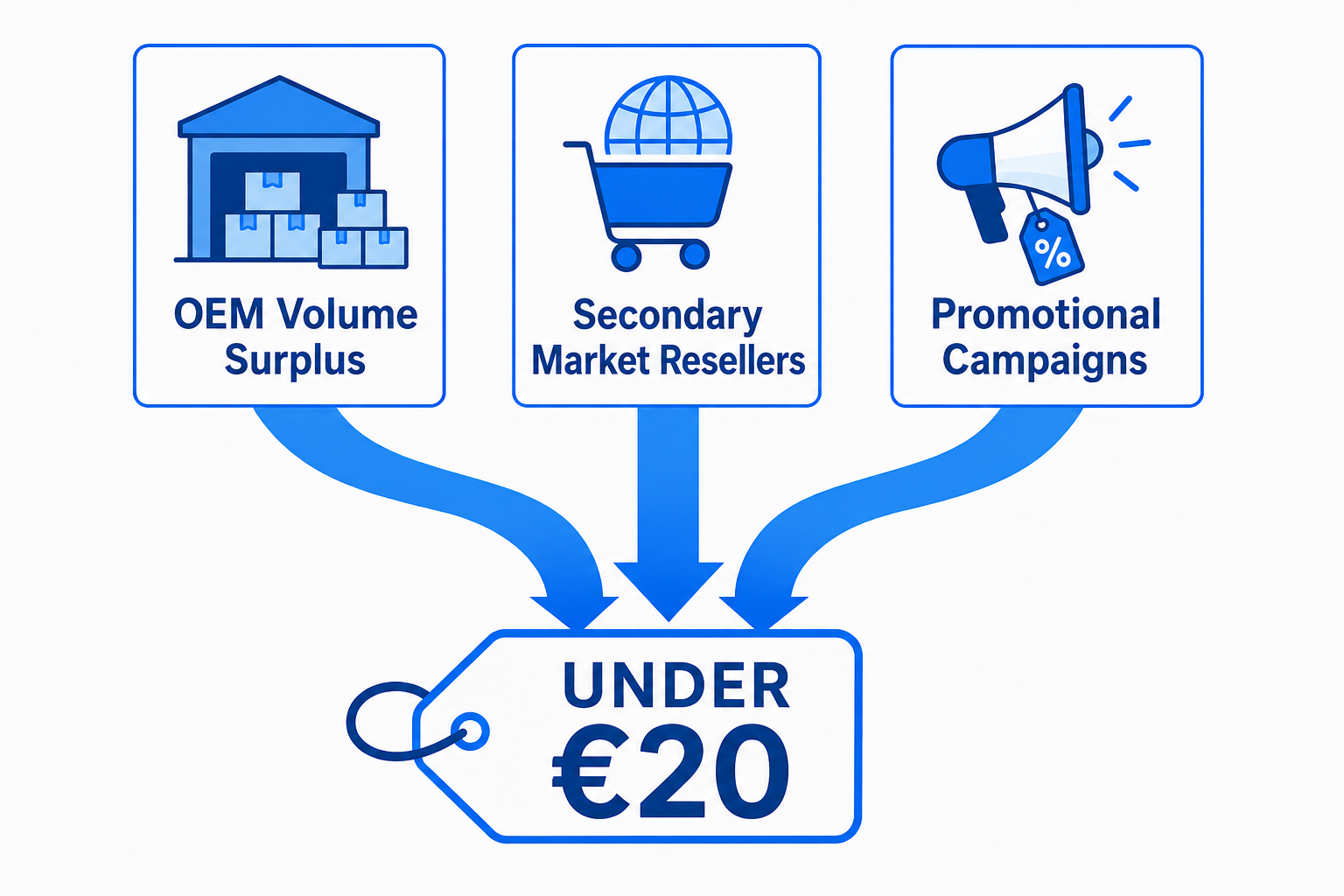
The under €20 price tag is not a glitch, a scam, or a piracy shortcut — it is the result of a well-established secondary market for OEM licence keys. Understanding why these prices exist is the first step to shopping confidently.
-
OEM volume licensing: Large manufacturers buy Windows licences in bulk at heavily discounted rates. Keys from batches that are surplus or decommissioned hardware often re-enter the market legally in many jurisdictions.
-
Cross-border resellers: Authorised resellers in regions with lower software pricing can legally sell keys cross-border, passing steep savings to international buyers.
-
Limited promotional windows: Some platforms run time-boxed campaigns — like the offer running through 19 July 2026 — to drive traffic and clear licence inventory fast.
-
Competition among digital stores: The digital software key market is fiercely competitive, and aggressive pricing is one of the primary ways stores differentiate.
None of this means every under €20 key is trustworthy. It means the mechanism that produces cheap Windows 11 Pro keys is real and documented — which is why vetting the seller matters as much as the price.
OEM vs Retail: Which Windows 11 license Do You Actually Need?
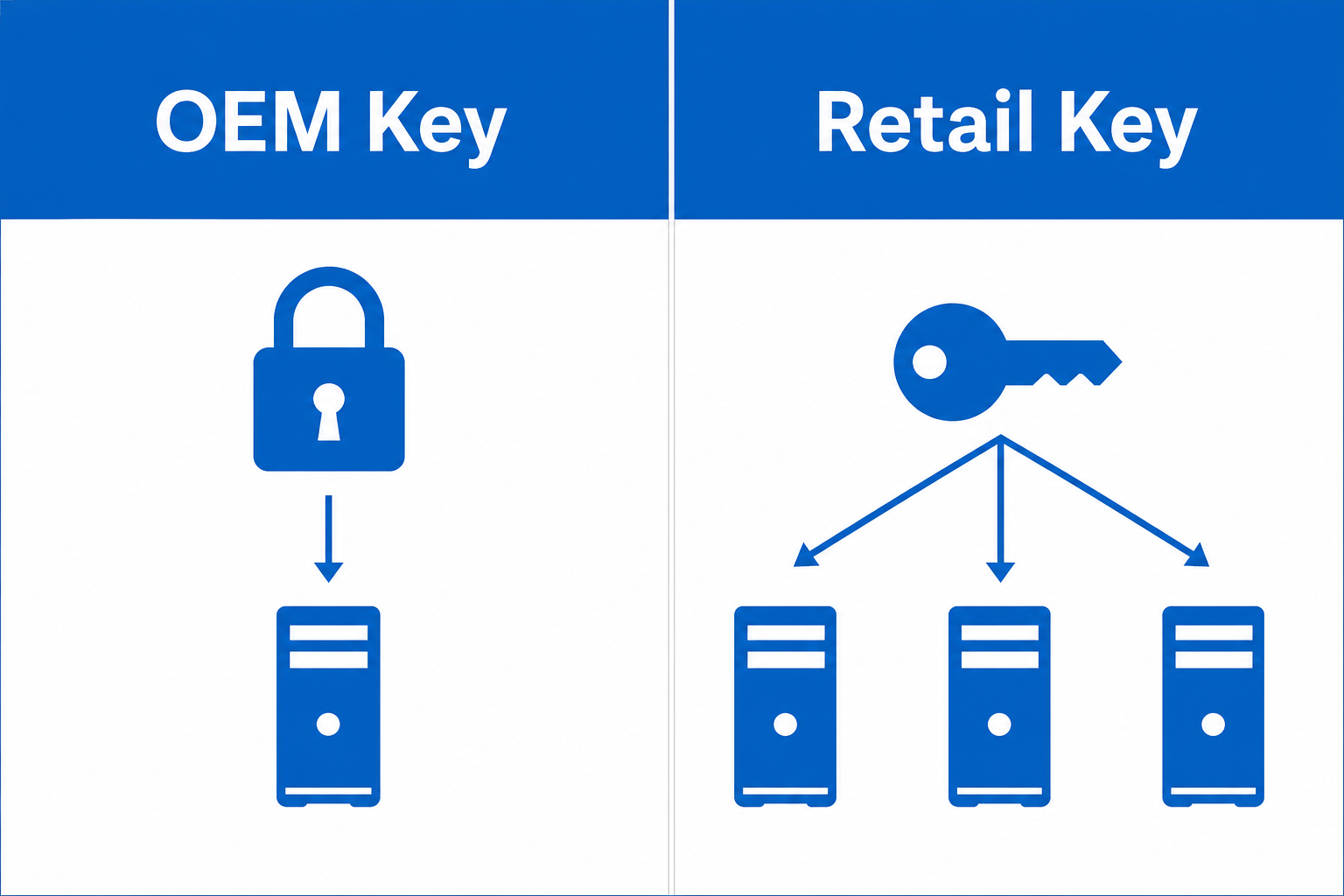
Choosing between an OEM and a retail Windows 11 license is the most important decision you will make when buying at a discounted price point. Getting it wrong costs you flexibility later.
OEM Licences — Best for a Single, Permanent Build
An OEM (Original Equipment Manufacturer) key activates Windows on one machine and binds to that machine’s hardware permanently. If you replace the motherboard or move to a completely new PC, the licence does not transfer. On the plus side, OEM keys activate cleanly via Microsoft’s servers, behave identically to retail in daily use, and are significantly cheaper — at Top Key Shop, a Windows 11 Pro OEM 64-bit key is available for just €7.95.
Retail Licences — Best for Flexibility and Transfers
A retail key is yours to keep across hardware upgrades. You can deactivate it on one machine and reactivate it on another — a crucial feature for power users who rebuild their rigs regularly. Retail keys also typically come with direct Microsoft support entitlement. The trade-off is a slightly higher price, though still far below the Microsoft Store’s $199.99 MSRP. Top Key Shop’s Windows 11 Pro Retail key is priced at €9.10 — still an outstanding cheap Windows 11 license compared to buying direct from Microsoft.
Quick Comparison at a Glance
-
OEM key: Tied to one device permanently. Cannot be transferred. Lowest price. Full feature parity in daily use.
-
Retail key: Transferable across devices. Comes with Microsoft support. Slightly higher cost. Best long-term flexibility.
-
Volume/MAK key: Enterprise-grade, rarely seen in consumer market deals. Watch for these being mis-sold as personal licences.
Is a Cheap Windows 11 License Actually Legitimate?
The legitimacy of a cheap Windows 11 Pro key deal depends almost entirely on the seller, not the price. Here is what separates a safe purchase from a trap.
Green Flags — Signs the Deal Is Safe
-
The store clearly states whether the key is OEM or retail before checkout.
-
There is a documented money-back guarantee or dispute resolution process.
-
Customer reviews are independently verifiable (Trustpilot, Google Reviews).
-
The store provides official Microsoft download links alongside the key.
-
Email delivery is fast — usually within minutes for digital products.
Red Flags — Licensing Traps to Avoid
-
No mention of OEM or retail — you have no idea what you are buying.
-
Keys sold in large batches on auction platforms with no seller history.
-
No contact information, no support channel, no refund policy.
-
Prices suspiciously below €5 / $5 with zero reviews or verification.
-
Sellers who cannot confirm whether the key activates via Microsoft’s own servers.
According to Microsoft’s official Windows 11 Pro product page, the standard retail price is $199.99 — so any deal well below that should prompt you to verify the licence type and seller credentials carefully, not to walk away automatically.
How to Safely Grab a Windows 11 Pro License Deal Before the Deadline
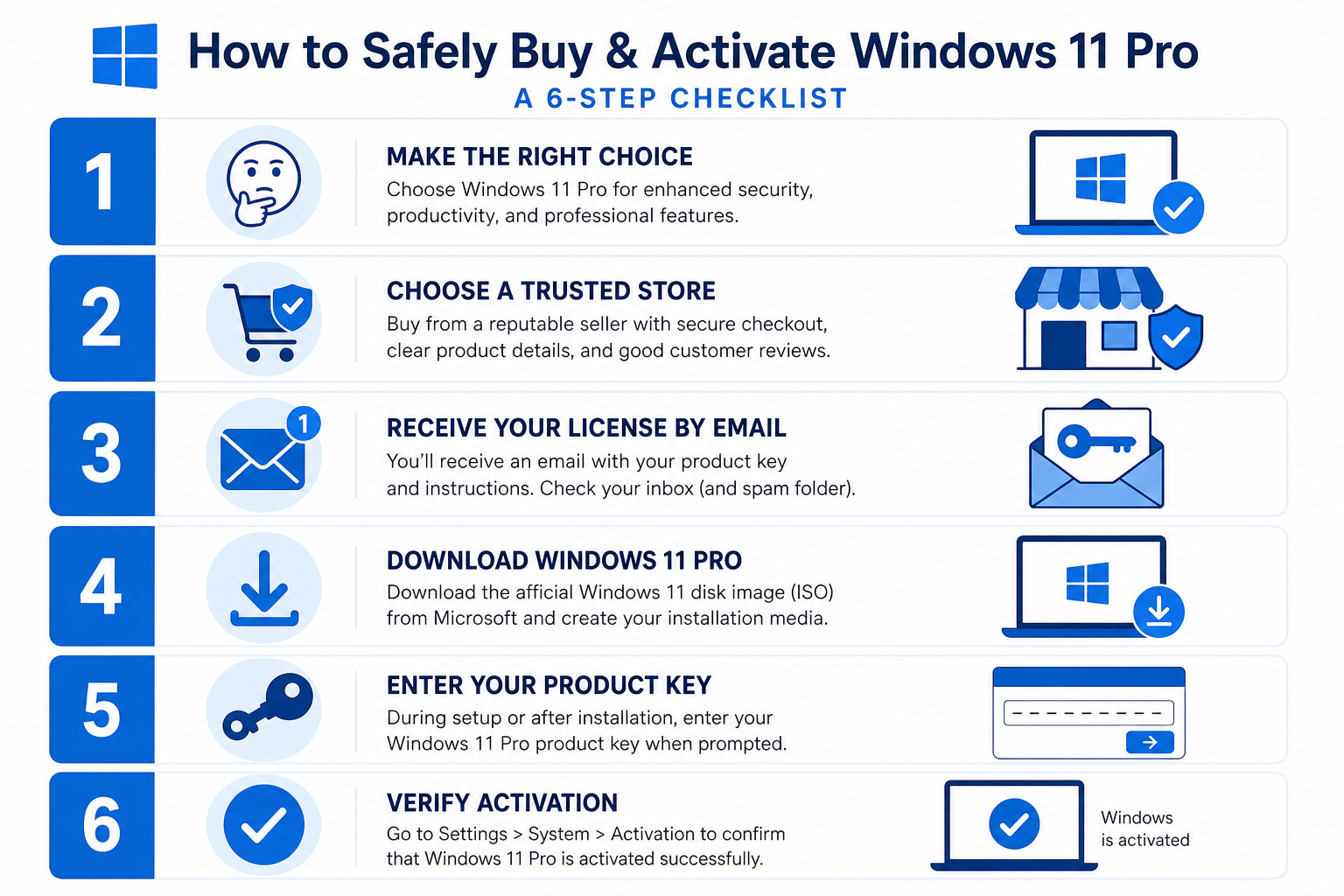
If you are ready to act on a Windows 11 Pro key before July 19, 2026, follow this straightforward process to buy safely and activate without headaches.
-
Decide OEM or retail based on whether you plan to upgrade your hardware in the next few years. If yes, go retail. If your build is permanent, OEM is fine.
-
Choose a reputable store with verifiable reviews, clear licence descriptions, and a stated refund or replacement policy for non-activating keys.
-
Complete your purchase and receive your key by email — legitimate digital stores deliver within minutes.
-
Download the official Windows 11 ISO directly from Microsoft’s website — never download setup files from the seller.
-
Run setup and enter your key when prompted, or activate post-install via Settings → System → Activation.
-
Verify activation — go to Settings → System → Activation and confirm it reads “Windows is activated with a digital licence.”
Windows 11 License Bundles: Get More for Your Money
A standalone cheap Windows 11 license is compelling, but bundle deals often deliver even greater value per euro spent. If you need Microsoft Office alongside Windows, a bundle eliminates the need for two separate purchases and typically saves 30–50% compared to buying each product individually.
Top Key Shop offers several bundle options worth considering. The Windows 11 Pro Retail + Office 2024 Professional Plus Bundle brings together two major Microsoft products for €19.10 — a remarkable Windows 11 Pro key value compared to buying Office 2024 standalone at retail pricing. If Office 2021 suits your workflow, the Windows 11 Pro OEM + Office 2021 Pro Plus Bundle is available from €17.10.
Browse the full range in the Windows 11 Pro category to find the licence type and bundle that fits your exact setup.
What About Windows 11 After Microsoft’s End-of-Support for Windows 10?
Microsoft officially ends mainstream support for Windows 10 on 14 October 2025. After that date, Windows 10 machines will no longer receive free security updates — making a Windows 11 license not just a bargain but a practical necessity for anyone still running older software. The urgency behind the current under €20 Windows 11 Pro license deal is, in part, a reflection of this industry-wide transition. Millions of users need to upgrade, and the demand for affordable activation keys has never been higher.
Windows 11 Pro delivers meaningful upgrades over Windows 10 Pro: BitLocker device encryption, Windows Sandbox for safe app testing, remote desktop hosting, Hyper-V virtualisation, and Group Policy management — features that matter to both home power users and small business operators.
Frequently Asked Questions
Is buying a cheap Windows 11 license legal?
In most countries, yes — purchasing an OEM or surplus retail key from a third-party reseller is legal for the buyer. The legality primarily concerns the seller’s sourcing practices. Buying from a reputable store with a clear licence description and a stated refund policy is the safest approach. Always confirm the key activates via Microsoft’s official activation servers.
What is the difference between an OEM and a retail Windows 11 Pro key?
An OEM key is permanently tied to the first PC it activates on and cannot be moved to a new machine. A retail key is transferable — you can deactivate it on one device and reactivate it on another. Both activate genuine Windows 11 Pro and unlock identical features in day-to-day use. For most home builds that won’t change hardware, OEM is perfectly sufficient.
Will under €20 Windows 11 key receive official Microsoft updates?
Yes. A legitimately activated Windows 11 key — regardless of price — receives the same Windows Update cycle as any retail copy. Microsoft’s activation servers do not distinguish by the price you paid; they only verify that the key is valid and not already in use on another machine.
What happens if my key doesn’t activate?
A reputable seller will offer a replacement key or a refund. Before purchasing, confirm the store’s policy on non-activating keys. At Top Key Shop, keys come with official download links and activation instructions, and customer support is available to assist if activation encounters any issues.
Can I upgrade from Windows 11 Home to Pro using a cheap key?
Yes. If your PC already runs Windows 11 Home, you can purchase a Windows 11 Pro upgrade key and enter it under Settings → System → Activation → Change product key. This unlocks Pro-tier features immediately without a full reinstall, making it one of the most cost-effective ways to get the Pro feature set.
