
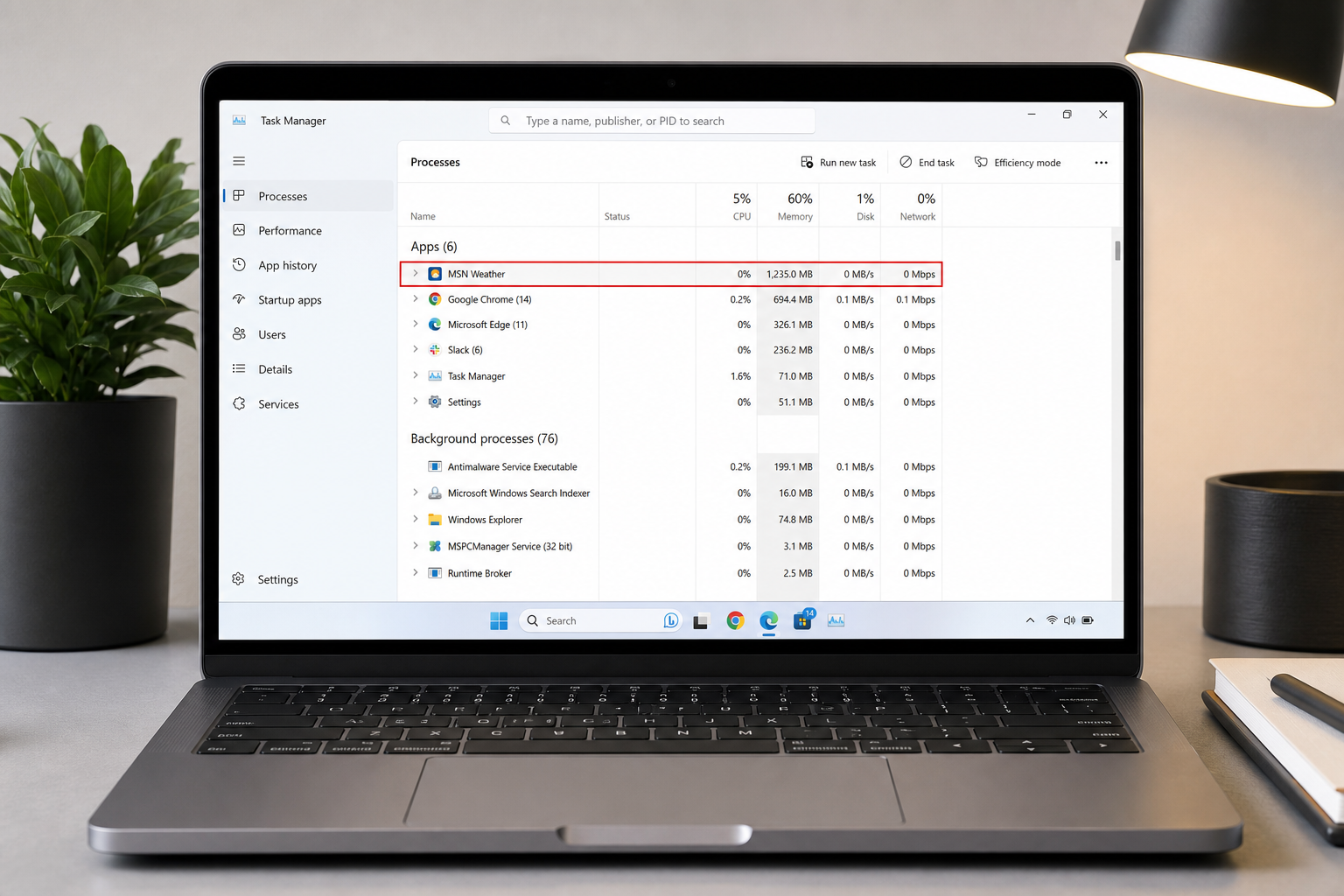
The Windows 11 weather app is quietly eating over 1.2 gigabytes of RAM on millions of PCs — not because it’s doing anything sophisticated, but because it’s a bloated web wrapper pretending to be a native application. If your system feels slower than it should, this overlooked background process could be a major culprit. Here’s the full story and, more importantly, exactly what you can do about it right now.
What Exactly Is the Windows 11 Weather App?
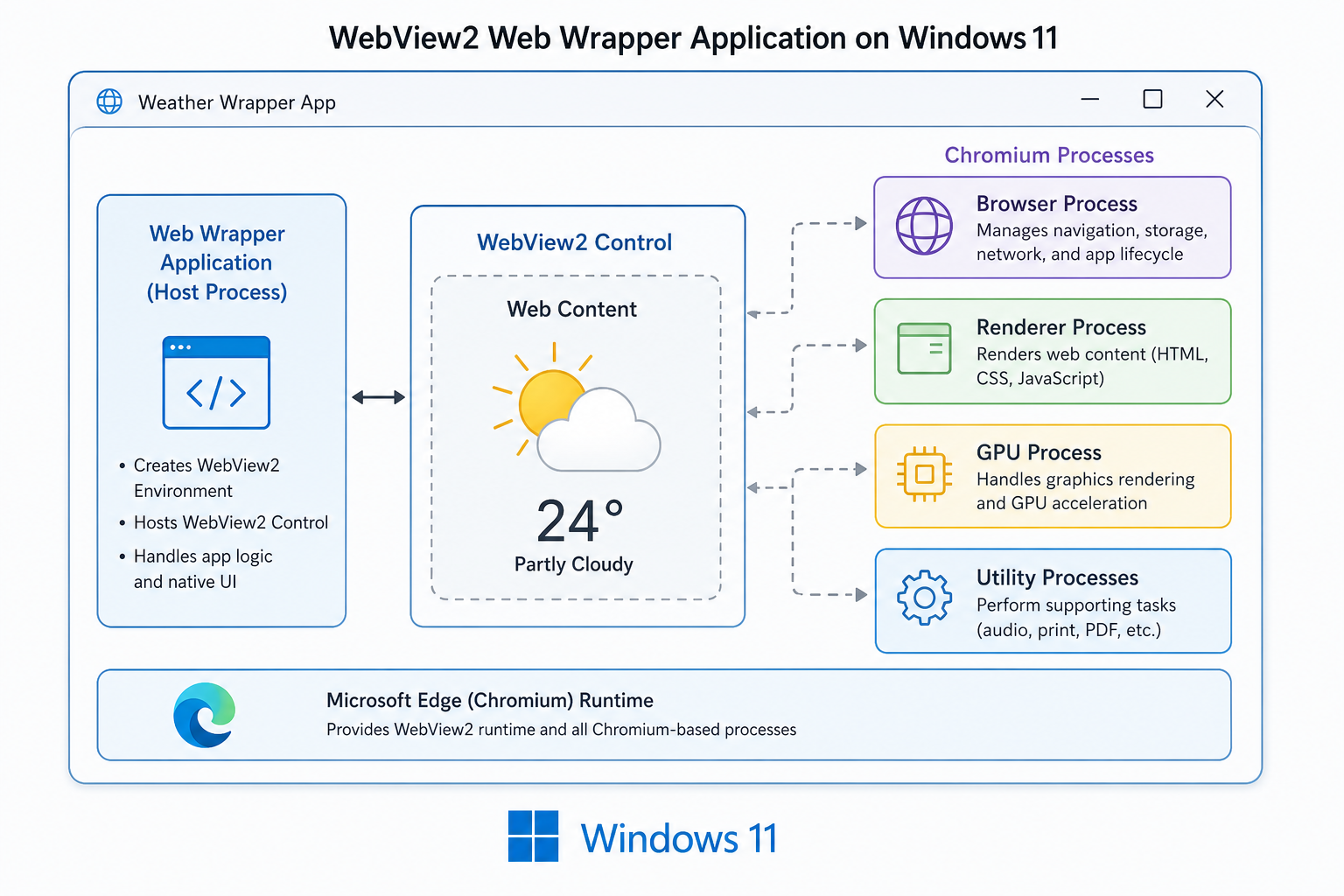
Most users assume the weather tile pinned to their taskbar or Start menu is a lightweight native Windows component. It isn’t. What Microsoft ships as the built-in weather experience is actually MSN Weather — a Chromium-based application that loads a full web page inside a Microsoft Edge WebView2 runtime container. In other words, it’s essentially a browser window dressed up as an app, complete with ad slots, news feeds, maps, and promotional content alongside the actual forecast.
WebView2 is Microsoft’s framework for rendering web content inside desktop applications. It’s a legitimate technology with genuine uses, but when a simple weather display requires spinning up an entire Chromium engine, the resource overhead becomes disproportionate. A basic weather widget should consume tens of megabytes at most — not over a gigabyte.
Why Does the Weather App RAM Usage Get So Out of Hand?
The weather app RAM bloat stems from several compounding factors that all trace back to the web-wrapper architecture.
-
Chromium’s multi-process model: WebView2 spawns multiple background processes — a browser process, a renderer process, a GPU process, and utility workers — each with its own memory allocation. Opening a “simple” weather app triggers all of them simultaneously.
-
Ad and content loading: MSN Weather isn’t just showing temperature and rain probability. It loads a full MSN news and advertising stack: banner ads, sponsored content, video previews, and a dynamic map renderer. Each of these pulls in additional JavaScript, images, and cached web data.
-
No memory ceiling: Unlike a native Windows application, the web layer inside WebView2 has no enforced memory cap. Chromium’s memory manager is designed for browser-scale tasks, not minimal background widgets.
-
Background activity: Even when minimised or closed to the taskbar, the app can retain WebView2 processes in memory to enable fast relaunch — meaning you pay the RAM cost even when you’re not actively using it.
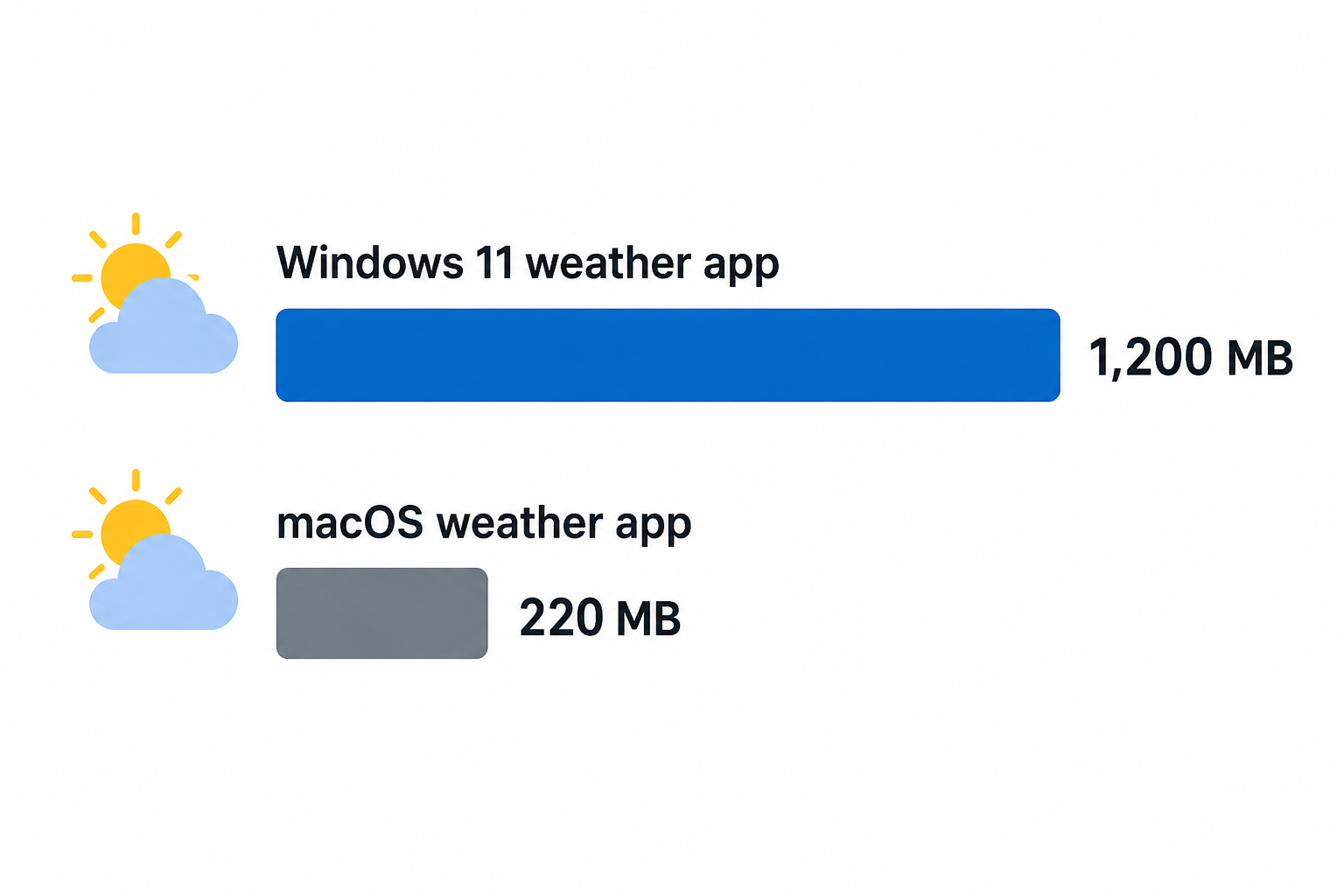
The result? Benchmarks reported by How-To Geek and corroborated by Tom’s Hardware confirm that MSN Weather routinely consumes more than 1.2GB of RAM — roughly five times the memory footprint of the equivalent native weather app on macOS, which sits at around 200–250MB.
Who Feels the Windows 11 Memory Usage Impact Most?
If you have 16GB or 32GB of RAM and run a handful of browser tabs alongside your normal workload, you might not notice 1.2GB disappearing into a weather widget. But a significant portion of Windows 11 users are on machines with 8GB of RAM — and on those systems, the Windows 11 memory usage hit from a single weather app represents roughly 15% of total available RAM. That’s memory that should be available for your browser, your productivity suite, or your creative tools.
Power users running virtual machines, video editing software, or large development environments will feel the squeeze even on 16GB systems. And anyone who bought a budget laptop specifically because Microsoft lowered the Windows 11 minimum specification to 4GB is in a genuinely uncomfortable position.
The Broader Problem: Web Wrappers as Fake Native Apps
MSN Weather is not an isolated case. Microsoft has increasingly shipped what are effectively web applications wrapped inside thin desktop containers and presented them as first-party Windows features. This approach lets teams ship cross-platform UI faster and update content server-side without requiring Windows Update patches — but it offloads the memory and CPU cost entirely onto the user’s hardware.
The irony is that Windows 11’s minimum RAM requirement is 4GB, yet one of its built-in ambient apps can claim 30% of that on its own. For a platform that positions itself as performance-conscious and AI-ready, this represents a genuine credibility gap between marketing and reality.
How to Reclaim Your RAM: Step-by-Step Fixes
The good news is that the MSN Weather app is not essential to Windows 11’s operation. You have several options depending on how completely you want to remove it.
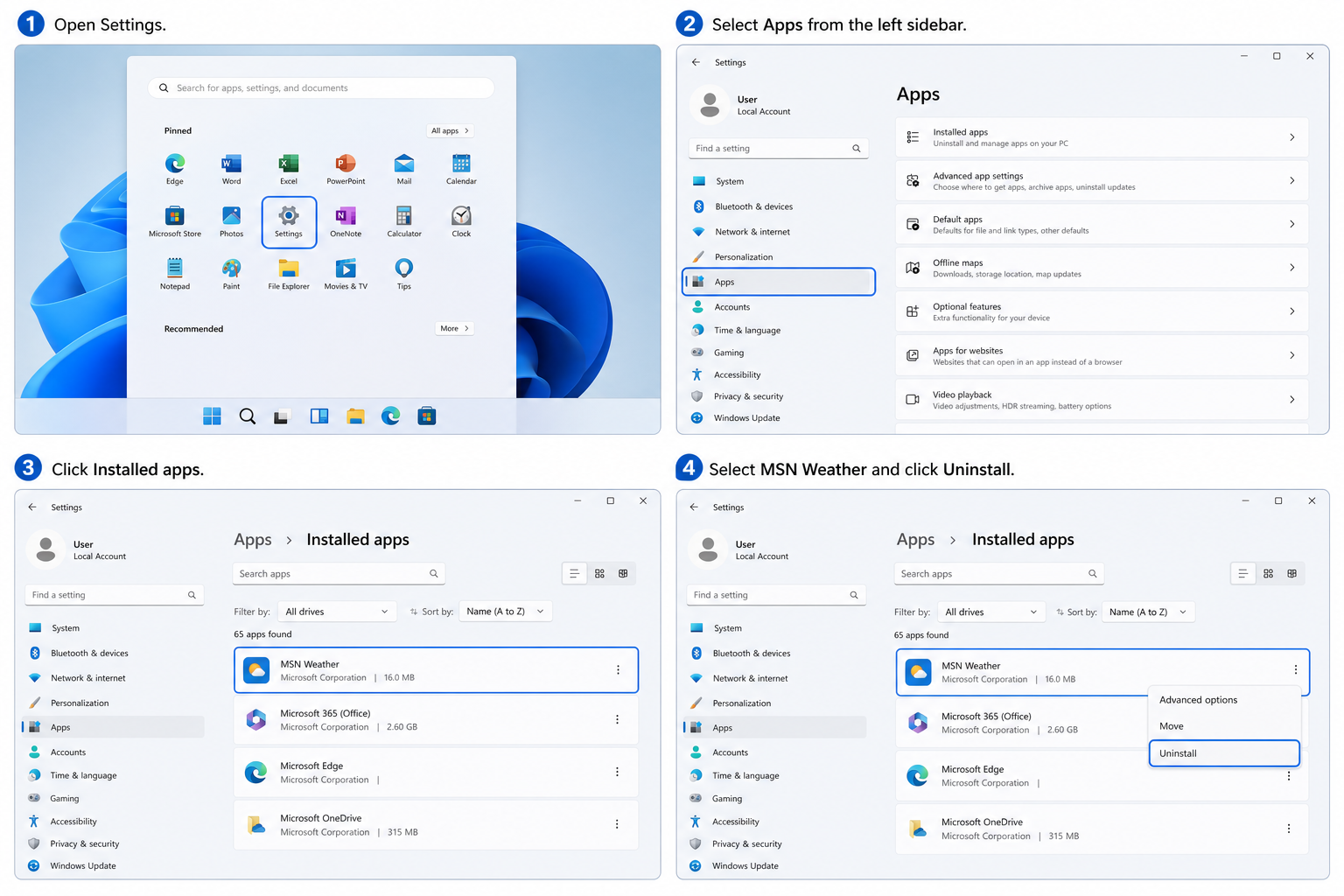
Option 1: Uninstall MSN Weather via Settings (Easiest)
-
Open Settings → Apps → Installed apps.
-
Use the search bar to find Weather.
-
Click the three-dot menu next to MSN Weather and select Uninstall.
-
Confirm the prompt. The app and its associated WebView2 processes will be removed.
This is the cleanest solution for users who simply check their phone or browser for weather. You won’t lose any Windows 11 functionality beyond the widget itself.
Option 2: Remove It via PowerShell (More Thorough)
If the Settings uninstall option is greyed out or the app reinstalls after a Windows Update, you can force-remove it with a single PowerShell command:
-
Right-click the Start button and select Windows Terminal (Admin) or PowerShell (Admin).
-
Run:
Get-AppxPackage *BingWeather* | Remove-AppxPackage -
Press Enter and wait a few seconds for confirmation.
This removes the package for the current user. Add -AllUsers to the command if you want it gone system-wide on a shared machine.
Option 3: Disable Background Activity Only
If you want to keep the app accessible but stop it from consuming weather app RAM in the background:
-
Go to Settings → System → Notifications.
-
Scroll to MSN Weather and toggle off Background activity permission.
-
Additionally, go to Settings → Apps → MSN Weather → Advanced options and set Background apps permissions to Never.
This won’t free up as much memory as a full uninstall, but it will prevent the app from running WebView2 processes when you aren’t actively looking at it.
Option 4: Remove the Taskbar Weather Widget
Even if you keep the app installed, you can stop it from launching automatically by removing the weather widget from the taskbar:
-
Right-click an empty area of the taskbar.
-
Select Taskbar settings.
-
Toggle off the Widgets option entirely.
This prevents the Widgets board — which also includes news, stocks, and traffic — from initialising its own background processes on startup.
What to Use Instead: Lightweight Weather Alternatives
Removing MSN Weather doesn’t mean going without a forecast. These alternatives use a fraction of the resources:
-
Your phone: A weather widget on your smartphone costs zero RAM on your PC.
-
A pinned browser tab: weather.com or AccuWeather in a browser tab you already have open uses no additional Chromium instance.
-
Weather Watcher Live: A traditional native Windows weather application with a genuine desktop footprint in the low tens of megabytes.
-
Windows 11’s Clock app: The updated Windows 11 Clock widget in later builds includes a basic weather summary without the full MSN stack.
Is This a Sign of a Deeper Windows 11 Problem?
The Windows 11 weather app saga points to a wider tension inside Microsoft: the commercial imperative to serve ads and news content through built-in apps versus the engineering responsibility to maintain a lean, performant operating system. MSN Weather is not just a weather tool — it is an ad-delivery platform dressed as a utility. The 1.2GB RAM bill is partly the cost of loading that advertising infrastructure every time you want to know whether to carry an umbrella.
That said, Windows 11 itself — stripped of its more egregious background processes — remains an excellent operating system with meaningful improvements over Windows 10 in areas like gaming performance, security, and productivity. The problem isn’t the OS architecture; it’s specific bundled apps that prioritise monetisation over user experience.
If you’re running Windows 11 on a machine that feels sluggish, reclaiming that 1.2GB is a free performance upgrade that takes under two minutes. Combine it with disabling other unused background apps, and you can recover several gigabytes of RAM without spending a penny.
Get a Clean Windows 11 Licence at the Best Price
If you’re still running Windows 10 or using an unactivated copy of Windows 11, now is a great time to get a genuine licence. At Top Key Shop, you can grab a Windows 11 Pro Retail licence for just €9.10 — with instant email delivery, a 100% money-back guarantee, and free 24/7 activation support. Alternatively, if you want the full productivity stack, the Windows 11 Pro + Office 2024 bundle is available from €19.10. Both come with genuine keys sourced from legitimate channels and activate directly with Microsoft’s official servers.
Frequently Asked Questions
Why does the Windows 11 weather app use so much RAM?
The built-in weather experience in Windows 11 is actually MSN Weather — a WebView2 application that embeds a full Chromium-based browser engine to render its interface. That engine spawns multiple background processes and also loads a significant amount of advertising and news content alongside the forecast itself. The combined overhead regularly exceeds 1.2GB of RAM, which is wildly disproportionate for a weather display.
Is it safe to uninstall the MSN Weather app?
Yes, completely. MSN Weather is a bundled application, not a core Windows 11 system component. Removing it will not affect system stability, security updates, or any other Windows feature. You can reinstall it from the Microsoft Store at any time if you change your mind.
Will removing the weather app speed up my PC?
On systems with 8GB of RAM or less, the improvement can be noticeable. Reclaiming 1.2GB reduces memory pressure, which means Windows needs to rely less on virtual memory (page file swapping) and can keep more of your active applications loaded in fast RAM. Users have reported snappier multitasking after uninstalling MSN Weather, particularly on budget laptops.
What is WebView2 and can I uninstall that too?
Microsoft Edge WebView2 Runtime is a framework that allows applications to embed web content using the Chromium engine. Multiple Microsoft apps and some third-party applications depend on it, so uninstalling WebView2 entirely can break other software on your system. The better approach is to uninstall the specific apps — like MSN Weather — that use it unnecessarily, rather than removing the runtime itself.
Does the Windows 11 memory usage problem affect gaming performance?
It can, particularly if you’re gaming on a machine with 8GB or 16GB of RAM. Games that are memory-intensive — open-world titles, simulators, or modded games — can experience stuttering and longer load times when background processes like MSN Weather are consuming a substantial slice of available RAM. Clearing unnecessary background apps before launching a game session is standard advice for a reason.
Are there other Windows 11 built-in apps that waste memory like this?
Yes. The Widgets board (which includes news, weather, traffic, and stocks) runs its own WebView2 instance separately from MSN Weather. Microsoft News, Microsoft Start, and the built-in Xbox app also have notable background footprints. A practical approach is to audit your installed apps via Task Manager’s Startup tab and App History tab, then disable or remove anything you don’t actively use.
