
The Windows 11 pricing increase is real, it is documented, and it is already making new PCs more expensive. Microsoft reportedly raised the OEM licence fees it charges PC manufacturers by an average of 7% to 10%, meaning the cost ripples straight through to the price tag you see in a shop. If you are buying a new PC, upgrading an existing machine, or managing a small business fleet, understanding the new cost structure — and knowing where to find a genuine licence at a fair price — could save you a meaningful amount of money right now.
Why Microsoft Is Raising Windows 11 Licence Fees
Microsoft’s pricing strategy has shifted noticeably since 2025. The company has been standardising costs across its commercial portfolio, and the OEM channel — the fees paid by Dell, HP, Lenovo, and every other PC maker to pre-install Windows — has not been immune. According to reporting picked up by Spiceworks, those OEM licence fees rose by an average of 7% to 10%, a sizeable jump that manufacturers have little choice but to pass on.
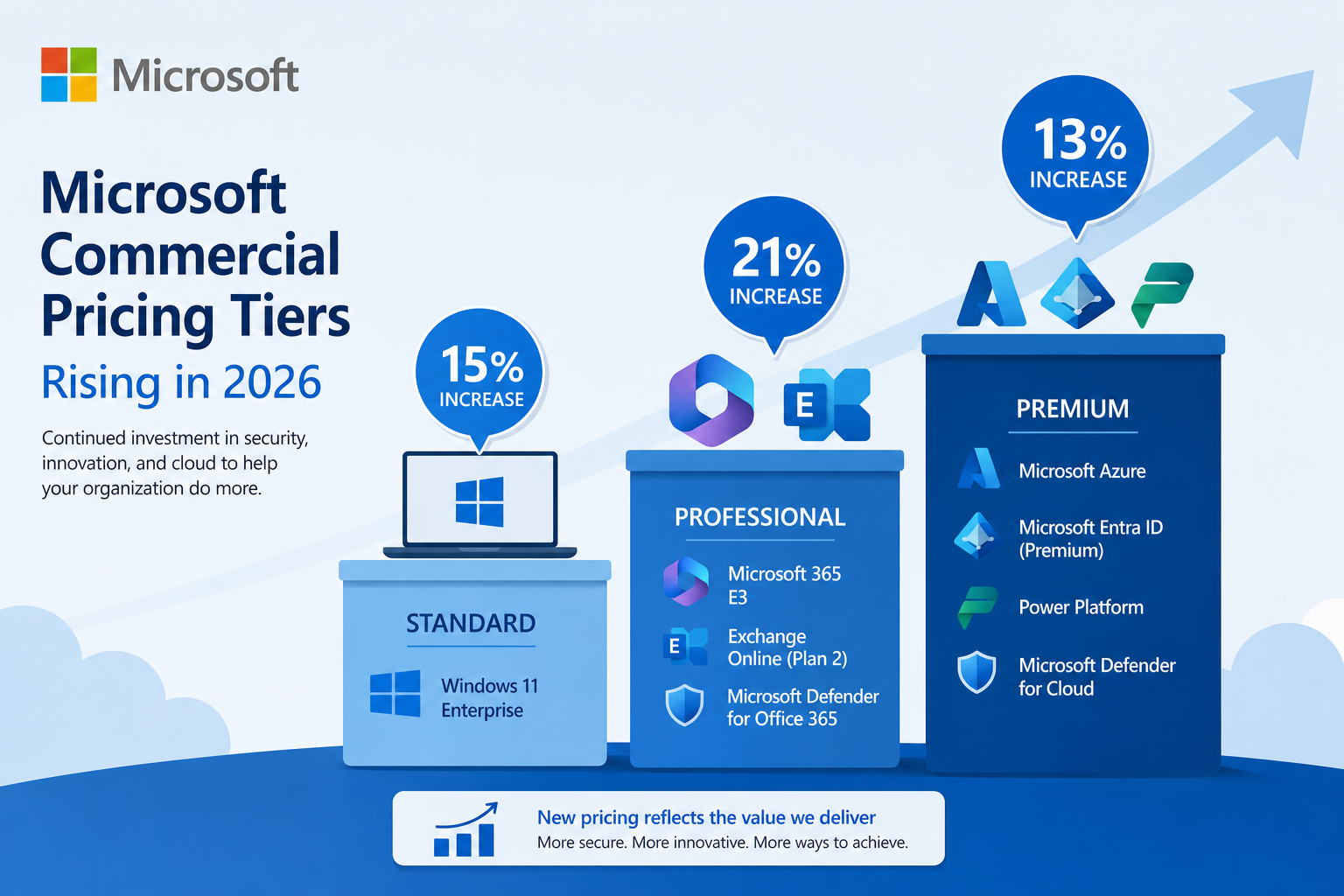
At the same time, Microsoft announced broader commercial price increases effective 1 July 2026, covering Windows E3 (up 15%), Apps for Business (up 21%), and Enterprise Mobility + Security E3 (up 13%). For businesses running volume licences, the cumulative bill is climbing fast. The core message: the era of flat or falling Windows licensing costs is over for the foreseeable future.
How the Windows 11 Cost 2026 Affects New PC Buyers
The Windows 11 cost 2026 rise hits new PC buyers in two ways. First, the sticker price on bundled PCs goes up, because the OEM licence cost is baked in. Second, anyone buying a standalone licence — either for a self-built machine or a bare-metal PC — faces higher reference prices at retail. Microsoft’s own website prices a full retail copy of Windows 11 Home at $139 USD and Windows 11 Pro at $199 USD at standard retail, figures that look set to remain elevated or climb further.
-
New laptop or desktop buyers: Expect to pay more for the same hardware spec as manufacturers absorb and pass on the OEM fee increase.
-
Self-builders and upgraders: Retail licence prices at big-box stores reflect these increases; independent resellers remain a legitimate and much cheaper alternative.
-
Small businesses: Volume and commercial licences are also rising; a proactive licence purchase before renewal dates can freeze costs.
-
Windows 10 holdouts: With Windows 10 end of support looming and upgrade costs rising, delaying the move to Windows 11 is getting more expensive, not less.
Windows 11 Home vs Pro: Which Licence Do You Actually Need?
Before spending any money, it is worth being clear on which edition fits your situation — because choosing wrong means either overpaying for features you will never use or missing functionality you genuinely need.
Windows 11 Home
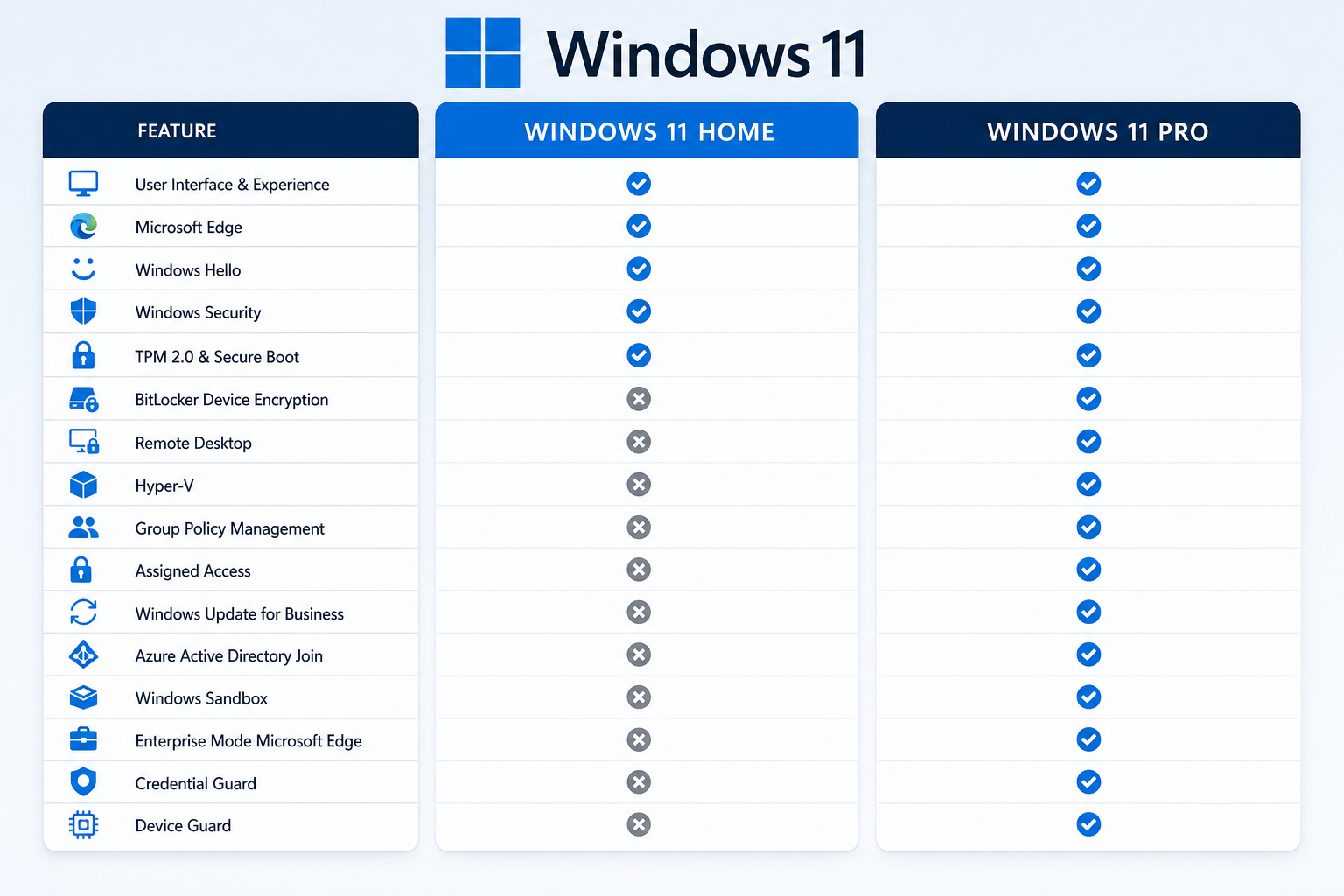
Home is the right pick for the vast majority of personal users. It includes everything needed for everyday computing: full support for the Start Menu redesign, Snap Layouts, Microsoft Teams integration, the Xbox app, and Windows Hello biometric sign-in. It does not include BitLocker full-disk encryption, Group Policy management, Hyper-V virtualisation, or Remote Desktop hosting.
Windows 11 Pro
Pro adds those business-critical features. If you work remotely and need to connect into your office PC, run virtual machines, or need enterprise-grade encryption for sensitive data, Pro is the edition to choose. The price gap between Home and Pro is relatively small when bought through a genuine independent reseller — making Pro worth the small premium for most knowledge workers.
Not sure which edition suits you? The full breakdown is covered in our Windows 11 Home vs Pro comparison guide.
The Windows 11 Price Hike in Numbers: Retail vs Reseller
The Windows 11 price hike becomes even clearer when you put retail prices next to genuine independent reseller prices side by side.
-
Microsoft retail (Windows 11 Home): ~$139 USD (typical market price)
-
Microsoft retail (Windows 11 Pro): ~$199 USD (typical market price)
-
Top Key Shop — Windows 11 Home Retail 64-bit: from €14.70
-
Top Key Shop — Windows 11 Pro OEM 64-bit: from €7.95
-
Top Key Shop — Windows 11 Pro Retail 64-bit: €9.10
The difference is dramatic. Every licence sold at Top Key Shop comes with an original activation key, official Microsoft download links, and a 100% money-back guarantee — the same genuine Windows activation, for a fraction of the retail price.
OEM vs Retail Licences: What the Windows 11 Licence Cost Difference Means
When you are comparing Windows 11 licence cost options, you will encounter two main licence types. Understanding the difference prevents a frustrating surprise later.
OEM Licences
An OEM (Original Equipment Manufacturer) licence is tied to the first PC it is activated on. It is the same type of licence that comes pre-installed on a new computer from a major brand. It is fully genuine and fully functional — it just cannot be transferred to a different machine if you later upgrade your hardware. This makes OEM licences ideal for a PC you plan to keep for its natural lifespan.
Retail Licences
A Retail licence is transferable. If you build a new PC in two years and want to carry your Windows licence across, a Retail licence lets you do that. It costs a little more than OEM but offers greater flexibility. For anyone who upgrades hardware regularly, the flexibility is worth the small difference in price.
Should You Upgrade Before the Windows 11 Pricing Increase Bites Further?
The short answer is yes, and the logic is straightforward. If you are still running Windows 10 — which reaches end of mainstream support in October 2025 — you face a hard deadline regardless of Windows 11 pricing. Staying on an unsupported OS exposes your machine to unpatched security vulnerabilities, and that risk compounds every month you delay.
Meanwhile, Windows 11 pricing increase pressure is not expected to reverse. Microsoft’s commercial pricing roadmap through 2026 points consistently upward. Acting now means locking in today’s pricing rather than paying a higher rate in six or twelve months’ time.
The good news: upgrading from Windows 10 to Windows 11 on a compatible machine is still technically free via Windows Update for eligible hardware. But if your PC does not meet the TPM 2.0 and other hardware requirements, or if you need a fresh installation on a new build, you will need to purchase a licence — and that is exactly where buying smart matters.
How to Get a Genuine Windows 11 Licence at the Best Price
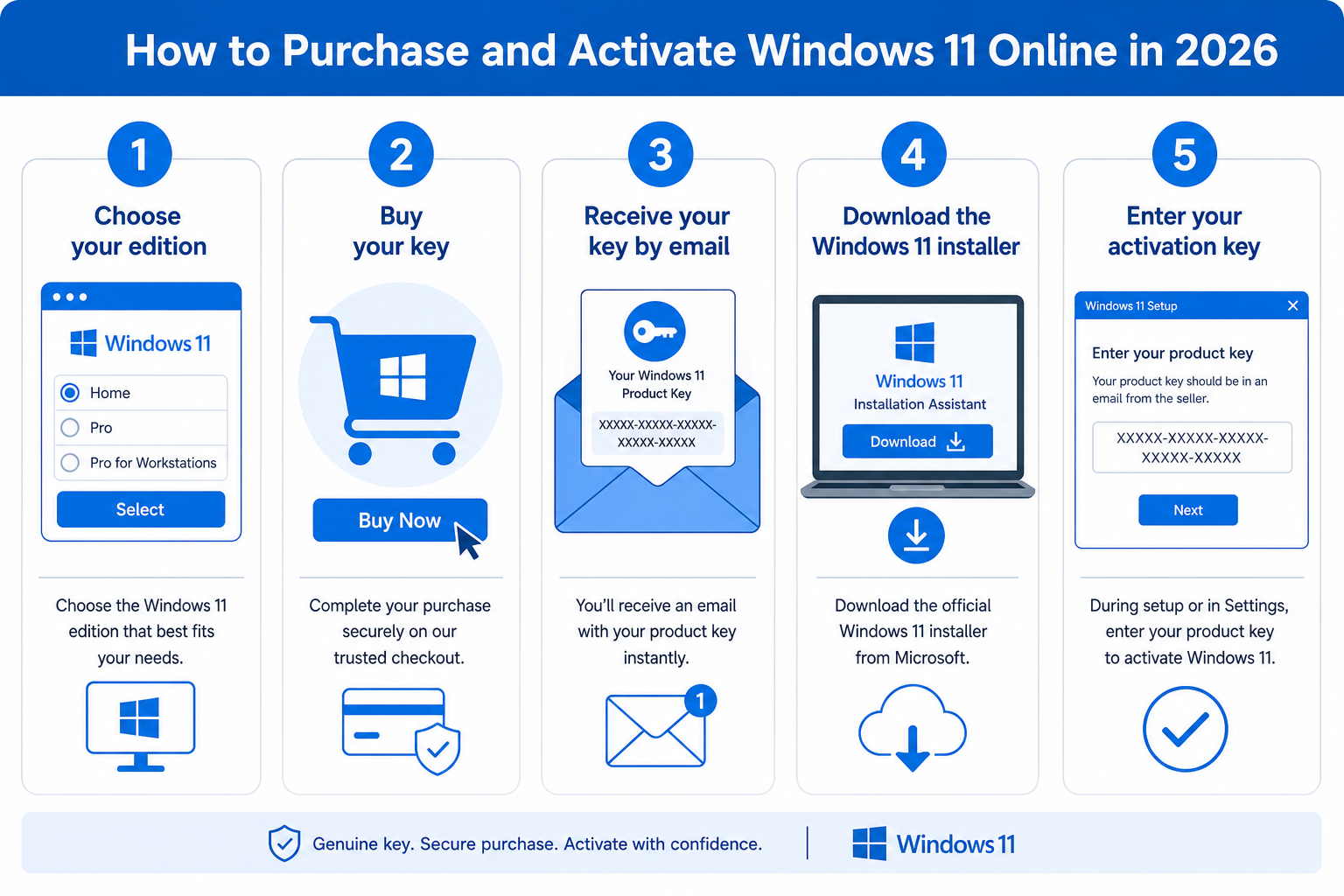
Top Key Shop offers genuine, original Windows 11 licences delivered by email — usually within minutes of purchase. Every product page includes official Microsoft download links and clear activation instructions. Here is how the process works:
-
Choose your edition — Home for everyday personal use, Pro if you need BitLocker, Remote Desktop, or Hyper-V.
-
Choose your licence type — OEM if the key stays on one machine; Retail if you want to transfer it later.
-
Complete your purchase — you will receive your activation key and download link by email, typically within minutes.
-
Download and install — use the official Microsoft Media Creation Tool linked in your email to download the installer and create a bootable USB if needed.
-
Activate — enter your key during or after installation in Settings → System → Activation.
Explore the full range of genuine Windows 11 licences at Top Key Shop — from single-user Home keys to multi-PC bundles — and lock in a low price before the next round of increases arrives.
Windows 11 Cost 2026: Frequently Asked Questions
FAQ
How much has Microsoft raised Windows 11 OEM licence fees?
Microsoft reportedly raised the OEM licence fees it charges PC manufacturers by an average of 7% to 10%. These are the fees baked into the cost of every new PC that ships with Windows pre-installed, and that increase is typically passed directly to the consumer via higher hardware prices.
Is the free upgrade from Windows 10 to Windows 11 still available?
Yes — on hardware that meets Microsoft’s minimum requirements (including TPM 2.0, a compatible CPU, and at least 4 GB of RAM), the upgrade from Windows 10 to Windows 11 is still available at no charge via Windows Update. However, if your PC does not meet the hardware requirements, or if you need a fresh standalone installation, you will need to purchase a licence separately.
What is the difference between an OEM and a Retail Windows 11 licence?
An OEM licence is tied to one machine and cannot be transferred if you upgrade your hardware. A Retail licence can be moved to a new PC, making it more flexible. OEM licences are typically cheaper and are ideal for stable hardware setups, while Retail licences suit users who frequently upgrade their machines.
Will Windows 11 pricing increase further after 2026?
Based on Microsoft’s published pricing roadmap and historical patterns, further increases are likely. Microsoft has consistently raised commercial licensing prices year-on-year since 2022, and there is no public signal of a reversal. Buying a genuine licence now at current pricing is the most cost-effective approach for anyone who needs to upgrade soon.
Are Windows 11 licences from independent resellers like Top Key Shop genuine?
Yes. Top Key Shop sells original activation keys with official Microsoft download links. Every purchase is backed by a 100% money-back guarantee. The keys activate through Microsoft’s own servers using the standard activation process — the same process used for any retail or OEM licence purchased anywhere.
Which Windows 11 edition should a small business choose?
For most small businesses, Windows 11 Pro is the right choice. It includes BitLocker encryption for protecting sensitive data, Group Policy management for IT administrators, and Remote Desktop for working across machines. The modest premium over Home is well justified for any professional environment handling confidential information or requiring remote access capabilities.
