

Windows 10 hardware compatibility is failing roughly one in three PCs worldwide — and that single statistic has reshaped Microsoft’s entire end-of-life strategy. According to data surfaced by HP in mid-2026, approximately 30% of PCs still running Windows 10 are simply unable to meet Windows 11’s minimum hardware requirements. That’s not a software problem you can patch away. It’s a silicon-level wall, and it has forced Microsoft to extend Windows 10 support well beyond its original October 2025 deadline — now pushed to October 2027 — to avoid leaving hundreds of millions of users stranded without security updates.
If you’re wondering whether your machine is in that 30%, or what your realistic options are once support truly ends, this guide breaks it all down clearly.
Why Windows 11 Compatibility Is Stricter Than Any Previous Windows Version
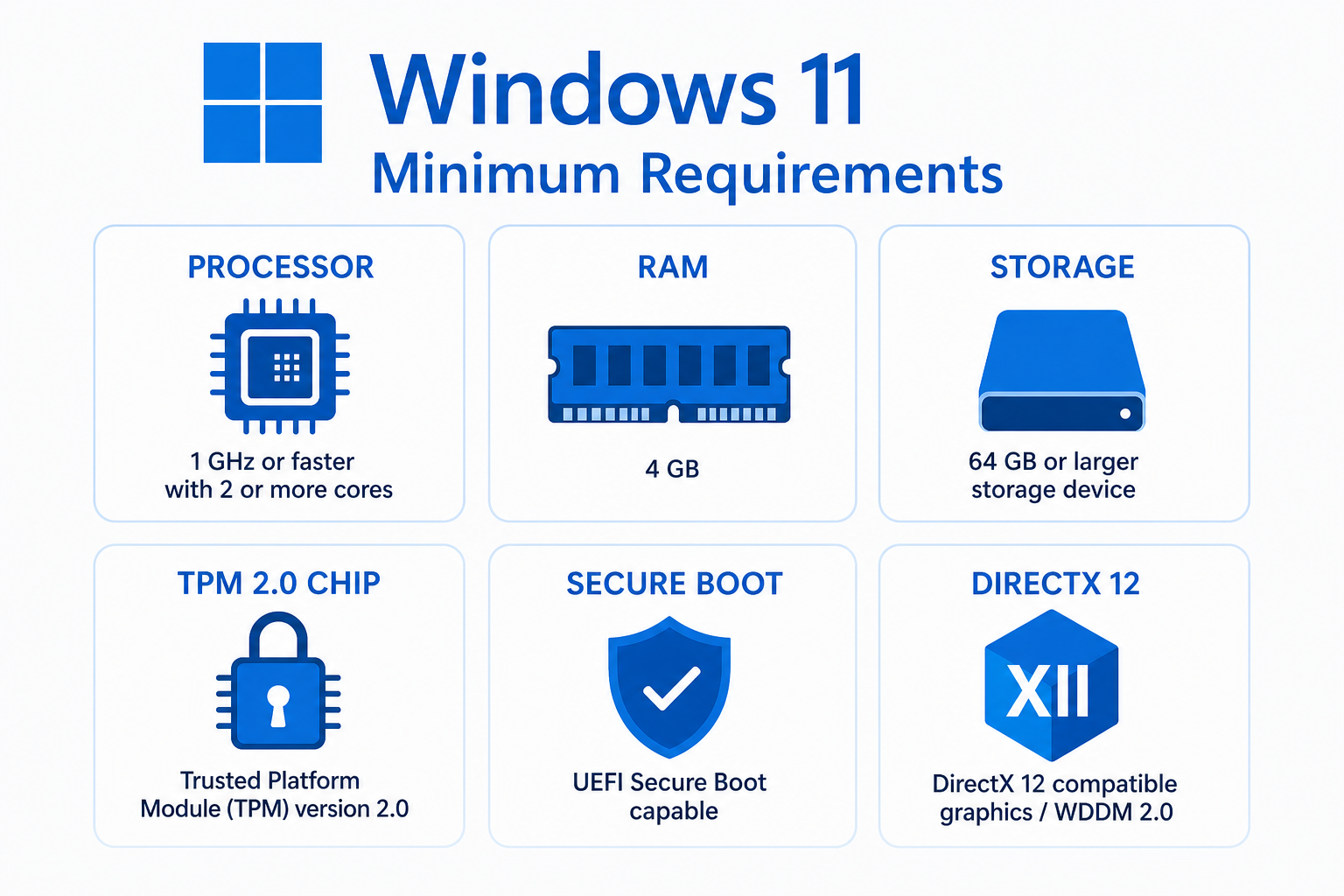
Every Windows upgrade has had requirements, but Windows 11 drew a hard line that older OS transitions never did. Microsoft tied Windows 11 to a specific set of modern security technologies rather than just raw processing power or storage. The result is that a machine from 2016 with a fast processor and plenty of RAM can still fail the Windows 11 compatibility check — not because it’s too slow, but because it lacks the right security chip.
Here are the core Windows 11 minimum requirements that trip up older hardware:
- Processor: 1 GHz or faster, with 2 or more cores on a compatible 64-bit processor. Critically, only processors from Intel’s 8th Generation (Coffee Lake) or AMD’s Ryzen 2000 series onward are on Microsoft’s approved list — anything older is blocked regardless of clock speed.
- RAM: 4 GB minimum
- Storage: 64 GB or larger
- Firmware: UEFI with Secure Boot enabled
- TPM: Trusted Platform Module version 2.0
- Display: 720p or higher, at least 9-inch diagonal
- DirectX: DirectX 12 compatible GPU with WDDM 2.0 driver
Of all these, the TPM 2.0 requirement is the most disruptive. TPM 2.0 is a dedicated security chip that handles encryption, credential storage, and device attestation. As Microsoft’s own documentation confirms, TPM 2.0 is required to run Windows 11 — and while many machines shipped after 2018 include a TPM 2.0 chip, a significant share have it disabled in firmware, have only TPM 1.2, or lack it entirely. According to Microsoft’s official Windows 11 specifications page, these requirements exist to support stronger security features including BitLocker and Windows Hello.
The HP Data: What the 30% Figure Actually Tells Us
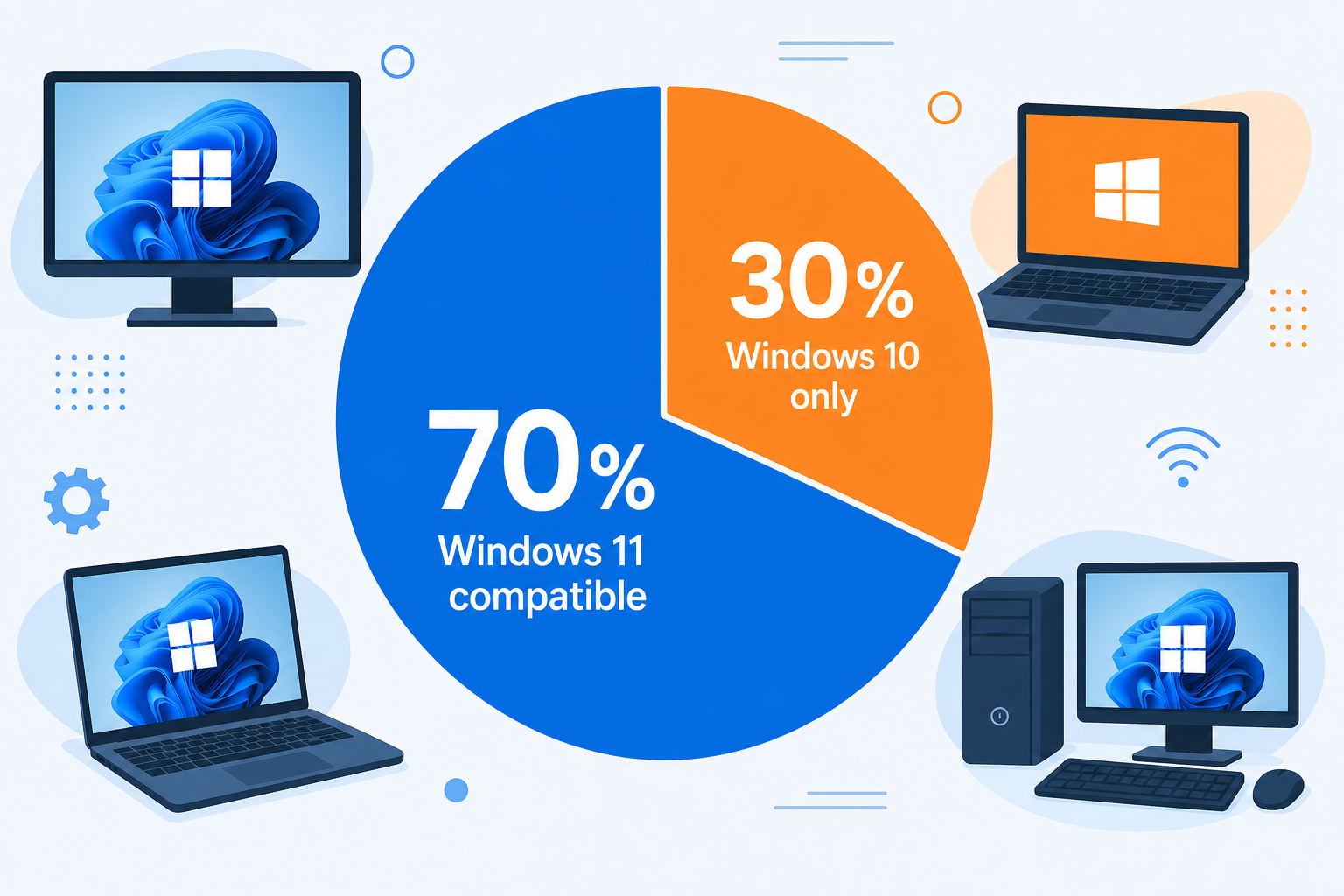
HP’s disclosure that roughly 30% of PCs in active use remain on Windows 10 — and are incompatible with Windows 11 — is significant because HP is one of the world’s largest PC manufacturers. Their fleet data is not a survey estimate; it reflects real hardware in the wild across enterprise, education, and consumer segments. Translate that percentage globally and you’re looking at hundreds of millions of devices that have no supported upgrade path to Windows 11, regardless of how much users might want one.
This is precisely why Microsoft caved. An October 2025 hard cut-off for Windows 10 security updates would have left that enormous installed base exposed to unpatched zero-day vulnerabilities, ransomware, and system exploits — overnight. Extending mainstream Windows 10 support to October 2027 buys time for businesses and consumers to replace hardware at a manageable pace rather than in a crisis.
But the extension is not a reprieve forever. October 2027 is the new deadline, and after that, only paid Extended Security Updates (ESU) will keep Windows 10 machines receiving patches — and ESU licensing is aimed at enterprises, not typical home users.
How to Check Your Own PC Upgrade Requirements
Before deciding on a path forward, confirm exactly where your machine stands. Microsoft provides two tools for this:
- PC Health Check app: Download it directly from Microsoft. It runs a compatibility scan and tells you whether your PC passes or fails Windows 11’s requirements — and specifically which requirement it fails.
- WhyNotWin11: An open-source third-party tool that gives a more granular breakdown of each requirement, including TPM status, Secure Boot state, and processor generation.
Common failure reasons include: an unsupported processor generation (the most frequent cause), TPM 2.0 absent or disabled, Secure Boot not enabled in firmware, or insufficient storage. Some TPM and Secure Boot issues can be resolved in your BIOS/UEFI settings without any hardware spend — always check here first before concluding your machine is truly incompatible.
Your Realistic Options When Windows 10 Hardware Compatibility Fails
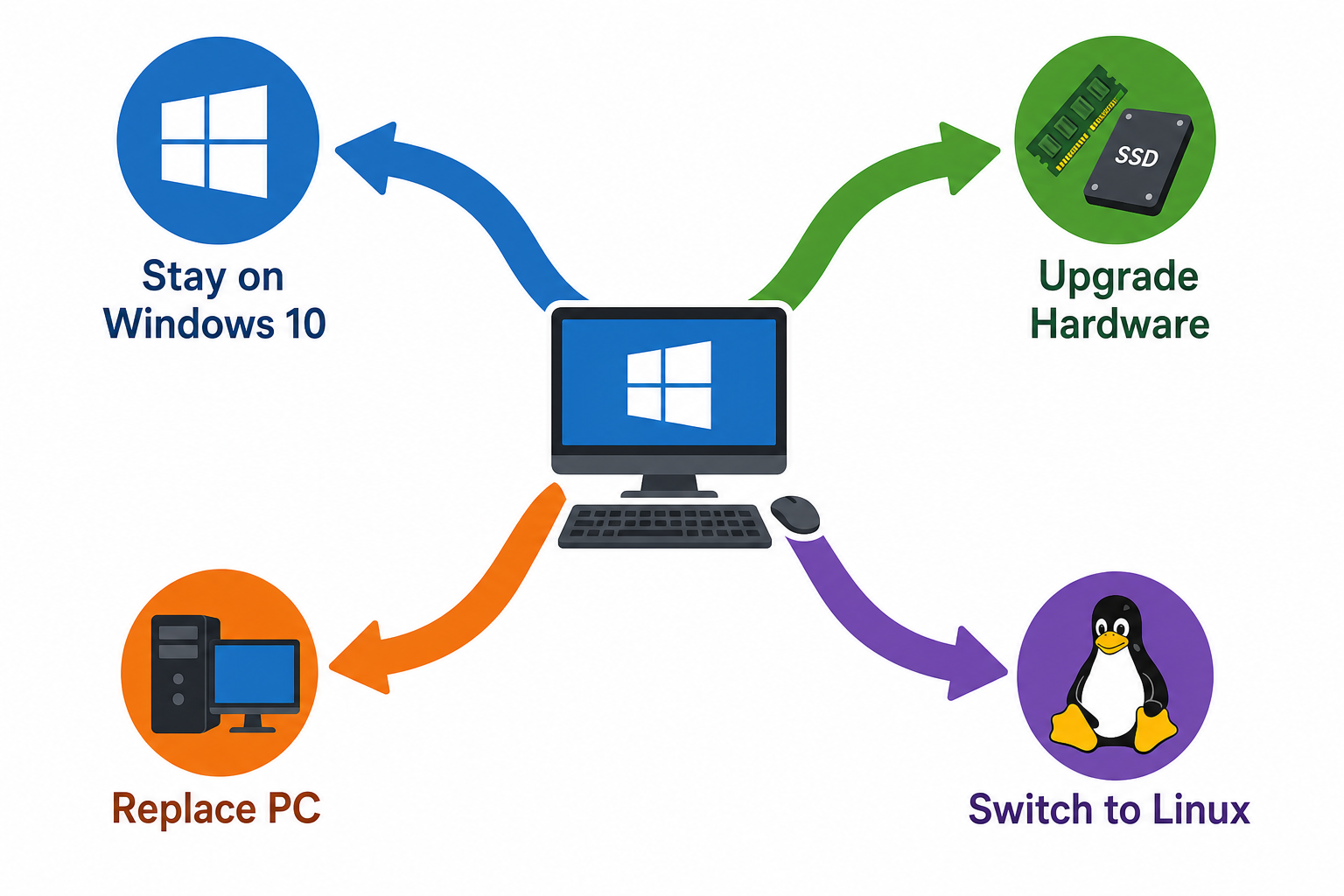
If your PC fails the Windows 11 compatibility check, you have four realistic paths. None is universally right — the best choice depends on your budget, your use case, and how much risk you’re comfortable carrying.
Option 1: Stay on Windows 10 Until October 2027
For users with hardware that simply cannot be upgraded, remaining on Windows 10 with full security patches until October 2027 is a fully legitimate strategy. Microsoft’s extension means your machine will receive critical security fixes for another year-plus beyond the original deadline. Use this time to budget for a hardware refresh rather than scrambling under pressure.
Option 2: Upgrade Your Hardware and Grab a Windows 11 Licence
If your processor or TPM is the bottleneck, a targeted hardware upgrade — a new motherboard and CPU combination that meets the Windows 11 processor list — is sometimes more cost-effective than a full PC replacement. Once your hardware qualifies, you can activate Windows 11 with a genuine licence key at a fraction of retail cost. At TopKeyShop, a Windows 11 Pro Retail licence is available from €9.10, giving you a clean, fully activated upgrade without the overhead of a new OEM machine.
Option 3: Replace Your PC — and Secure a Genuine Windows Licence
For machines that are genuinely past their useful life — older processors, failing drives, too little RAM to expand — a full PC replacement is often the most sensible outcome. When you purchase a new machine that may not include a retail Windows licence, or if you’re building your own, a genuine Windows 10 licence (from €7.90 at TopKeyShop) remains a valid and cost-efficient option for machines that qualify, while Windows 11 keys are available for compatible new builds.
Option 4: Consider Linux as a Supplementary or Primary OS
For users whose ageing hardware will not be replaced and whose workload is browser-centric — email, web, documents, media — a lightweight Linux distribution such as Linux Mint or Ubuntu LTS can keep an otherwise functional machine productive and secure beyond 2027, at no licence cost. This is not the right fit for users who depend on Windows-exclusive professional software, but it is a genuine option worth evaluating for secondary or household machines.
What the Windows 10 Upgrade Timeline Means for Businesses
The stakes for businesses are higher than for individual home users. A company running 500 Windows 10 machines — even 30% of which are incompatible with Windows 11 — faces a significant procurement and deployment challenge. Microsoft’s Extended Security Updates programme provides a safety net, but ESU licences are not free: pricing tiers increase year on year for each year of coverage, making it substantially cheaper to plan hardware refresh cycles now rather than rolling ESU costs into IT budgets later.
IT teams should audit their device estate immediately using the PC Health Check app or an enterprise deployment tool such as Microsoft Endpoint Configuration Manager. Devices that pass the Windows 11 compatibility check should be prioritised for in-place upgrades, using genuine Windows 11 licences to remain compliant. Devices that fail should be earmarked for scheduled replacement aligned to the October 2027 deadline.
Does Bypassing Windows 11 Hardware Requirements Actually Work?
Registry hacks and third-party tools exist that allow Windows 11 to install on unsupported hardware. Microsoft has been clear: machines that bypass the requirements are not officially supported, will not receive future feature updates in the same way as compliant devices, and carry additional security risk precisely because the TPM 2.0 and Secure Boot requirements exist to protect against firmware-level attacks. Using a bypass may keep a machine nominally running Windows 11, but it erodes the security posture the upgrade was supposed to improve — which rather defeats the point.
FAQ
Why does Windows 11 require TPM 2.0?
TPM 2.0 (Trusted Platform Module version 2.0) is a dedicated security chip that stores encryption keys, supports BitLocker drive encryption, and enables secure boot verification. Microsoft made it mandatory in Windows 11 to raise the baseline security floor across the installed base. The goal is to make credential theft and firmware-level attacks significantly harder on every compliant machine.
Can I enable TPM 2.0 without buying new hardware?
Sometimes, yes. Many PCs shipped after 2016 include a TPM 2.0 chip that is simply disabled in firmware (UEFI/BIOS) by default. Entering your BIOS settings and enabling the TPM or fTPM (firmware TPM) option can make a previously “incompatible” machine pass the Windows 11 compatibility check immediately. Check your motherboard manufacturer’s support page for the exact setting name — it varies by vendor.
Is it safe to keep using Windows 10 after October 2025?
Microsoft has extended Windows 10 mainstream support to October 2027, so machines will continue to receive security patches until then. After that date, using Windows 10 without ESU coverage will expose machines to unpatched vulnerabilities. Running without security updates on an internet-connected machine is not recommended, particularly for business or financial use.
What is the cheapest way to get a genuine Windows 11 licence?
The most cost-effective route is a genuine retail or OEM activation key from a trusted reseller. At TopKeyShop, Windows 11 Pro OEM licences start from €7.95 — a fraction of the full retail price from Microsoft’s own store — and include official download links and fast email delivery. Always ensure you are purchasing from a reputable source to avoid invalid or recycled keys.
What happens if my PC fails Windows 10 hardware compatibility for Windows 11 and I do nothing?
If you take no action and remain on Windows 10 past October 2027 without an ESU subscription, your machine will stop receiving security patches. It will continue to function, but each month that passes without updates increases the risk of exploitation via newly discovered vulnerabilities. The practical advice is to use the time between now and October 2027 to plan and execute a hardware upgrade or replacement.
Does Windows 10 hardware compatibility affect Office or other software?
Your existing Windows 10 hardware compatibility status does not directly affect Microsoft 365 or standalone Office licences — those products have their own system requirements. However, newer versions of Office (2024 and beyond) may eventually require Windows 11, so users planning to stay on ageing hardware long-term should be aware that software compatibility across the board tends to track OS compatibility over time.
