

The Microsoft 365 outage that struck on 23 July 2026 was a sharp reminder of how fragile cloud dependency can be. Within minutes of the incident starting at 10:44 AM ET, businesses across North America found themselves locked out of Teams, SharePoint, Outlook, and a cascade of connected services — all because of a single bug buried in an automated maintenance system. Here is a clear breakdown of what happened, why it spread so fast, and — more importantly — exactly what you can do to ensure your business never gets caught flat-footed again.
What Triggered the Microsoft 365 Outage?
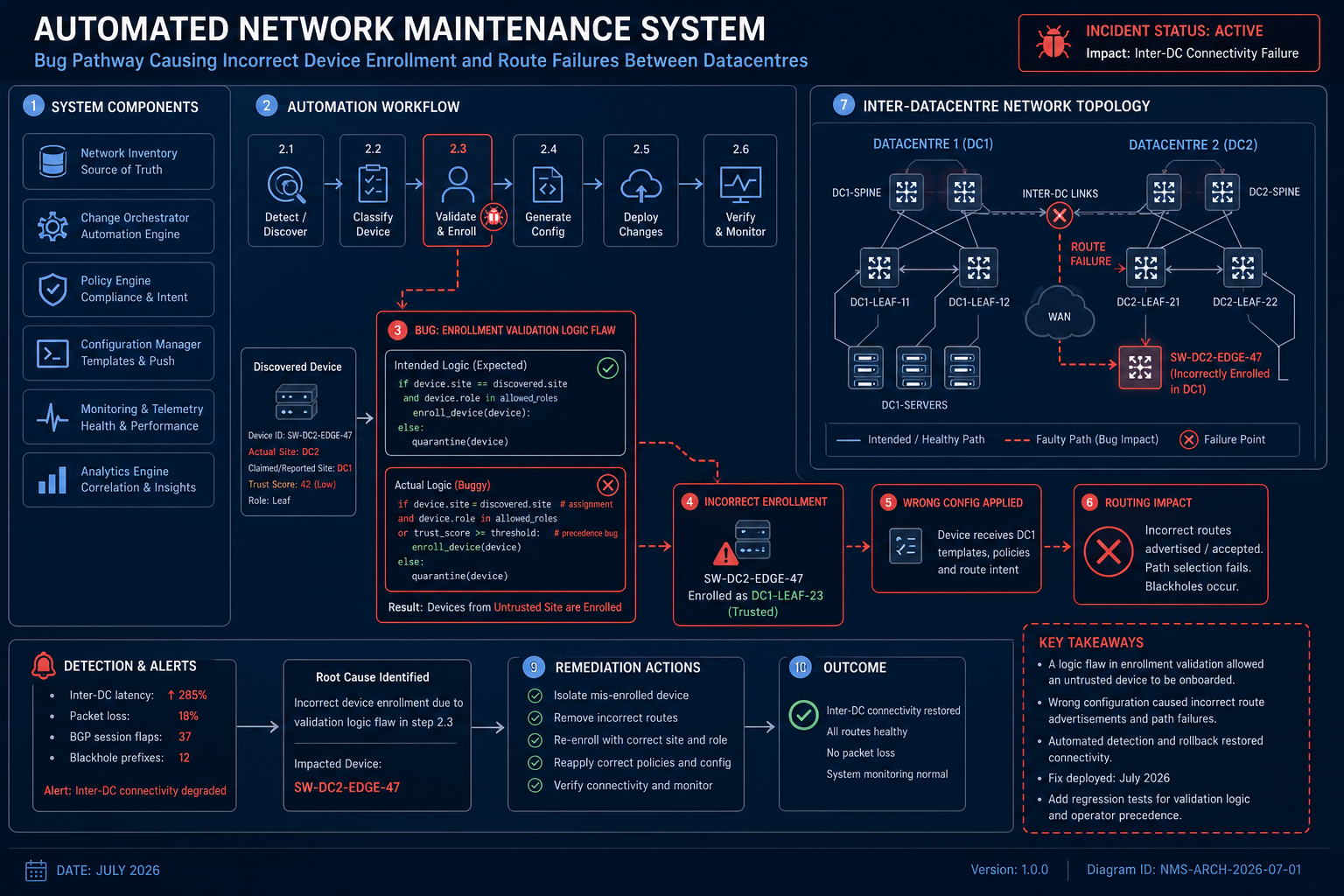
Microsoft’s own post-incident review confirmed that the root cause was a bug in its automated network maintenance request system. The faulty logic incorrectly enrolled production devices into a scheduled maintenance event, severing routes between datacentres and end users. Rather than a cyberattack or hardware failure, this was a classic software-induced cloud service disruption — one that spread because automation moved faster than human oversight could catch it.
- The outage began at 10:44 AM ET on 23 July 2026.
- Services affected included Microsoft Teams, SharePoint Online, Outlook, and the Microsoft 365 Admin Centre.
- North American users were hit hardest, though ripple effects were felt globally.
- Microsoft resolved the incident by reverting the problematic network update — a fix that itself took several hours to propagate.
The incident echoes the pattern seen in the January 2026 Microsoft 365 disruption, confirming that even the world’s largest software vendor can be undone by its own tooling. According to Microsoft’s official Service Health and Continuity documentation, service incidents can originate from hardware failure, software bugs, or network configuration changes — and full datacentre redundancy may not be immediately restored after a catastrophic outage.
How Long Did the M365 Downtime Last?
The M365 downtime stretched for several hours, during which tens of millions of users could not reliably access cloud-hosted email, documents, or collaboration tools. For businesses running entirely on Microsoft 365, this translated directly into lost productivity, missed deadlines, and frustrated customers.
Microsoft communicated updates through the Service Health Dashboard inside the Admin Centre, but many smaller organisations only learned about the incident through social media — highlighting a critical gap in incident-awareness planning for SMBs.
Why This Cloud Service Disruption Hit Businesses So Hard
Modern businesses have consolidated nearly everything into Microsoft 365: email, calendar, file storage, video calls, internal wikis, and HR workflows. This consolidation is efficient during normal operations, but it creates a single point of failure during any cloud service disruption. When Teams went down, so did the ability to coordinate a response. When SharePoint dropped, so did access to runbooks and recovery procedures. The irony is painful.
Industries Most Exposed to M365 Downtime
- Professional services (law, accounting, consulting) — real-time document collaboration stopped entirely.
- Education — remote learning platforms built on Teams were inaccessible.
- Healthcare admin — scheduling and internal communications relying on Outlook were disrupted.
- E-commerce and retail back-office — order management workflows dependent on SharePoint lists were frozen.
Step-by-Step: Microsoft 365 Outage Recovery for Your Business
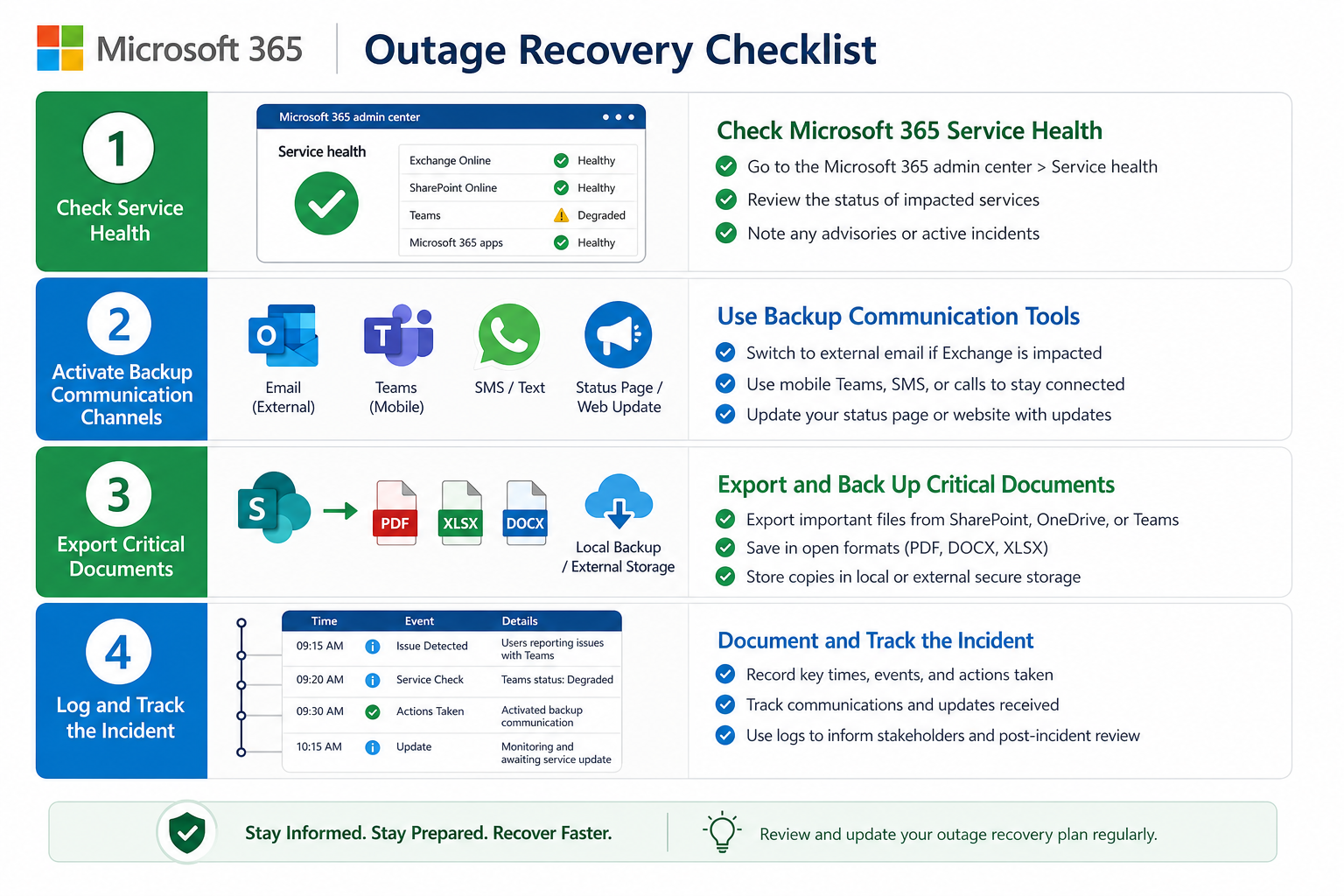
Solid 365 outage recovery planning is not glamorous, but it is what separates businesses that shrug off an incident from those that lose hours of billable work. Follow these steps both during and after any future disruption.
During the Outage
- Check the Microsoft Service Health Dashboard — Sign in at admin.microsoft.com, navigate to Health > Service Health, and confirm whether Microsoft has acknowledged the incident. This is the fastest way to rule out a local network problem versus a global cloud issue.
- Switch to pre-agreed backup channels — A secondary communication tool (Slack, WhatsApp group, or even SMS) should be defined in advance so your team can coordinate without relying on the downed platform.
- Notify clients proactively — A short, honest message sent early builds more trust than silence followed by an explanation. Use mobile email apps on cellular data if corporate Wi-Fi routes through affected Microsoft services.
- Document the timeline — Log exactly when services went down for your organisation, which workflows were impacted, and how long each was unavailable. This is essential for any SLA claims or post-incident reviews.
After the Microsoft 365 Outage Clears
- Review the Post-Incident Report (PIR) — Microsoft publishes PIRs in the Service Health Dashboard. Read it, understand the root cause, and map it to your own risk register.
- Audit your single points of failure — List every critical business process that has no offline or cross-platform fallback. Prioritise closing those gaps before the next M365 downtime event.
- Export and locally cache critical data — OneDrive’s sync client keeps a local copy of your files. Ensure every staff member’s OneDrive is configured to sync locally, not stream-only.
- Test your communication tree — A recovery plan that exists only in SharePoint is useless during a SharePoint outage. Store emergency procedures in a printed document, a shared drive outside Microsoft’s ecosystem, or a password-managed note.
Is a Lifetime Office Licence a Smarter Backup Strategy?
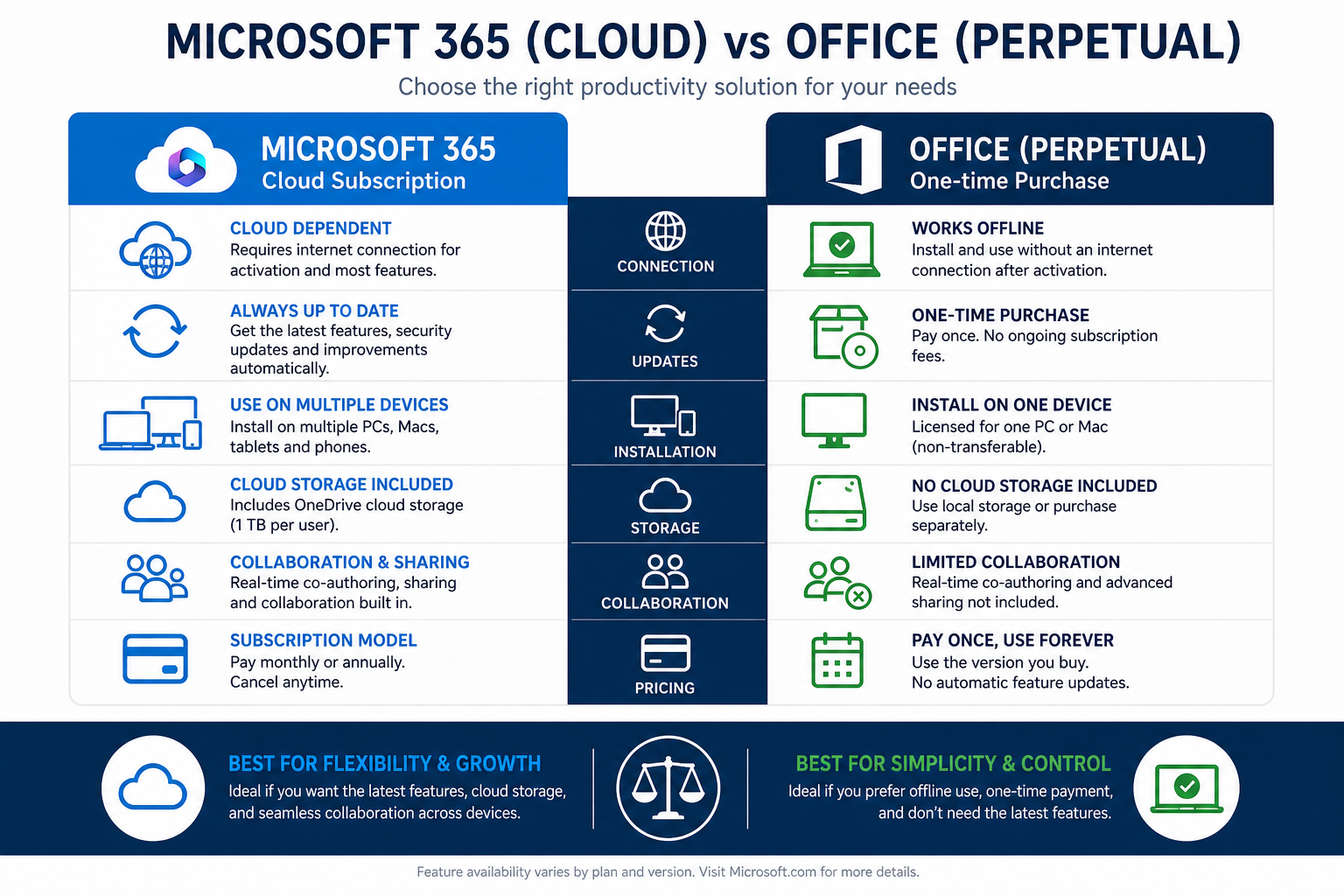
One practical lesson from this Microsoft 365 outage is that locally installed Office applications continue working even when Microsoft’s cloud is unavailable — because they do not depend on a live connection to function. Word, Excel, PowerPoint, and Outlook (in cached-mode) all operated normally for users who had a perpetual licence installed, while cloud-only users were left waiting.
This has reignited the debate between subscription and perpetual licensing. Our in-depth guide on lifetime Microsoft Office licence vs Microsoft 365 subscription costs walks through the full financial comparison — and the productivity resilience argument is now stronger than ever.
If you want the reliability of a locally installed suite without paying a recurring fee, Office 2021 Professional Plus is available at TopKeyShop for just €15.90 — a one-time purchase that gives you Word, Excel, PowerPoint, Outlook, Access, and Publisher with no monthly bill and no cloud dependency for core functionality.
How to Monitor Microsoft 365 Service Health Proactively
The best 365 outage recovery is one you see coming. Microsoft provides several real-time tools that every admin should have bookmarked.
- Microsoft 365 Admin Centre (Health > Service Health) — The authoritative source, updated by Microsoft engineers during active incidents.
- Microsoft 365 Status on X (formerly Twitter): @MSFT365Status — Rapid informal updates when the admin centre itself is slow to load.
- Third-party monitors — Services like Downdetector aggregate user reports and often surface issues minutes before Microsoft’s official acknowledgement.
- Azure Service Health alerts — If your organisation uses Azure-backed services, configure email or SMS alerts for service degradations that affect your region.
Long-Term Resilience: Lessons from the July 2026 Cloud Service Disruption
Every major cloud service disruption teaches the same lesson at increasing cost: resilience must be built before the incident, not improvised during it. The July 2026 event affected millions of users across what is arguably the most scrutinised software platform on the planet. If Microsoft’s own infrastructure can be knocked offline by an internal maintenance bug, no organisation should assume their cloud tools are infallible.
Key Resilience Principles to Adopt Now
- Diversify communication platforms — Maintain at least one communication channel outside Microsoft’s ecosystem.
- Local application installs as a fallback — Perpetual-licence Office apps work offline; browser-only tools do not.
- Regular data exports — Schedule monthly exports of critical SharePoint lists and Exchange mailbox archives to on-premises or third-party storage.
- Incident response runbook — A written, accessible (non-cloud-hosted) document that every team lead can follow without needing to log into Microsoft services.
- Staff awareness training — Ensure employees know how to switch to backup tools within the first 10 minutes of any service disruption, not after two hours of confusion.
FAQ: Microsoft 365 Outage July 2026
What caused the Microsoft 365 outage in July 2026?
A bug in Microsoft’s automated network maintenance request system incorrectly added production devices to a maintenance event. This severed network routes between Microsoft datacentres and end users, triggering the widespread disruption across Teams, SharePoint, Outlook, and other M365 services.
How long did the July 2026 M365 downtime last?
The outage began at 10:44 AM ET on 23 July 2026. Microsoft resolved the incident by reverting the faulty network update, though the fix took several hours to fully propagate — meaning some users experienced extended disruption well into the afternoon and evening.
Which Microsoft 365 services were affected?
Microsoft Teams, SharePoint Online, Outlook, and the Microsoft 365 Admin Centre were the primary services affected. Because these services are deeply integrated, disruption to one created cascading issues across dependent workflows and third-party integrations.
How can I check if Microsoft 365 is down right now?
The most reliable method is the Service Health section inside the Microsoft 365 Admin Centre (admin.microsoft.com > Health > Service Health). You can also monitor @MSFT365Status on X for real-time updates, or use Downdetector to see aggregated user reports during an active cloud service disruption.
Can I still use Office apps during a Microsoft 365 outage?
Yes — if you have a locally installed version of Office (via a perpetual licence such as Office 2021 or Office 2024), the desktop applications will continue to function for local file editing even when Microsoft’s cloud is unavailable. Cloud features like real-time co-authoring, OneDrive sync, and Exchange Online will be disrupted, but core productivity tools remain usable.
How do I build a 365 outage recovery plan for my business?
Start by auditing every critical workflow that depends exclusively on Microsoft 365. Assign a backup communication channel, ensure OneDrive is set to sync files locally, store emergency procedures outside the Microsoft ecosystem, and configure Azure Service Health alerts for your region. Run a simulated outage drill at least once per year to ensure your team knows the plan.
