
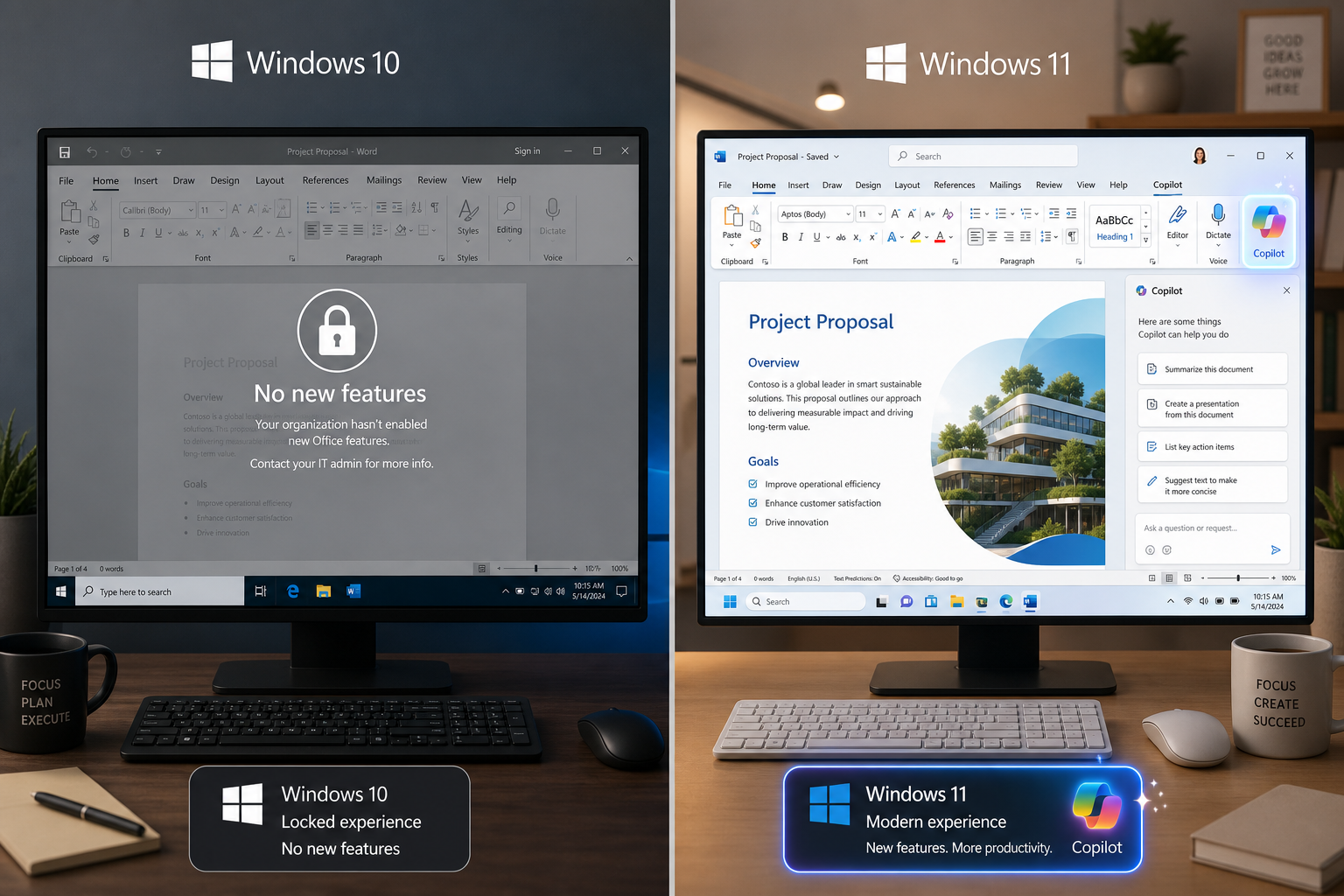
New Office features on Windows 10 are officially being frozen — and if you’re among the hundreds of millions still running Microsoft’s older OS, this change will affect your daily productivity sooner than you might think. From August 2026, Microsoft 365 apps installed on Windows 10 will no longer receive any new capabilities, making now the right time to understand what that means and decide on your next move.
What Microsoft Has Actually Announced about Office features on Windows 10
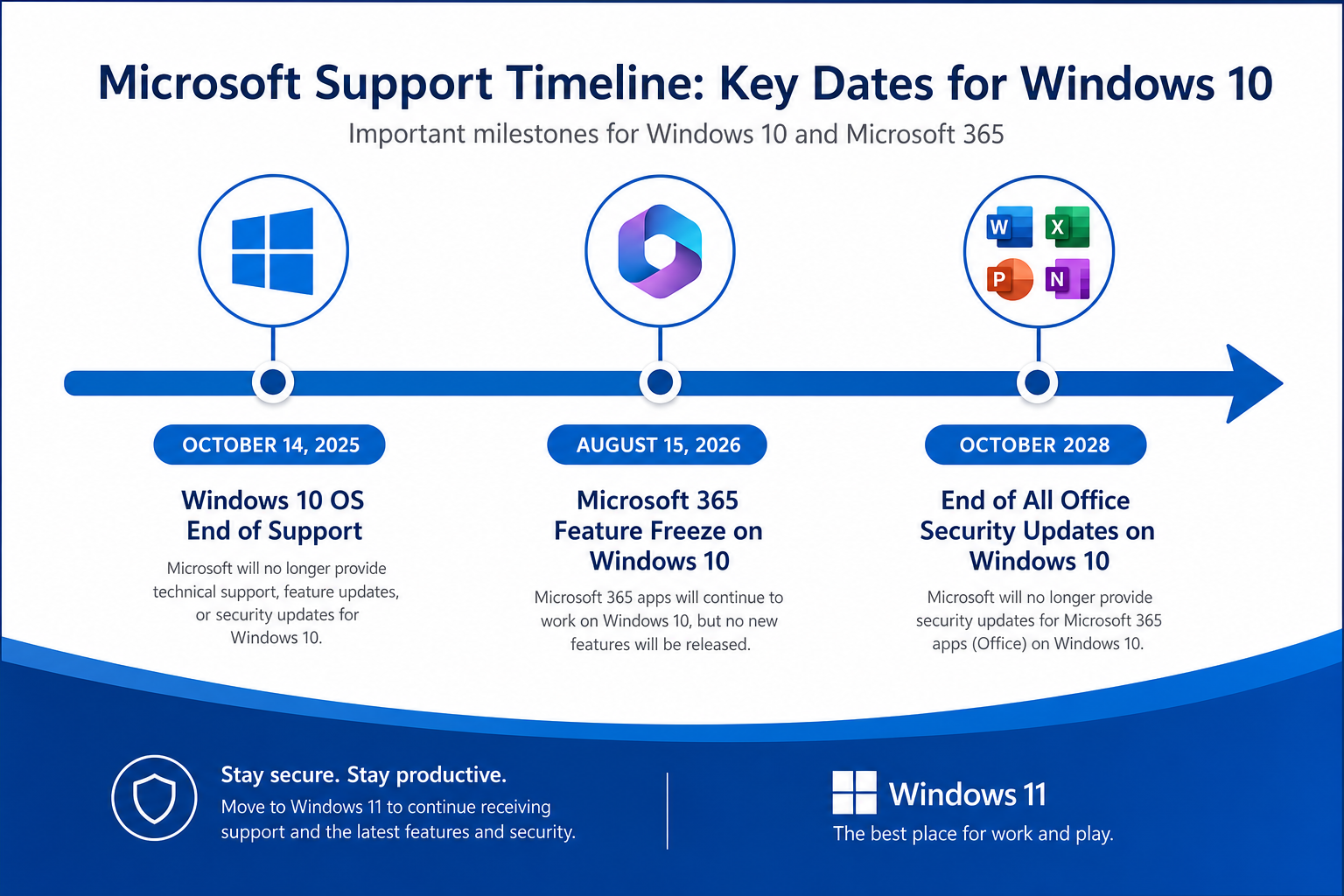
Microsoft confirmed in its official support documentation that Microsoft 365 apps on Windows 10 will stop receiving new features from August 15, 2026. The apps themselves won’t vanish overnight — they’ll continue to function — but they’ll be frozen at version 2608, the build released in August 2026. No new ribbon tools, no new Copilot integrations, no further AI-driven additions. The feature tap is simply switched off.
This follows the broader end-of-support milestone Windows 10 reached on October 14, 2025, when Microsoft stopped providing security updates and technical assistance for the operating system itself. The August 2026 Office cutoff is the next logical step in Microsoft’s staged withdrawal from Windows 10 support.
-
October 14, 2025 — Windows 10 OS reached end of support (no more security patches).
-
August 15, 2026 — Microsoft 365 apps on Windows 10 stop receiving new features entirely.
-
October 2028 — Security updates for Microsoft 365 apps on Windows 10 are expected to end completely.
-
Office 2016 and Office 2019 support also ended on October 14, 2025.
-
Office 2021 and Office 2024 continue to receive mainstream support on supported operating systems.
Which Office Features Are Being Cut Off?
The freeze on Office on Windows 10 is comprehensive — it’s not about removing individual tools but about permanently halting the feature pipeline. Here’s the practical breakdown of what you’ll stop seeing:
Copilot and AI-Powered Tools
Microsoft has been aggressively rolling out AI features across Word, Excel, PowerPoint, and Outlook. Every new Copilot capability — from draft generation in Word to intelligent data analysis in Excel — will arrive exclusively on Windows 11. Windows 10 users are frozen out of this entire roadmap the moment the cutoff lands.
New Collaboration and Cloud Features
Real-time collaboration improvements, OneDrive integration updates, and new sharing workflows will no longer reach Windows 10. Notably, from August 15, 2026, the OneDrive sync app on Windows 10 version 21H2 and earlier will also stop receiving security patches and feature updates — a double blow to users relying on cloud storage in their daily work.
Ribbon and Interface Updates
Any refinements to the Office ribbon, new shortcut options, updated task panes, or redesigned dialogue boxes rolling out post-August 2026 will be Windows 11 exclusives. The Windows 10 version of Microsoft 365 will look and behave exactly as it did in August 2026 — permanently.
Security Patches — On a Deadline
Critically, security updates for Microsoft 365 on Windows 10 are not cut off immediately in August 2026 — they’re expected to continue until around October 2028. But once that date arrives, running Microsoft 365 on Windows 10 will become a genuine security risk. Plan accordingly.
How Many Users Does This Affect?
The scale is significant. As of mid-2026, Windows 10 still accounted for roughly 60% of Windows PC market share globally — meaning the majority of Windows users worldwide are running an OS now on a support countdown. Businesses that delayed Windows 11 migrations for hardware compatibility or application testing reasons are the most exposed, but millions of home users are in the same position.
Should You Upgrade to Windows 11?
For most users, the honest answer is: yes, upgrading to Windows 11 is the right move — and sooner is better. Here’s how to think through it.
Check Your Hardware First
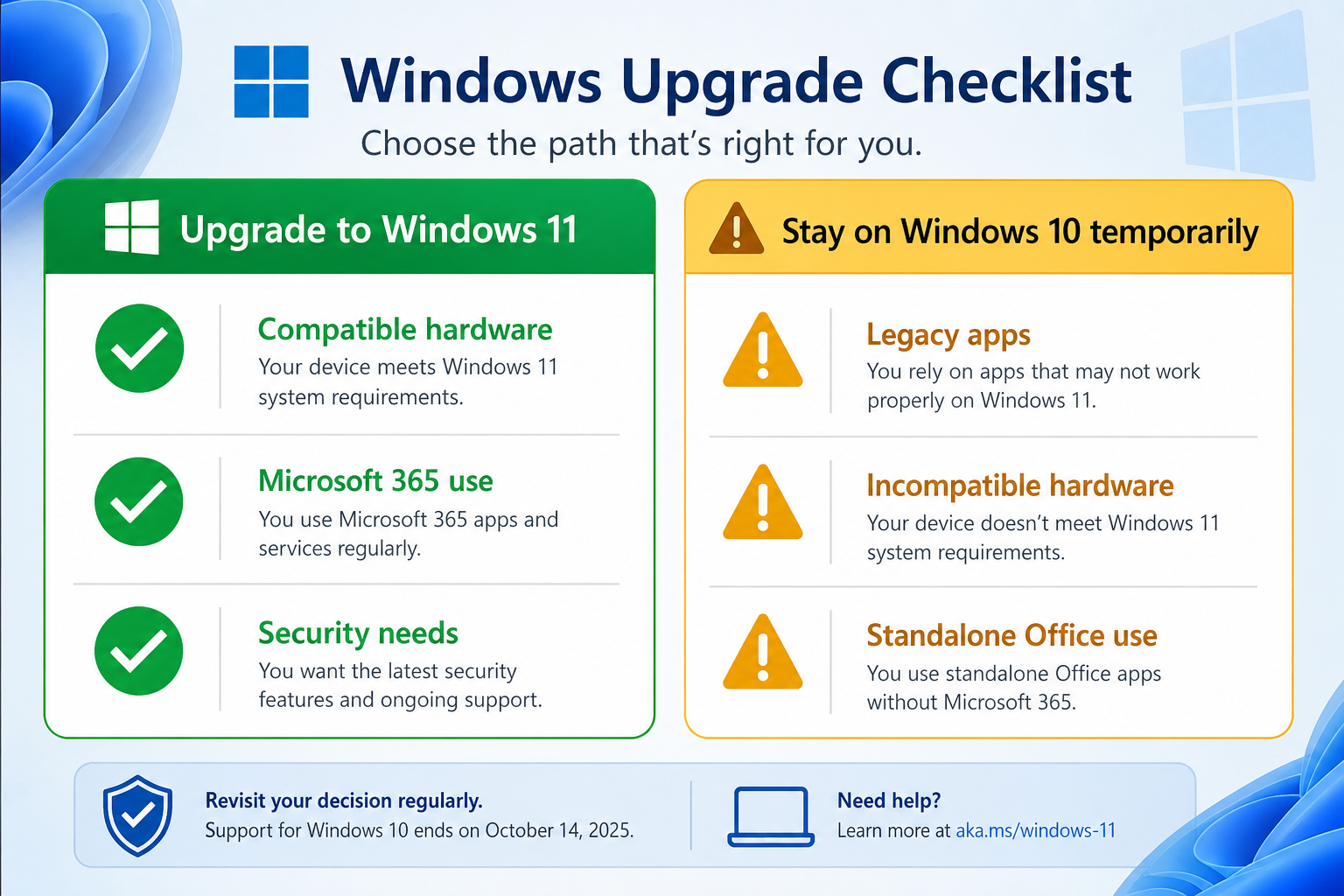
Windows 11 has a well-known hardware requirement: your PC must have a TPM 2.0 chip and a compatible 64-bit processor (8th-generation Intel Core or AMD Ryzen 2000 series or newer). If your machine was bought after 2018, there’s a strong chance it qualifies. Run Microsoft’s free PC Health Check tool to confirm before doing anything else.
When Upgrading Makes Sense
-
Your PC meets the Windows 11 hardware requirements.
-
You use Microsoft 365 regularly and want access to Copilot and new productivity features.
-
You handle sensitive data and need ongoing security patches beyond 2026.
-
You’re a business user who can’t afford to run unsupported software.
When Staying on Windows 10 (Temporarily) May Be Acceptable
-
Your hardware cannot run Windows 11 and a new PC purchase isn’t yet feasible.
-
You rely on a legacy application not yet tested for Windows 11 compatibility.
-
You use a standalone Office licence (such as Office 2021) rather than a Microsoft 365 subscription — standalone versions follow their own support lifecycle and are not subject to the same feature-freeze cutoff.
If you’re staying on Windows 10 temporarily, Microsoft’s Extended Security Update (ESU) programme offers paid security coverage beyond the October 2025 end-of-support date — it’s worth investigating if you need more runway for a managed migration.
Microsoft 365 vs Standalone Office on Windows 10
This is an important distinction that many users miss. The August 2026 feature freeze specifically targets Microsoft 365 apps (subscription-based) running on Windows 10. Standalone perpetual licences — such as Office 2021 — operate on a fixed feature set by design. They don’t receive rolling feature updates regardless of which OS you run, so the cutoff doesn’t change anything material for those users in terms of features.
That said, Office 2021 mainstream support runs until October 2026, and extended support runs to October 2026 as well. If you’re on a standalone licence and using Windows 10, keep an eye on those dates too.
For users who want a cost-effective way to move forward, a Windows 11 Pro + Office 2021 Professional Plus bundle can be an efficient single step — upgrading the OS and locking in a permanent Office licence simultaneously, currently available for €17.10.
What Happens to Your Existing Office Data?
Nothing dramatic. Files you’ve created in Word, Excel, or PowerPoint on Windows 10 don’t disappear and remain fully compatible across Office versions and operating systems. The concern is not data loss — it’s falling behind on productivity tools while competitors and colleagues gain access to AI features, smarter workflows, and improved security. The gap will widen every month from August 2026 onward.
The Practical Upgrade Path: Step by Step
If you’ve decided to move to Windows 11, here’s a straightforward action plan:
-
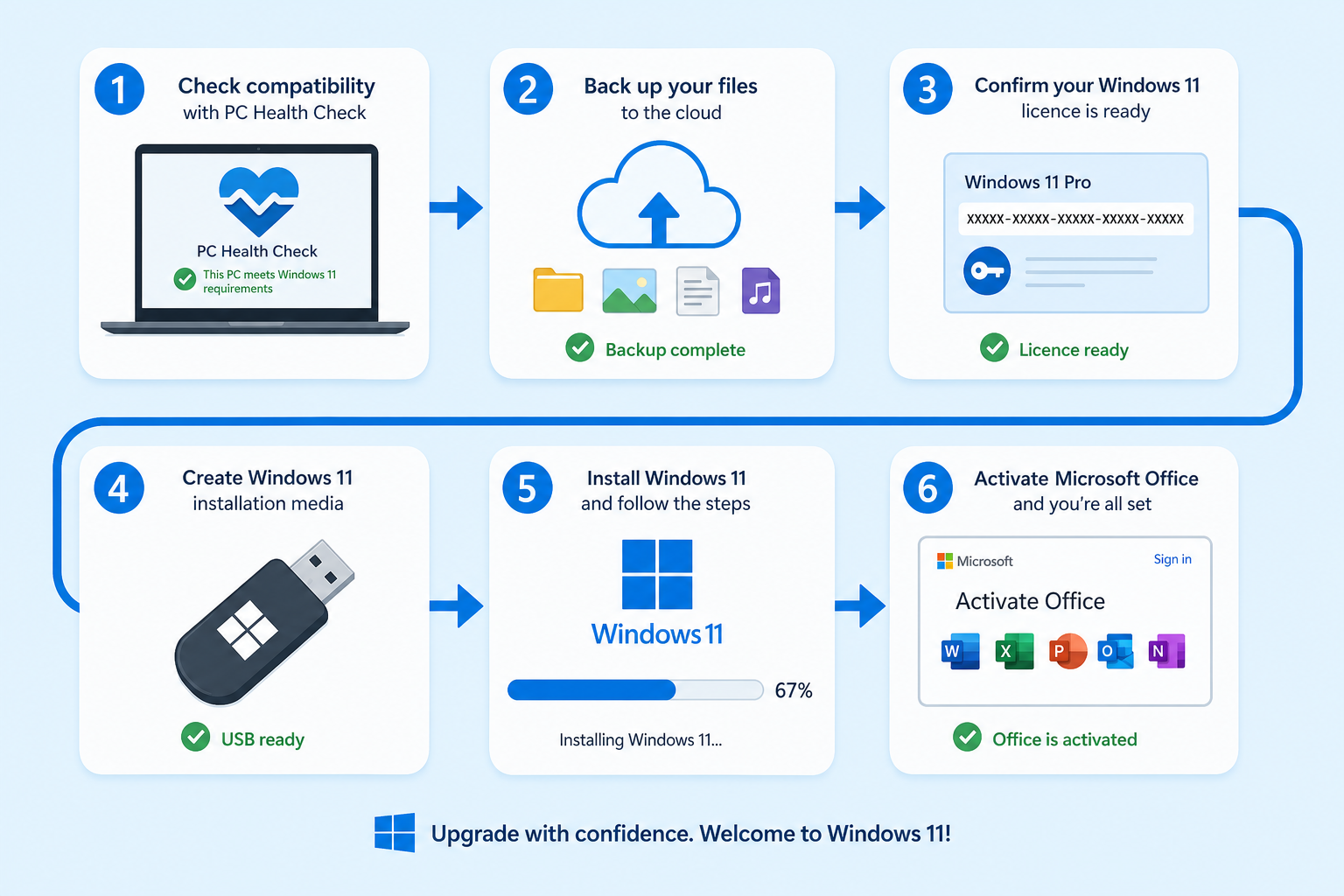
Run the PC Health Check tool to confirm hardware compatibility for Windows 11.
-
Back up your data — use OneDrive, an external drive, or both.
-
Obtain a genuine Windows 11 licence key — at TopKeyShop, Windows 11 licences are available for Home and Pro editions, starting from €14.70.
-
Download the Windows 11 installation media using the official Media Creation Tool from Microsoft.
-
Perform an in-place upgrade — in most cases, your files and applications carry over automatically.
-
Reactivate Office if prompted; your Microsoft account or product key handles this seamlessly.
For a full walkthrough of the installation process, see the Windows 11 Pro installation and activation guide on TopKeyShop.
Office Features Windows 10 Users Will Never See
To put the stakes concretely: here’s a sample of what Windows 10 Office users will miss post-August 2026 if they don’t upgrade:
-
Copilot-powered email drafting and summarisation in Outlook.
-
AI-generated slide design suggestions in PowerPoint.
-
Natural-language formula creation in Excel.
-
New real-time co-authoring enhancements in Word.
-
Upcoming Loop component integrations across Office apps.
-
Any post-August 2026 OneDrive sync improvements.
These aren’t minor quality-of-life tweaks — they represent the core direction of Microsoft’s productivity roadmap for the next several years. Sitting them out is a meaningful trade-off, particularly for knowledge workers and small businesses that rely on Office daily.
For an authoritative overview of exactly how Windows 10 Office update support is winding down across all Office versions, Microsoft’s own support page — What Windows end of support means for Office and Microsoft 365 — provides the full lifecycle details, including which builds receive which update types and for how long.
TopKeyShop: Upgrade Without Overpaying
Moving from Windows 10 to Windows 11 doesn’t have to be expensive. TopKeyShop stocks genuine Windows 11 and Office licence keys at accessible prices, delivered digitally within minutes. Whether you need a standalone Windows 11 licence or a bundle that pairs the OS with Office 2021, there’s a cost-effective path to a fully supported, feature-complete setup — without the ongoing subscription cost of Microsoft 365.
FAQ
When exactly do new Office features stop on Windows 10?
Microsoft has confirmed that Microsoft 365 apps on Windows 10 will stop receiving new features from August 15, 2026. The apps will continue to work after that date, but no new functionality will be added. Security updates are expected to continue until approximately October 2028, after which the apps will be fully unsupported on Windows 10.
Does this affect standalone Office licences like Office 2021?
No — not in the same way. The August 2026 feature freeze applies specifically to Microsoft 365 subscription apps on Windows 10. Standalone licences like Office 2021 have a fixed feature set by design and were never going to receive rolling new features regardless. However, Office 2021 mainstream support ends in October 2026, so users should factor that into their long-term planning.
Can I still use Office on Windows 10 after August 2026?
Yes, your Microsoft 365 apps will still open and run on Windows 10 after August 2026 — you just won’t receive any new features. Security patches are expected to continue until around October 2028. After that date, however, running Office on Windows 10 becomes a genuine security risk, and Microsoft will not provide any further support.
What’s the cheapest way to upgrade to Windows 11?
If your current hardware supports Windows 11 (TPM 2.0 and a compatible processor), upgrading via a genuine licence key is the most affordable route. At TopKeyShop, Windows 11 Home starts from €14.70 — significantly less than buying a new PC. Bundle deals pairing Windows 11 with Office 2021 start from €17.10, making it possible to upgrade both in a single transaction.
Will my files be safe if I upgrade from Windows 10 to Windows 11?
Yes. An in-place upgrade from Windows 10 to Windows 11 preserves your files, applications, and settings in the vast majority of cases. Microsoft’s upgrade process is designed to carry everything over. That said, it’s always best practice to back up your important files before any major OS upgrade — use OneDrive, an external hard drive, or both for peace of mind.
