
A Windows 0-day in July 2026 landed at the worst possible moment: the exact same day Microsoft rolled out its single largest security update in company history. With 622 vulnerabilities patched in one go — including two zero-days already being exploited in the wild — this is not a routine Patch Tuesday you can defer. If you run Windows 10 or Windows 11 on any device, you need to act today.
What Happened: The Record-Breaking July 2026 Patch Tuesday
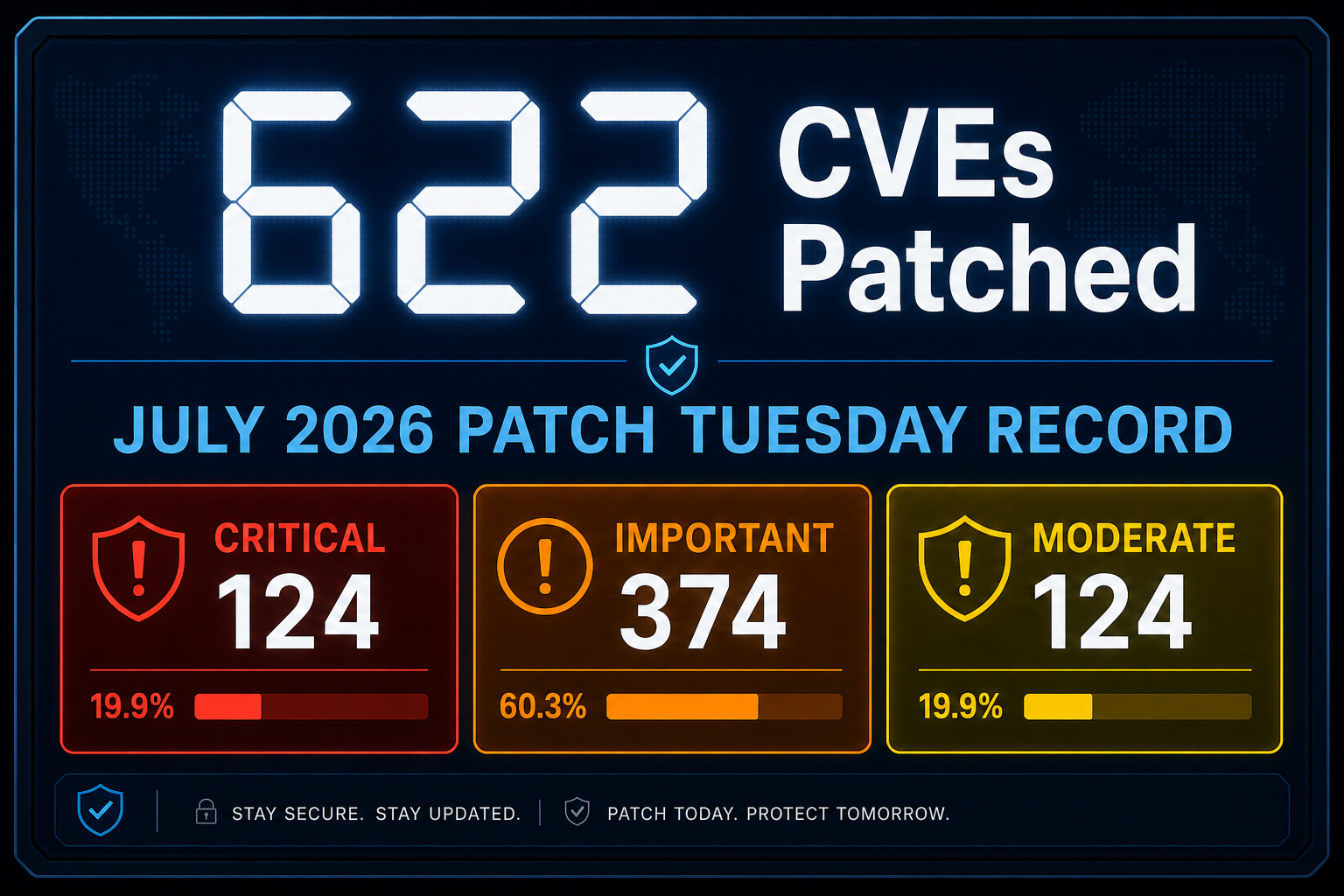
Microsoft’s July 2026 Patch Tuesday shattered every previous record, addressing 622 CVEs across Windows, Microsoft 365, SharePoint Server, Active Directory Federation Services (AD FS), Azure, and more. The previous single-month record stood at 198 CVEs — this month more than tripled it. Security analysts at Rapid7 noted that 416 of the 622 vulnerabilities affected Windows components directly, while 59 were rated Critical.
The sheer volume has a clear driver: AI-assisted vulnerability research tools are enabling both Microsoft’s own security teams and external researchers to discover flaws faster than ever before. That means patch batches will likely grow, not shrink, in the months ahead.
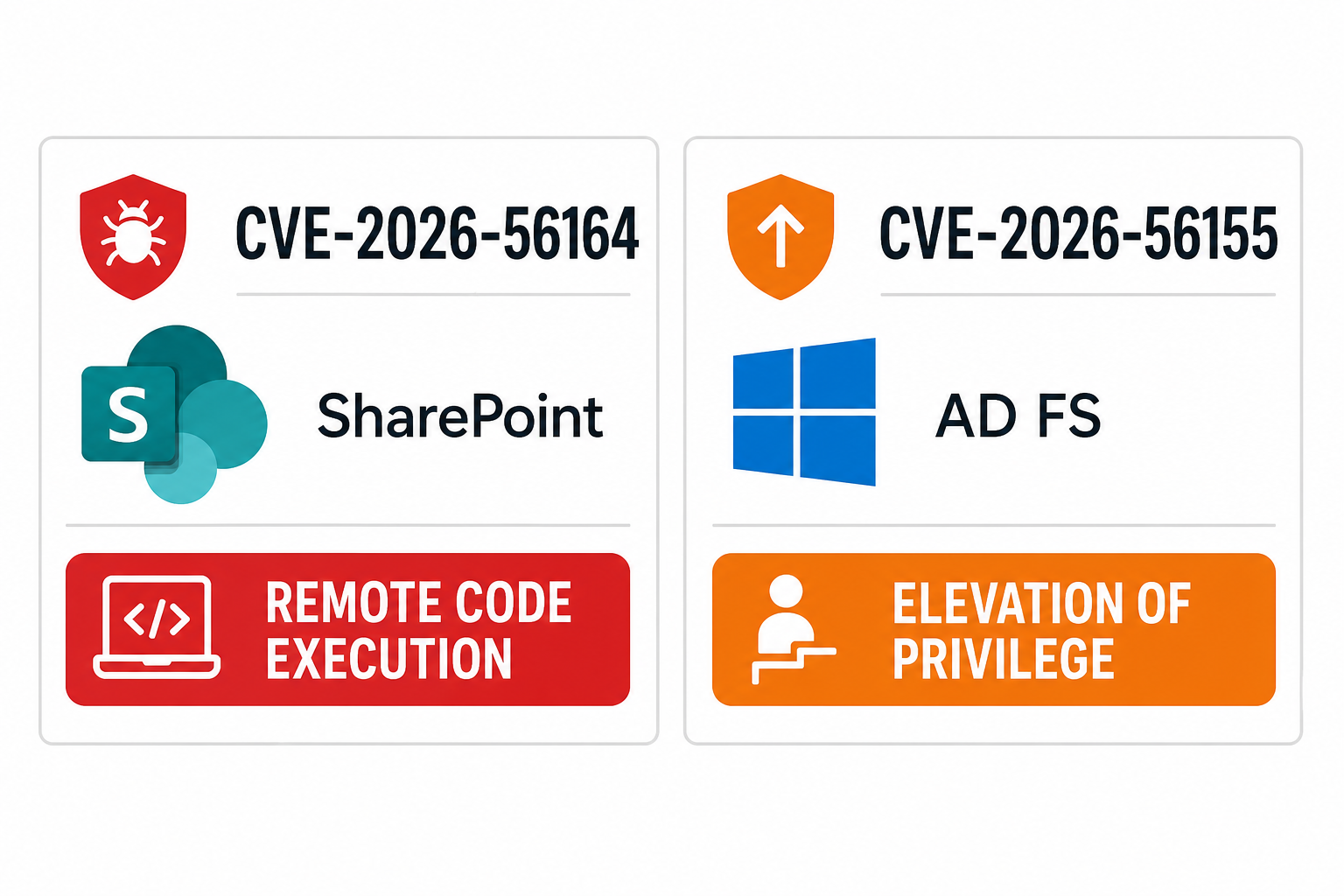
The Windows Zero-Day Exploit: CVE-2026-56164 and CVE-2026-56155
Two zero-days were confirmed as actively exploited in attacks before Microsoft released a fix — meaning attackers had a head start. Both represent serious, real-world risks to businesses and everyday users alike.
CVE-2026-56164 — SharePoint Server Remote Code Execution
This is the headline vulnerability. CVE-2026-56164 affects on-premises Microsoft SharePoint Server and allows remote code execution with low attack complexity — meaning an attacker does not need sophisticated skills or physical access to trigger it. It was being exploited in targeted attacks before the July 2026 patch cycle began. Organisations running SharePoint Server on-premises should treat this as a critical emergency patch, not a scheduled maintenance item.
CVE-2026-56155 — AD FS Elevation of Privilege
The second actively exploited flaw targets Active Directory Federation Services, carrying a CVSSv3 score of 7.8. Successful exploitation allows an attacker to elevate their privileges on a compromised system — a classic stepping-stone for ransomware deployment and lateral movement across corporate networks. Any environment relying on AD FS for single sign-on or federated identity is at direct risk until this patch is applied.
CVE-2026-57092 — Critical VMSwitch Elevation of Privilege
While not confirmed as actively exploited at time of publication, this use-after-free vulnerability in Windows VMSwitch carries a jaw-dropping CVSS score of 9.9 — near the maximum possible severity. It affects virtualisation environments and should be prioritised immediately by any enterprise running Hyper-V workloads.
Which Windows Versions Are Affected?
The July 2026 patches affect virtually the entire Microsoft product portfolio that is still in support. According to analysis by Zecurit, the affected operating systems include:
- Windows 11: All versions from 21H2 through 26H1
- Windows 10: ESU-enrolled devices (Extended Security Updates)
- Windows Server 2016, 2019, 2022, and 2025
- SharePoint Server 2016, 2019, and Subscription Edition (CVE-2026-56164)
- Active Directory Federation Services on all supported Server versions (CVE-2026-56155)
Note that Windows 10 mainstream support ended in October 2025. If you are still running Windows 10 without an ESU subscription, your device is not receiving these fixes and is exposed to every vulnerability in this batch.
Why This Windows Security Patch Is Different
Most Patch Tuesdays fix theoretical vulnerabilities — things that could be exploited under controlled conditions. This month is different in three important ways:
- Active exploitation confirmed: Both CVE-2026-56164 and CVE-2026-56155 were already being used in real attacks before Microsoft published the fix. The clock started ticking before most users even heard about it.
- Scale creates noise: When 622 patches land at once, IT teams face a triage nightmare. Attackers know that overwhelmed teams deprioritise patches — and they exploit that window aggressively.
- AI-accelerated discovery: The record patch count reflects AI-assisted bug hunting tools now available to researchers and threat actors alike. The pace of vulnerability discovery is accelerating on both sides of the security fence.
Immediate Action Items: Your Windows Security Patch Checklist
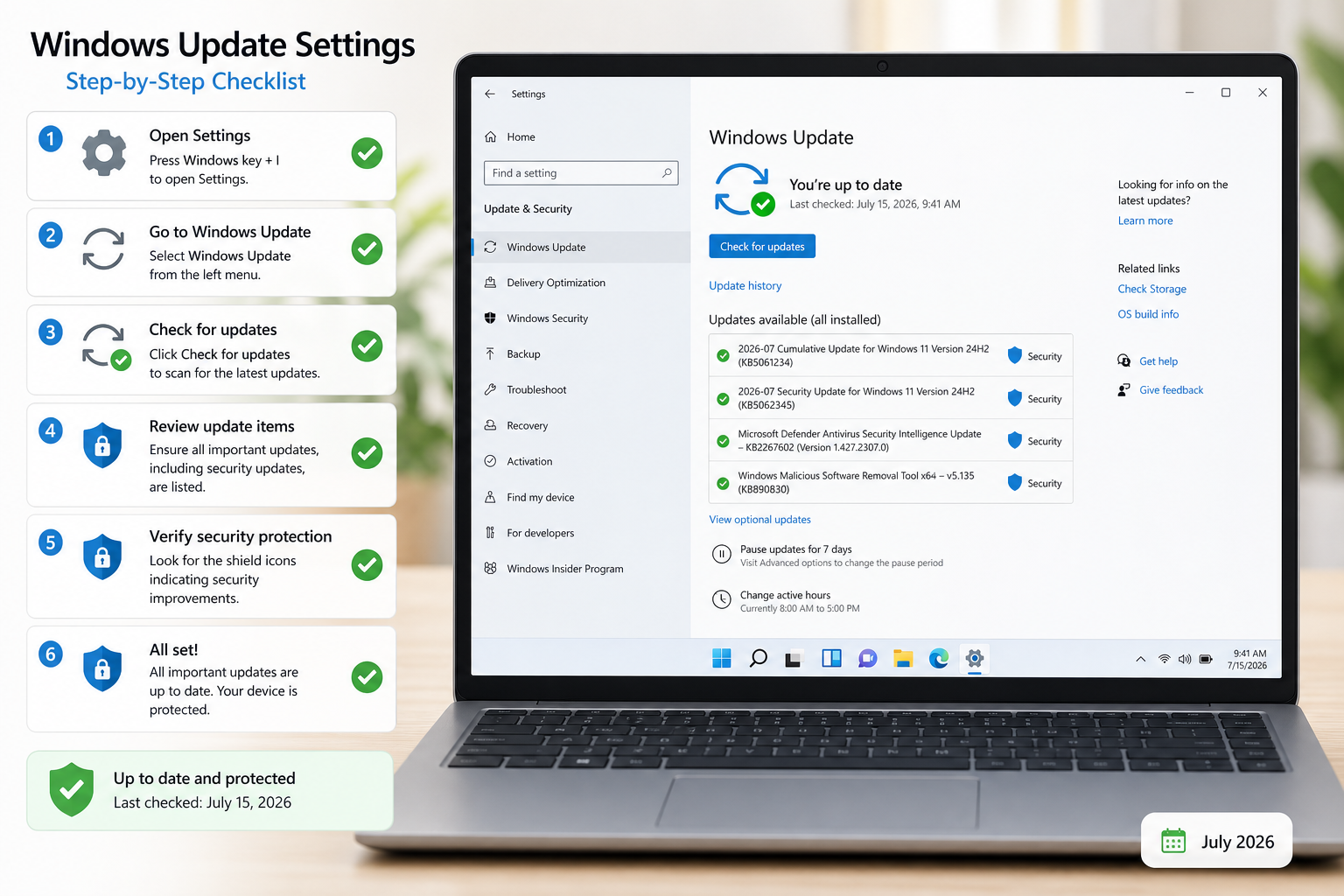
Do not wait for your next scheduled maintenance window. Here is your prioritised action list for the July 2026 patch wave.
1. Run Windows Update Now
On Windows 11 or Windows 10, open Settings → Windows Update → Check for updates. Download and install all available updates. Restart when prompted — do not defer the restart, as some patches only fully apply after a reboot. This is the single most important step for home and small-business users.
2. Prioritise SharePoint and AD FS Patching
If you manage on-premises SharePoint Server or AD FS infrastructure, treat CVE-2026-56164 and CVE-2026-56155 as emergency patches and apply them outside of your normal change window if necessary. The risk of delay far outweighs the risk of an unplanned restart.
3. Patch Hyper-V Hosts Without Delay
The CVE-2026-57092 VMSwitch flaw with its CVSS 9.9 score demands immediate attention on any host running Hyper-V virtual machines, regardless of whether active exploitation has been confirmed.
4. Verify Your Windows Version Is Still Supported
If you are running Windows 10 without an ESU agreement, you are receiving no security fixes at all. Upgrading to a fully supported version of Windows 11 is now a security requirement, not merely a feature upgrade. Windows 11 Home Retail is available at TopKeyShop for just €14.70, making the move to a patched, actively supported OS genuinely affordable.
5. Add a Dedicated Security Layer
Patches close known doors, but zero-days — by definition — arrive before patches exist. A dedicated antivirus solution adds real-time behavioural detection that can catch exploit attempts even against unpatched vulnerabilities. Browse the antivirus software range at TopKeyShop for options starting from under €11, including Avast Pro and McAfee AntiVirus.
6. Enable Automatic Updates Permanently
The users most at risk from the July 2026 zero-day exploit are those who had automatic updates disabled. Re-enable automatic updates and configure your device to install them outside working hours so you are never caught behind on a critical patch cycle.
The Bigger Picture: Windows Zero-Day Exploit Trends in 2026
This July event is not an anomaly — it is an acceleration of a trend that has been building throughout 2025 and 2026. AI-driven vulnerability scanners are now capable of discovering classes of bugs in hours that used to take months of manual analysis. Both the defensive and offensive communities have access to these tools, which means the gap between vulnerability discovery and active exploitation is shrinking rapidly.
For home users, the lesson is simple: automatic updates are now a non-negotiable baseline. For IT teams and system administrators, this month’s 622-CVE batch is a signal to review patch cadence, triage frameworks, and whether legacy systems still running unsupported Windows versions represent an acceptable risk — the answer is almost certainly no.
Security researchers at The Hacker News have provided detailed CVE-by-CVE breakdowns of this patch batch, which is worth bookmarking for IT teams doing comprehensive triage. Microsoft’s own Security Response Center also publishes a full release note for every Patch Tuesday at msrc.microsoft.com.
Should You Upgrade to Windows 11 Now?
If you are still on Windows 10, the answer this month is an unambiguous yes. Windows 10 mainstream support ended in October 2025, and without an Extended Security Update subscription, every vulnerability patched in the July 2026 Patch Tuesday — including both actively exploited zero-days — remains permanently unpatched on your machine.
Windows 11 is not just about security, but security is the most compelling reason to upgrade today. Its hardware-based security features, including TPM 2.0 enforcement, Secure Boot, and VBS (Virtualisation-Based Security), add layers of protection that Windows 10 simply cannot match. You can get started with a genuine, fully licensed copy via the Windows 11 category at TopKeyShop, with keys delivered by email within minutes.
FAQ
What is the Windows 0-day in July 2026?
The term refers to two vulnerabilities — CVE-2026-56164 (SharePoint Server remote code execution) and CVE-2026-56155 (AD FS elevation of privilege) — that were being actively exploited in real-world attacks on the same day Microsoft released patches for them. A zero-day means attackers had access to the exploit before a fix existed, giving defenders no lead time.
Does this July 2026 patch Tuesday affect Windows 10?
Yes, but only for devices enrolled in Microsoft’s Extended Security Update (ESU) programme. Standard Windows 10 support ended in October 2025. If your Windows 10 device does not have an ESU subscription, it will not receive any of the July 2026 fixes and remains permanently exposed to all 622 vulnerabilities patched this month.
How do I check if my Windows security patch has been applied?
Go to Settings → Windows Update → View update history. Look for the July 2026 cumulative update — it will reference a KB number. If you do not see it listed as installed, click Check for updates immediately and allow the installation to complete. Restart your device afterwards to ensure all patches are fully active.
Is CVE-2026-56164 a risk to home users?
CVE-2026-56164 targets on-premises SharePoint Server, which is primarily an enterprise product. Most home users will not be directly vulnerable to this specific CVE. However, the same July 2026 Patch Tuesday batch contains over 416 Windows-specific vulnerabilities, many of which do affect consumer devices. Home users should still apply all updates immediately.
Why were so many patches released at once in July 2026?
The record 622-CVE count is attributed in part to AI-assisted vulnerability discovery tools, which allow both Microsoft’s security researchers and external bug hunters to identify flaws across large codebases far more quickly than traditional manual methods. Microsoft consolidates these into monthly Patch Tuesday releases, meaning high-discovery months produce large batches.
What should I do if I cannot patch immediately?
If patching is not immediately possible — for example, due to compatibility testing requirements in an enterprise environment — implement compensating controls: restrict external access to SharePoint and AD FS endpoints at the network perimeter, increase monitoring on authentication events, and ensure endpoint detection and response (EDR) tools are active and up to date. Patch as soon as possible; compensating controls are a temporary measure only.
