
Ransomware protection is no longer a checkbox on your antivirus settings page — it is a layered discipline that traditional signature scanners were never designed to handle. In 2026, encrypting malware moves faster, hides deeper, and exploits legitimate system tools that legacy antivirus trusts completely. Understanding what modern protection actually does — and what it cannot do — is the first step to keeping your files safe.
Why Traditional Antivirus Falls Short Against Ransomware
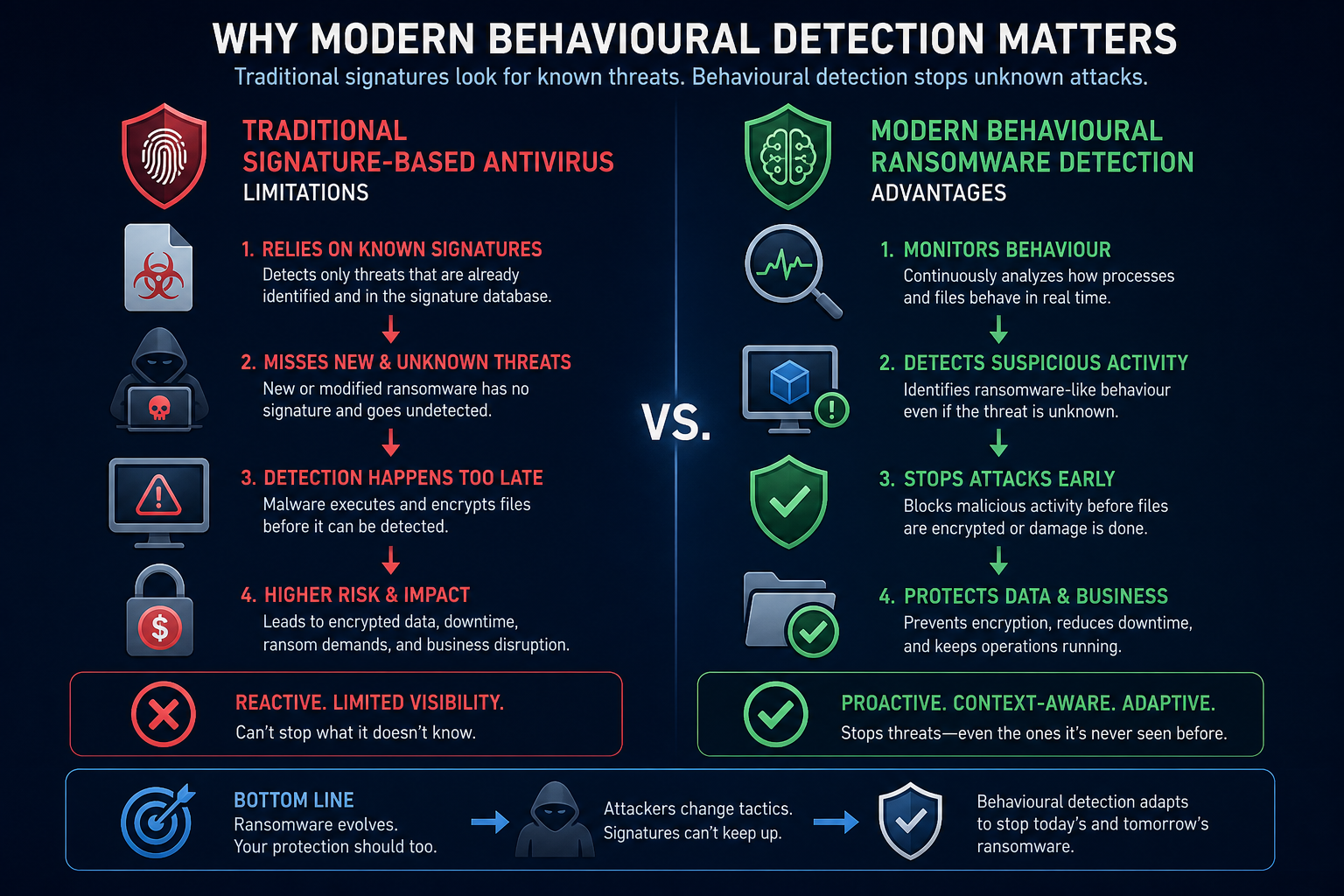
Classic antivirus software works by comparing files against a database of known malicious signatures. That approach is fast and cheap to run, but it has a fundamental weakness: it only catches threats it has already seen. Ransomware authors exploit this by mutating their code automatically, producing thousands of unique variants per day. By the time a new signature is added, the attack is already over.
According to the CISA StopRansomware Guide, even organisations that run centrally managed antivirus can be compromised if that antivirus relies solely on signatures without behavioural or heuristic layers. The guide specifically recommends solutions capable of detecting “precursor” malware — the loaders and droppers that arrive before the encryption payload — something a pure signature scanner rarely catches in time.
What Behavioural Detection Actually Does
Behavioural detection shifts the question from “have I seen this file before?” to “what is this process trying to do right now?” Modern antivirus ransomware engines watch for clusters of suspicious activity: a process enumerating thousands of files in rapid succession, shadow copy deletion commands, or attempts to overwrite file headers. When enough of these signals combine, the engine kills the process before the damage spreads.
Key Behavioural Signals Modern Engines Monitor
- Mass file-rename operations — ransomware typically appends a custom extension to every encrypted file.
- Volume Shadow Copy deletion — attackers almost always run
vssadmin delete shadowsto prevent easy recovery. - Unusual entropy spikes — encrypted data produces near-random byte patterns that stand out from normal files.
- Lateral movement via legitimate tools — abuse of WMI, PowerShell, or PsExec to spread across a network.
- Rapid credential access — reading the LSASS process or querying the SAM database to steal passwords for propagation.
Because behavioural engines do not rely on signatures, they can catch brand-new ransomware strains on their first appearance — a critical advantage in 2026 when novel variants outnumber known families by a wide margin.
Zero-Trust Controls: Stopping Ransomware Before It Runs
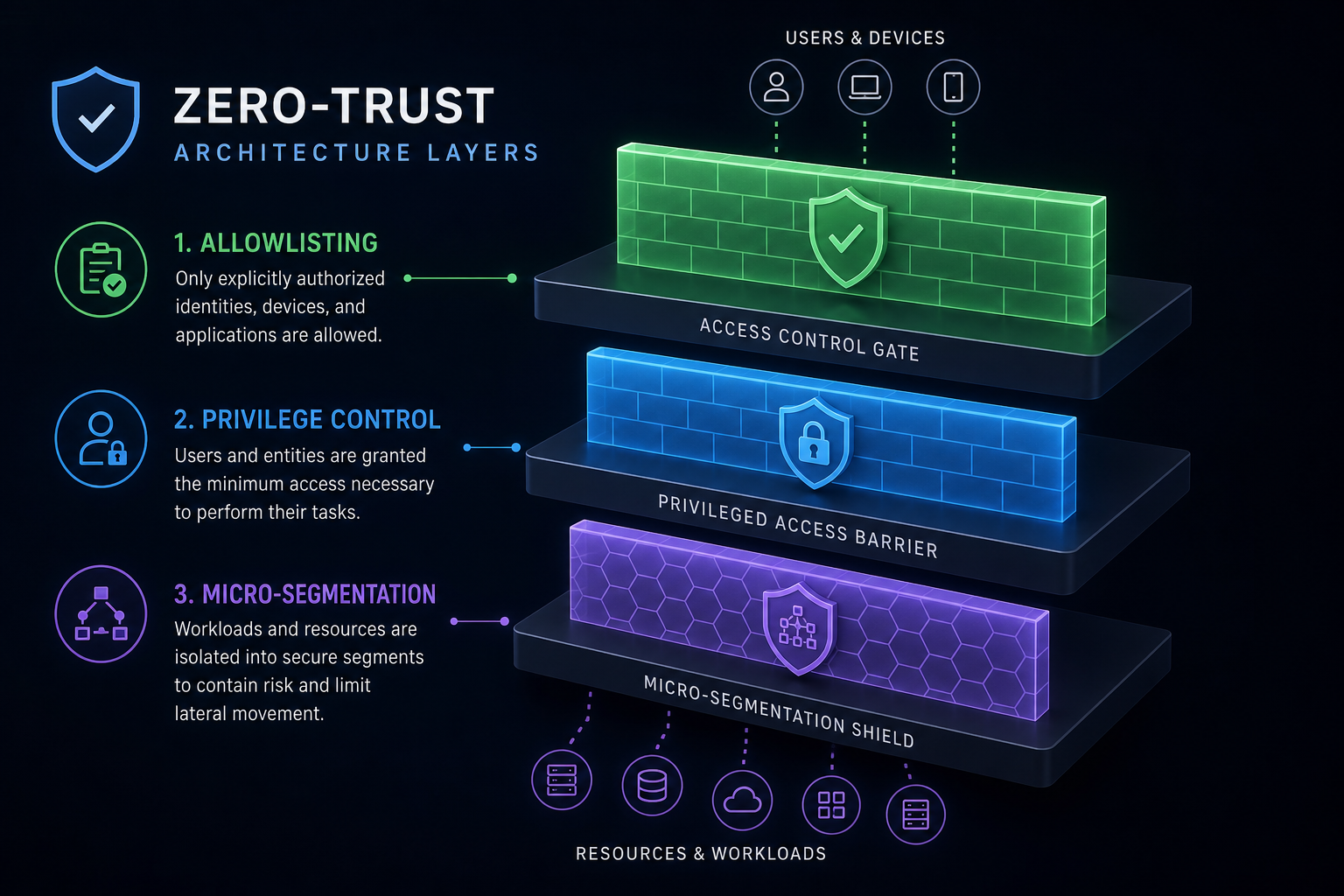
Zero-trust architecture takes ransomware defense a step further by applying a deny-by-default policy to everything on the system. Rather than deciding whether a file is malicious after it runs, zero-trust controls prevent unauthorised executables from launching in the first place. This is particularly effective against living-off-the-land attacks, where attackers use Windows’ own tools — PowerShell, mshta.exe, certutil — to execute payloads without ever dropping a suspicious file on disk.
Core Zero-Trust Features to Look For
- Application allowlisting — only pre-approved software is permitted to run; everything else is blocked automatically.
- Privilege access control — limits which accounts can install software, modify system settings, or access sensitive directories.
- Network micro-segmentation — prevents a compromised endpoint from communicating freely with the rest of the network, stopping lateral spread.
- Controlled folder access — a feature built into Windows Defender that restricts which applications can write to protected folders, acting as a lightweight allowlisting layer for your documents.
Antivirus Ransomware Features That Actually Make a Difference
Not all paid antivirus suites are equal when it comes to stop ransomware capabilities. When evaluating a product, look beyond the headline detection rate and focus on these specific features:
Automatic File Rollback
Some modern suites — including Avast, Bitdefender, and Malwarebytes Premium — maintain real-time shadow copies of files in protected directories. If ransomware successfully encrypts even a handful of documents before it is killed, the engine can restore the originals from its own backup. This is genuine ransomware defense, not just detection.
Real-Time Ransomware Shield
A dedicated ransomware shield runs separately from the main antivirus engine. It monitors file-system activity at the kernel level and uses heuristics tuned specifically to encryption behaviour rather than generic malware patterns. Products like Avast Pro Antivirus (from €11.90) include this as a named feature, making it straightforward to confirm it is active.
Ransomware-Specific Sandboxing
Suspicious processes are detonated in an isolated virtual environment before they are permitted to interact with real files. If the sandboxed process starts behaving like ransomware, it is terminated before any real-world impact. This catches packed or obfuscated payloads that would sail past a signature scan.
Windows Built-In Ransomware Defense: How Far Does It Go?
Windows 11 includes Microsoft Defender with Controlled Folder Access — a genuine antivirus ransomware layer that blocks untrusted applications from modifying files in your Documents, Pictures, and Desktop folders. It is enabled by default on Windows 11 and is a meaningful first line of defense for home users. However, it offers no automatic rollback, limited network-based threat intelligence, and relies on Microsoft’s update cadence for new behavioural rules — making it a strong baseline but an incomplete solution for anyone handling sensitive data.
For a more capable third-party option, McAfee AntiVirus (from €10.90) adds web protection, firewall controls, and identity monitoring on top of the core ransomware detection layer, covering gaps that Defender leaves open.
The Role of Backups in Ransomware Protection
No antivirus product — regardless of how sophisticated its ransomware defense is — carries a 100% guarantee. A determined attacker with enough dwell time can disable endpoint agents, corrupt rollback caches, or encrypt drives before behavioural rules fire. The only truly resilient layer is an offline or immutable backup that ransomware cannot reach.
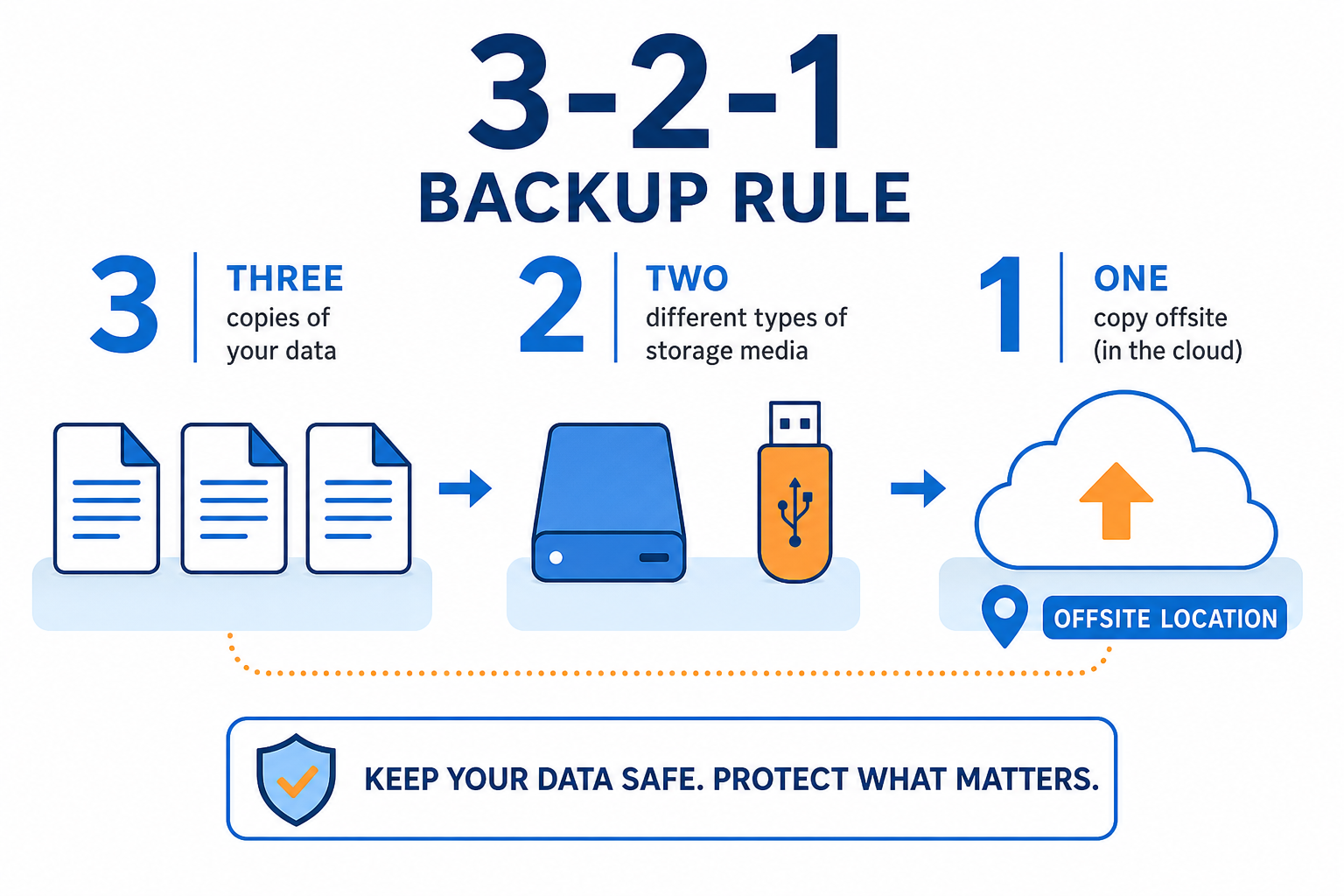
- Follow the 3-2-1 rule: three copies of your data, on two different media types, with one stored offsite or in immutable cloud storage.
- Test your restore process regularly — a backup you have never tested is not a backup you can rely on.
- Keep at least one backup completely disconnected from your network; ransomware actively seeks mapped drives and cloud sync folders.
Combining a modern antivirus ransomware engine with verified, immutable backups gives you genuine defence-in-depth: the antivirus stops the vast majority of attacks before damage occurs, and the backup handles the edge cases it misses.
Choosing the Right Antivirus Ransomware Product in 2026
The market for stop ransomware solutions has matured rapidly. Here is a quick framework for choosing the right tier for your needs:
Home Users
Enable Controlled Folder Access in Windows Defender immediately — it costs nothing and stops a wide class of ransomware. Pair it with a premium suite like Avast Pro or McAfee AntiVirus for rollback, real-time shields, and phishing protection. Both are available from the TopKeyShop antivirus category at competitive prices.
Small Businesses
Step up to a suite with network-level visibility: look for endpoint detection and response (EDR) features, centralised management, and automatic isolation of compromised devices. Application allowlisting becomes increasingly important at this tier to limit blast radius.
Enterprises
A full zero-trust platform — combining EDR, identity controls, network micro-segmentation, and immutable backup — is now considered baseline, not premium. CISA’s own guidance classes zero-trust architecture as a core mitigation in its StopRansomware recommendations.
Frequently Asked Questions
Does free antivirus offer any ransomware protection?
Free antivirus products typically include basic signature scanning and may have limited behavioural detection, but they rarely include dedicated ransomware shields or automatic file rollback. Windows Defender (free) is a notable exception with its Controlled Folder Access feature, though it lacks rollback. For meaningful ransomware defense, a paid suite is strongly recommended.
Can ransomware disable my antivirus before encrypting files?
Advanced ransomware strains do attempt to kill antivirus processes and disable services before executing. Modern suites counter this with tamper-protection features that prevent unauthorised termination of the security agent. Always verify that tamper protection is enabled in your chosen product’s settings.
Is behavioural detection enough to stop ransomware, or do I need more?
Behavioural detection is the most effective single layer available today, but no single layer is sufficient on its own. Combining behavioural detection with application allowlisting, controlled folder access, network segmentation, and immutable backups creates the defence-in-depth that security professionals recommend. Think of each layer as reducing risk, not eliminating it.
How quickly does ransomware encrypt files before being stopped?
Modern ransomware variants can encrypt tens of thousands of files per minute. Behavioural engines typically detect and halt encryption within seconds of the pattern being confirmed, but a small number of files may already be affected. This is precisely why automatic rollback features are valuable — they restore those early victims without manual intervention.
Does ransomware protection antivirus software slow down my PC?
Performance impact varies by product. Modern suites are designed to scan in the background during idle periods and use cloud-assisted lookups to minimise local processing. Independent lab tests typically show under 5% performance impact for top-tier products in everyday workloads — a trade-off most users find acceptable given the stakes involved.
