

The Windows Hello security upgrade delivered through KB5101684 is one of the most significant passwordless authentication improvements Microsoft has shipped for Windows 11 to date. In a single cumulative update, Microsoft extends Enhanced Sign-in Security (ESS) to external fingerprint sensors, tightens biometric data encryption, and speeds up recognition — making secure, passwordless sign-in accessible to far more devices than before. Whether you manage a fleet of enterprise machines or simply want a faster, safer way to unlock your PC, this update deserves your attention.
What Is KB5101684 and Why Does It Matter?
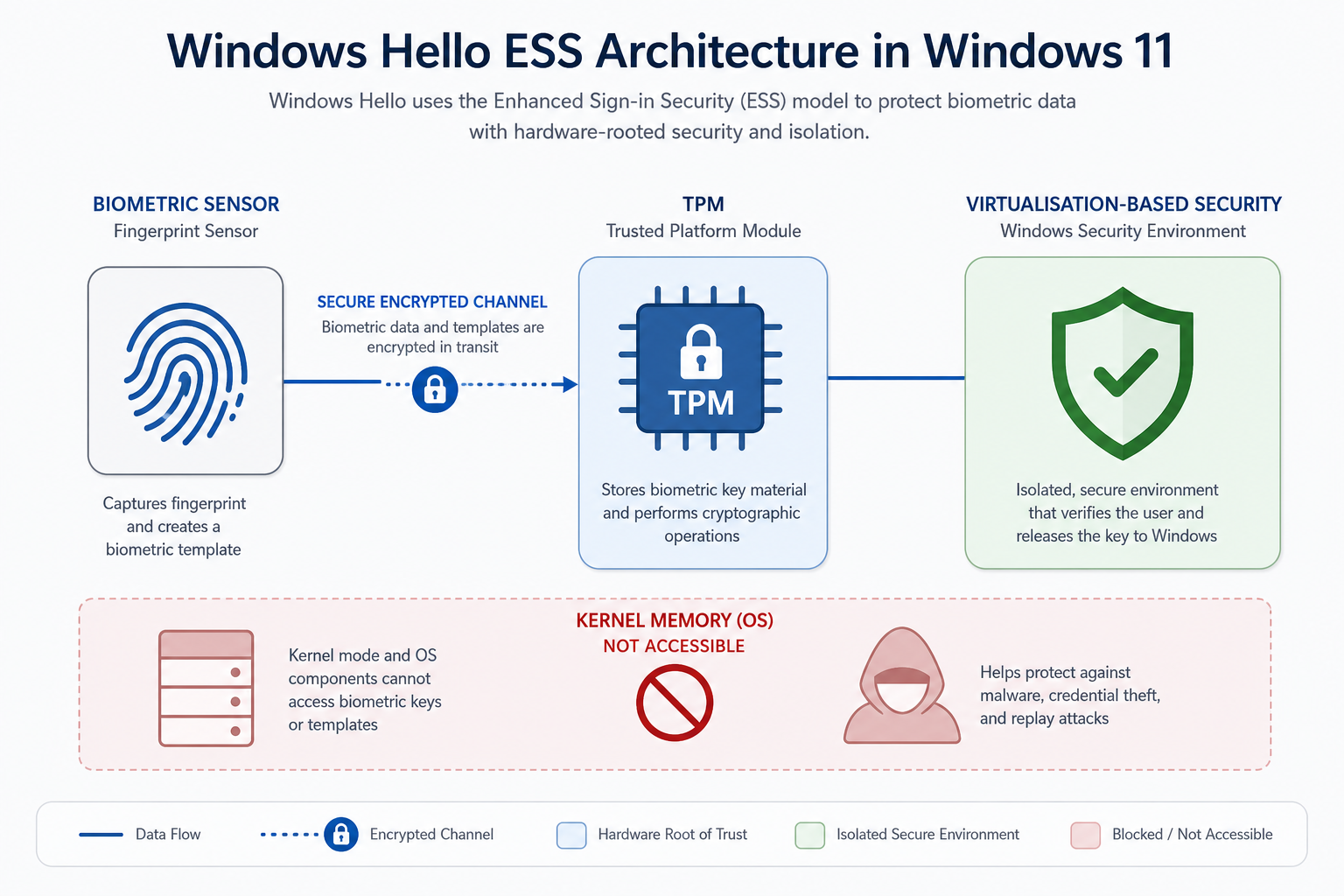
KB5101684 is a cumulative preview update for Windows 11 that ships 42 individual changes and fixes. The headline feature is the expansion of Windows Hello Enhanced Sign-in Security (ESS) to include peripheral (external) fingerprint sensors — a capability previously restricted to built-in hardware on select Copilot+ and modern OEM devices. According to BleepingComputer’s full change-log analysis, this single addition unlocks ESS-grade security for a much wider range of desktop and laptop configurations.
ESS was introduced precisely because standard biometric pipelines pass data through general-purpose system memory — a path that sophisticated malware can intercept. With ESS, biometric template data and the matching algorithm are isolated inside a trusted execution environment, shielded by Virtualisation-Based Security (VBS). KB5101684 brings that same isolation to USB and Bluetooth fingerprint readers for the first time.
How the Windows Hello Update Strengthens Biometric Encryption
The core of the Windows Hello update centres on two interlocking improvements: stronger encryption for stored biometric templates and a faster, more reliable matching pipeline.
Virtualisation-Based Security for External Sensors
Before KB5101684, ESS relied on sensors physically integrated into the device chassis and connected via a secure internal channel. The update extends trust to selected external fingerprint readers by verifying sensor firmware against a Microsoft-maintained allowlist. Once verified, the sensor’s data pathway is protected by VBS, meaning the raw fingerprint image never travels through general-purpose kernel memory where it could be captured by a rootkit or driver exploit.
Encrypted Biometric Templates at Rest
Windows Hello stores a mathematical representation — not an image — of your fingerprint or facial geometry. With the latest Hello biometric authentication changes, those templates are encrypted at rest using keys bound to the device’s TPM 2.0 chip. This ensures that even if an attacker extracts the stored template file, it is cryptographically useless without the exact hardware it was created on.
Faster Recognition Speeds
Microsoft has also tuned the matching algorithm to reduce false-rejection rates, which previously caused users to fall back to PIN or password entry. Faster recognition is not just a convenience improvement — it discourages users from disabling biometric login out of frustration, which is one of the leading reasons organisations see poor adoption of passwordless policies.
Windows Hello ESS: Enterprise Implications
For IT administrators, the Windows Hello ESS expansion in KB5101684 is strategically important for three reasons.
- Broader hardware support: Organisations can now deploy ESS across desktops with external fingerprint readers, not just premium laptops with built-in sensors. This dramatically lowers the hardware barrier to a zero-trust, passwordless environment.
- Reduced credential theft risk: Passwords stored in memory or transmitted over networks are a primary attack vector. Biometric credentials bound to local hardware cannot be phished, sprayed, or passed-the-hash — KB5101684 makes that protection available at scale.
- FIDO2 alignment: Windows Hello for Business already supports FIDO2 passkeys. The stronger encryption introduced in this update aligns more tightly with the FIDO Alliance’s latest authenticator security requirements, making compliance reporting simpler for regulated industries.
- Group Policy and Intune controls: ESS on external sensors is opt-in via policy. Admins can whitelist specific sensor models through Mobile Device Management (MDM) or Group Policy — providing precise control over which peripherals are trusted across the estate.
- Audit trail improvements: The update also refines Windows Event Log entries for biometric sign-in events, making it easier for security teams to detect anomalous authentication attempts in SIEM tools.
Who Should Prioritise This Windows Hello Security Upgrade?
The short answer is: any Windows 11 user or administrator who relies on passwordless sign-in or is planning to roll it out. Specifically, the following groups should treat KB5101684 as a priority install:
- Enterprise IT teams running zero-trust or passwordless authentication projects
- Desktop users with USB or Bluetooth fingerprint readers who previously could not use ESS
- Copilot+ PC owners — the update also improves recognition reliability on built-in sensors for these newer machines
- Regulated industries (finance, healthcare, government) where strong authentication is a compliance requirement
- Remote workers who sign in over VPN and want to eliminate password-based exposure on endpoints
Even for home users, this Windows Hello update is worth installing simply because it reduces the chance of being locked out by a failed biometric read — a frustration that pushes many users back to weaker PIN or password sign-in.
How to Install KB5101684
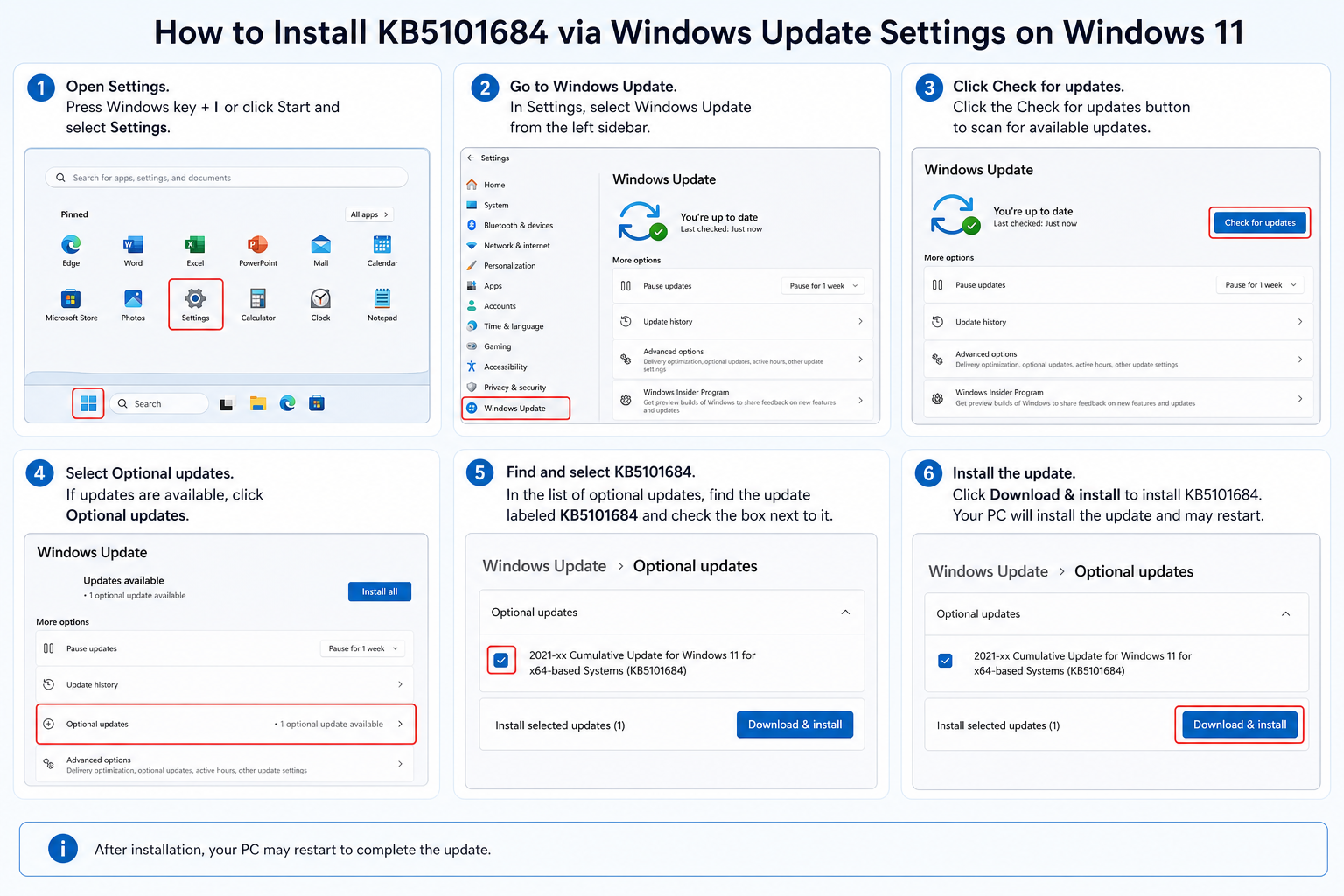
Installing the update is straightforward. Open Settings → Windows Update and click Check for updates. KB5101684 is classified as a preview cumulative update, which means it may not appear automatically for all users — look for the Optional updates section if it does not show under the main update list. After a standard restart, your device is protected.
Verify ESS Is Active After the Update
To confirm Enhanced Sign-in Security is running with your external fingerprint reader:
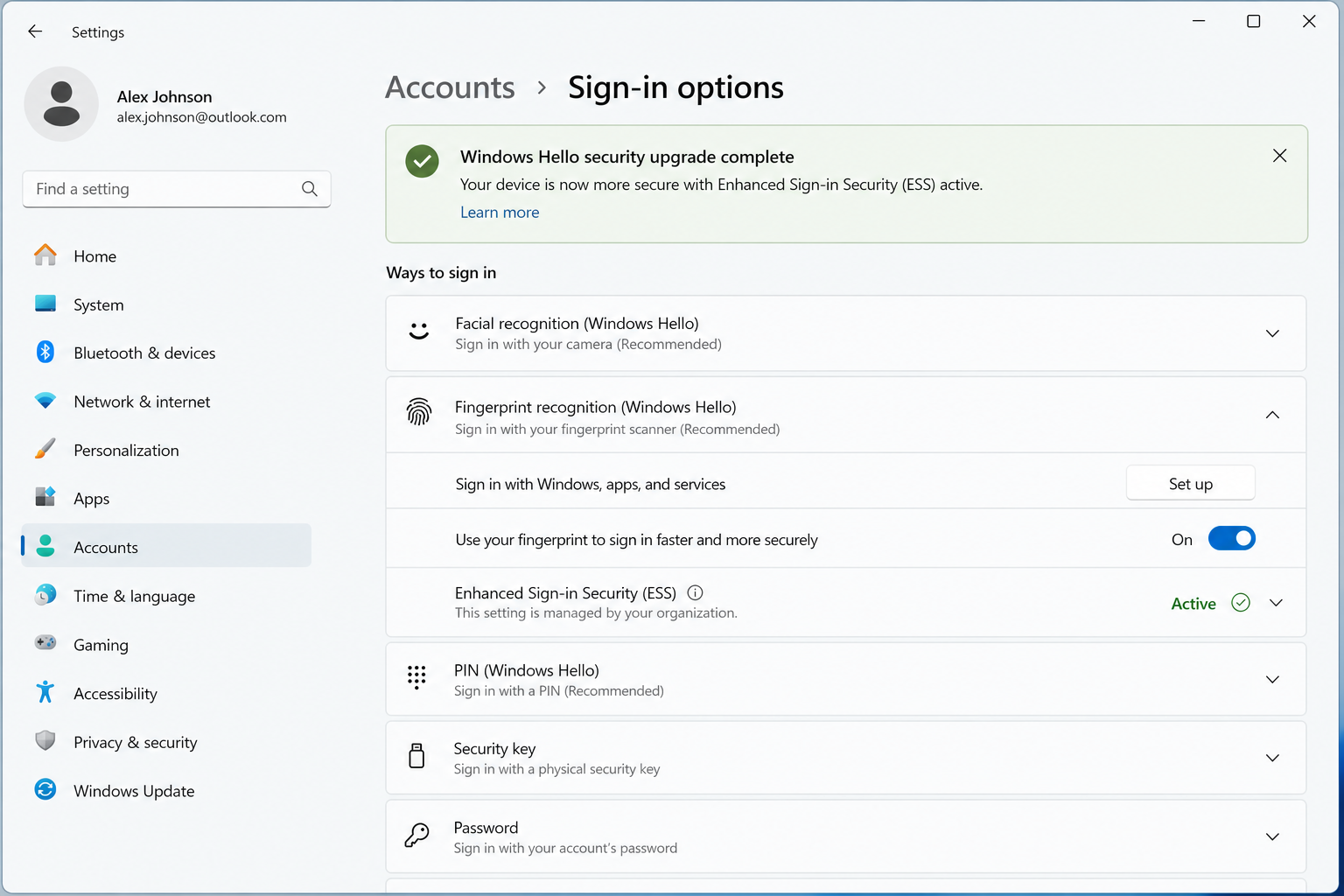
- Open Settings → Accounts → Sign-in options.
- Expand the Fingerprint recognition (Windows Hello) section.
- If ESS is active, you will see a note confirming the sensor is running in enhanced security mode.
- If the sensor is not on Microsoft’s approved list, standard (non-ESS) fingerprint login will still work — it will simply not carry the isolated-execution guarantee.
Microsoft’s official documentation for Hello biometric authentication and ESS hardware requirements is maintained on the Windows Hello Enhanced Sign-in Security page at Microsoft Learn — the definitive reference for compatible sensor specifications and deployment guidance.
Windows Hello and the Broader Passwordless Future
KB5101684 does not exist in a vacuum. Microsoft has been progressively hardening Windows Hello since its introduction in Windows 10, and the trajectory is clear: passwords are being systematically phased out in favour of cryptographic, device-bound credentials. As of 2025, Microsoft reports that over 99% of its own employees use passwordless authentication for daily work — a statistic that underscores both the maturity and the security advantage of this approach.
The Windows Hello security upgrade in this patch is a meaningful step toward making that same standard realistic for organisations of every size. By extending ESS to external sensors, Microsoft removes the argument that strong biometric security requires expensive, purpose-built hardware. A €14.70 Windows 11 licence paired with a quality fingerprint reader can now deliver enterprise-grade authentication that matches the isolation guarantees previously reserved for premium OEM devices.
If your organisation has not yet evaluated a passwordless rollout, KB5101684 is an excellent prompt to start that conversation. The combination of broader hardware support, tighter encryption, and improved usability removes most of the technical objections that historically stalled these projects.
Get a Genuine Windows 11 Licence and Take Advantage of Every Security Update
Security updates like KB5101684 are only available to users running a genuine, activated copy of Windows 11. Unactivated or counterfeit installs are blocked from receiving cumulative updates through Windows Update — meaning the biometric and encryption improvements described above will never reach those machines, leaving them exposed.
TopKeyShop offers genuine Windows 11 licences at competitive prices, with fast email delivery and official Microsoft download links. The Windows 11 licence range includes Home and Pro options starting from €9.70, so there is no reason to run unprotected. For users who want to pair a fresh Windows 11 install with a productivity suite, the Windows 11 Pro Retail + Office 2024 Professional Plus Bundle delivers both for €19.10 — a straightforward way to get a fully activated, update-ready system from day one.
Frequently Asked Questions
What does the Windows Hello security upgrade in KB5101684 actually change?
KB5101684 extends Windows Hello Enhanced Sign-in Security (ESS) to selected external fingerprint sensors, strengthens encryption for biometric template data stored on the device, and improves recognition speed and reliability. Previously, ESS was limited to built-in sensors on specific modern hardware. This update makes those protections available to a much wider range of devices.
Do I need special hardware for the Windows Hello ESS features in this update?
Yes, ESS for external fingerprint sensors requires a sensor that appears on Microsoft’s verified hardware allowlist, plus a device with TPM 2.0 and Virtualisation-Based Security enabled in firmware. If your external reader is not on the allowlist, standard (non-ESS) Windows Hello fingerprint login still works — you just will not get the isolated execution environment that ESS provides.
Is this Hello biometric authentication update mandatory?
KB5101684 is classified as a preview cumulative update, so it is optional at the time of initial release. However, the security improvements it contains will eventually roll into a mandatory monthly cumulative update. Enterprise administrators should evaluate and test it promptly so they can deploy it without delay when it becomes mandatory.
How does Windows Hello protect my fingerprint data from hackers?
Windows Hello never stores an image of your fingerprint. It creates a mathematical template that is encrypted and bound to your device’s TPM chip, so it cannot be used on any other machine. With ESS active, the entire matching process runs inside a virtualisation-protected memory region, keeping biometric data away from the parts of the OS that malware typically targets. Even a kernel-level exploit cannot access the raw template data.
Will KB5101684 improve Windows Hello on my laptop’s built-in sensor?
Yes. In addition to adding external sensor support, the update refines the recognition algorithm for built-in sensors, reducing false-rejection rates. Copilot+ PC owners and users of recent OEM laptops with integrated IR cameras or fingerprint readers should notice marginally faster, more consistent sign-ins after installing the update.
Do I need Windows 11 Pro for these Windows Hello update features?
Most Windows Hello features, including ESS on supported hardware, are available on both Windows 11 Home and Windows 11 Pro. Windows Hello for Business — which adds Azure AD integration, certificate-based credentials, and advanced MDM policies — requires Pro or Enterprise. For straightforward biometric sign-in on a personal or small-business device, Home is fully sufficient.
