

Windows device ID tracking is more powerful than most users realise — and a landmark 2025 court case just proved it. When a 19-year-old suspected member of the cybercriminal group Scattered Spider was arrested in Helsinki while boarding a flight to Japan, the key evidence tying him to a devastating cyberattack came not from a witness or a hacked server, but from a silent, persistent identifier baked into his Windows installation: the Global Device ID, or GDID. Here is what that means for ordinary users, how device tracking in Windows actually works, and what you can genuinely do to limit your exposure.
What Is the Windows Global Device ID (GDID)?
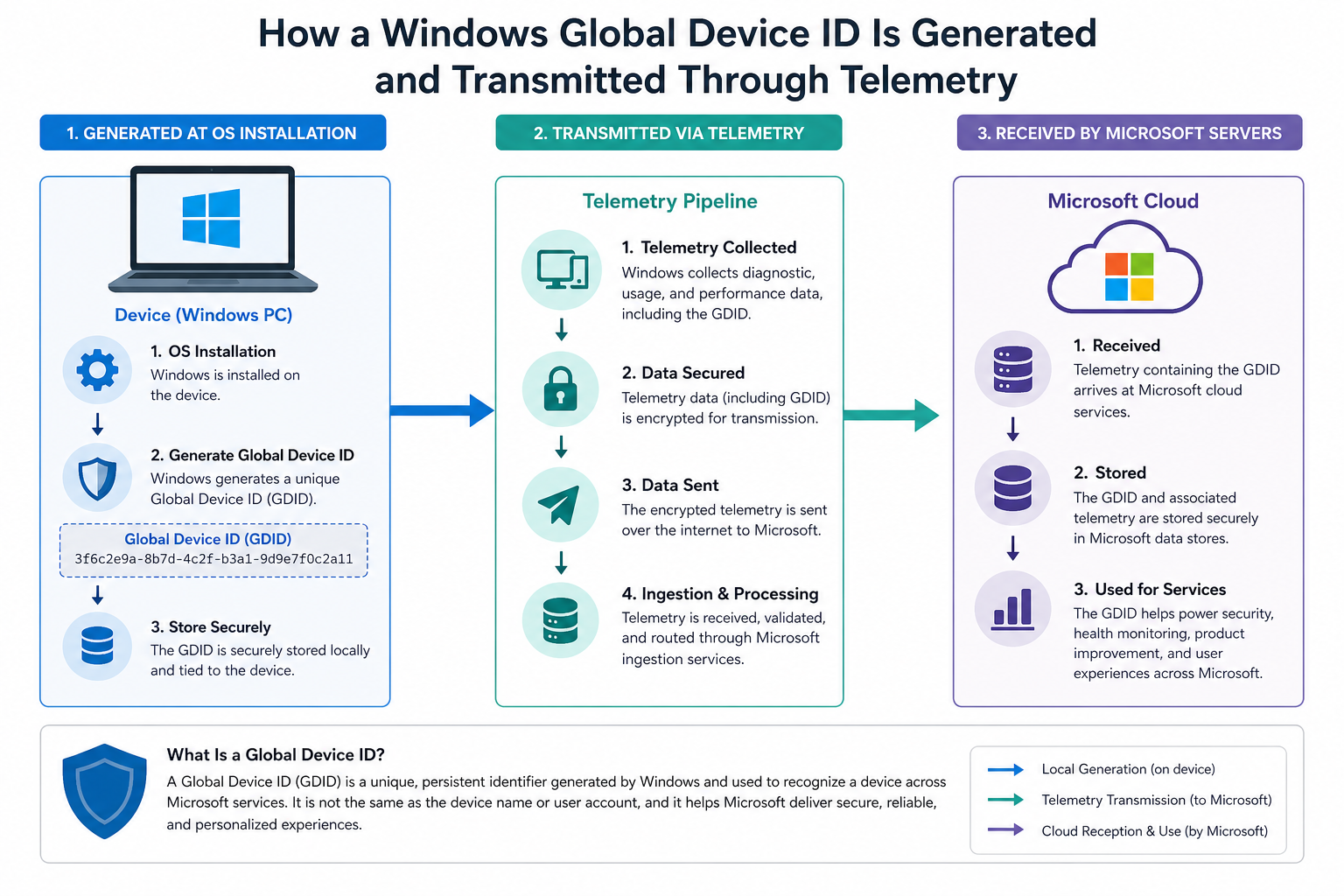
The GDID is a globally unique identifier that Windows generates and ties permanently to a specific installation of the operating system on a specific device. Unlike a browser cookie that can be cleared, or an IP address that changes with every router restart, a GDID is persistent — it survives reboots, software updates, and even some reinstallation scenarios. According to court documents filed in the case against Peter Stokes, Microsoft was able to link telemetry data carrying his GDID to online activity connected to a May 2025 hack of a jewellery retailer, in which 77 GB of data was stolen and an $8 million ransom was demanded.
The GDID is transmitted to Microsoft as part of Windows telemetry — the background data-collection process that Microsoft uses to monitor operating system performance, crash reports, and usage patterns. This is distinct from the advertising ID that Windows also generates (which can be reset in Settings), and from Microsoft Entra ID device identities used in enterprise environments. The GDID is a lower-level identifier tied directly to the OS installation itself.
How Windows Device ID Tracking Helped Catch a Hacker
Device tracking in Windows became the linchpin of a federal investigation. According to a court filing cited by The Hacker News and PCMag, investigators obtained records from Microsoft that showed the suspect’s GDID appearing across sessions tied to the breach. Even though the attacker used techniques designed to mask his identity — including VPNs — the GDID persisted in telemetry data sent to Microsoft servers, effectively creating a reliable thread connecting activity across different sessions and IP addresses.
The suspect, named in court documents as Peter Stokes, was reportedly a 19-year-old with dual US-Estonian nationality and alleged links to Scattered Spider, the English-speaking hacking collective known for high-profile ransomware and extortion campaigns. His arrest illustrates a point that cybersecurity professionals have warned about for years: VPNs and anonymisation tools protect your network-level identity, but they do nothing to mask device-level identifiers that your operating system transmits independently.
For law enforcement, this is a significant capability. For privacy-conscious users, it raises serious questions about the scope of Windows device ID tracking and whether ordinary people — not just criminals — should be concerned.
Windows Privacy Tracking: What Data Does Microsoft Actually Collect?
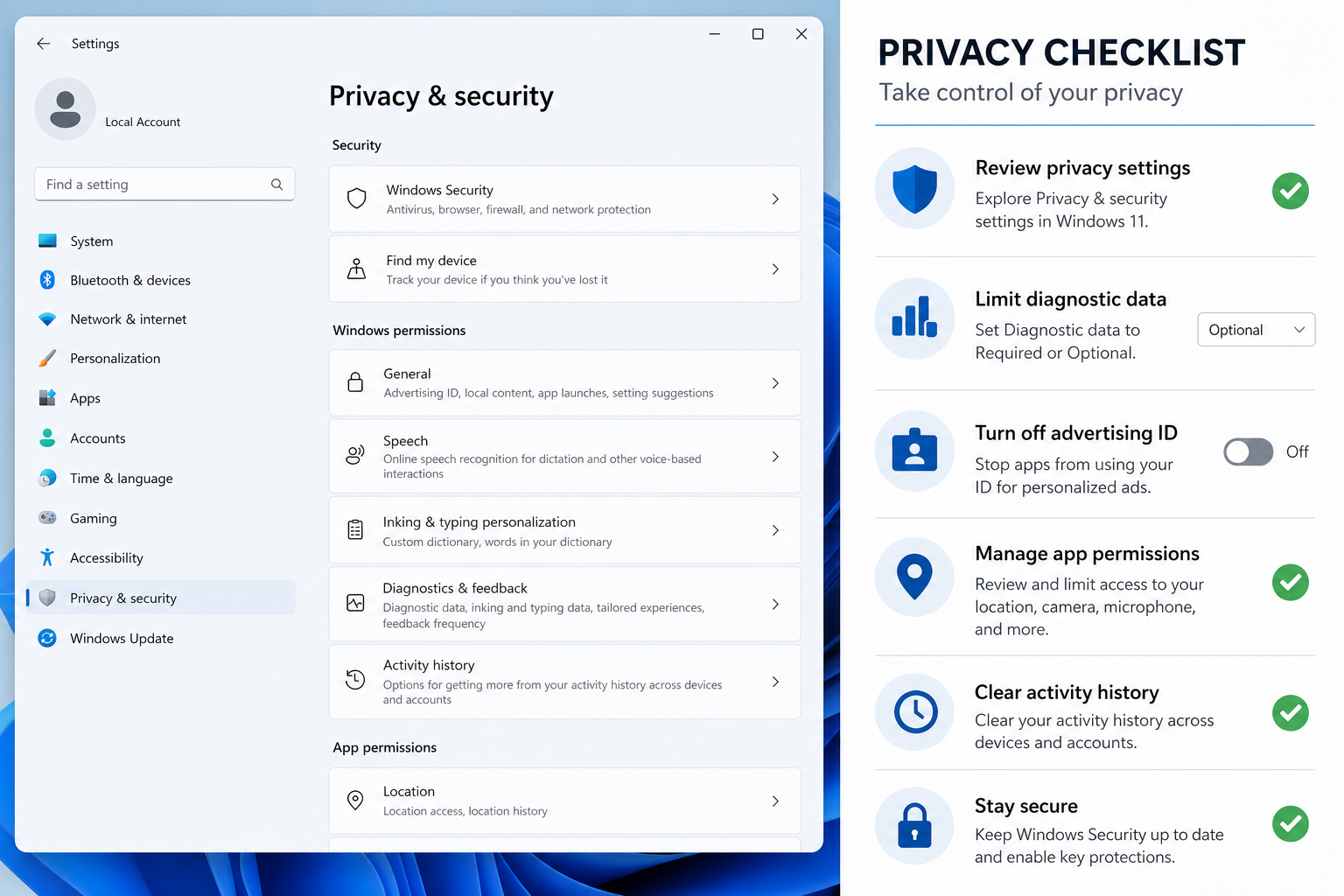
Microsoft’s telemetry operates at different levels, and understanding those levels is the first step in managing your exposure. Windows collects data under two broad settings:
- Required (Basic) Diagnostic Data: Device information, crash reports, basic hardware identifiers, and performance data. This level is mandatory for Windows 10 and 11 and cannot be fully disabled on consumer editions.
- Optional (Full) Diagnostic Data: Broader usage data including app activity, browsing behaviour in Microsoft Edge, and more detailed device telemetry. This is opt-in on consumer editions and can be turned off.
The GDID appears to be transmitted even at the Required level, making it a persistent fixture of Windows telemetry regardless of which privacy settings you choose. Microsoft’s own general privacy settings guidance for Windows explains the advertising ID and other user-level identifiers, but the GDID operates at a deeper layer — one that Microsoft has not widely publicised until this court case brought it to light.
Is Windows GDID a Privacy Threat for Ordinary Users?
The short answer is: it depends on your threat model. For the vast majority of Windows users, the GDID poses no immediate risk. Microsoft is not selling GDID data to advertisers, and there is no evidence it is being used for commercial profiling. The identifier is primarily a telemetry and diagnostic tool, and the FBI obtained the data through a legal court process — not through any rogue access.
However, there are legitimate concerns worth acknowledging:
- Scope of data retention: If Microsoft retains GDID-linked telemetry indefinitely, the historical record of a device’s activity could be extensive.
- Legal compulsion: Any data Microsoft holds can be requested by law enforcement through legal channels — and as this case demonstrates, the company will cooperate.
- Cross-session linkage: The GDID allows activity to be linked across different IP addresses, VPNs, and user accounts — a capability that goes well beyond what most users assume telemetry covers.
- Reinstallation persistence: In some configurations, the GDID may survive a Windows reinstall, meaning wiping and re-installing the OS may not reset the identifier.
How to Manage Device Tracking in Windows 11

While you cannot fully opt out of Required Diagnostic Data on consumer Windows editions, there are steps you can take to reduce your overall telemetry footprint and understand what Windows is sharing:
- Reduce Optional Diagnostics: Go to Settings > Privacy & Security > Diagnostics & Feedback and switch from Optional to Required diagnostic data. Also disable the “Improve inking and typing” and “Tailored experiences” toggles.
- Reset your Advertising ID: Under Settings > Privacy & Security > General, turn off the advertising ID toggle. This resets the ad-targeting identifier, though it does not affect the GDID.
- Use a local account where possible: Signing in with a Microsoft account links your device activity to your cloud profile. A local account reduces this linkage, though the GDID still persists in telemetry regardless of account type.
- Review Connected Experiences: In Microsoft 365 apps, disable optional connected experiences under File > Account > Manage Settings to limit additional telemetry from Office applications.
- Enterprise and Pro users — use Group Policy: Windows 11 Pro and Enterprise users can use Group Policy or the Registry to enforce stricter telemetry limits. Navigate to Computer Configuration > Administrative Templates > Windows Components > Data Collection and Preview Builds.
It is also worth noting that Windows 11 Pro gives you more granular control over privacy and telemetry settings compared to Windows 11 Home — one practical reason to consider an upgrade if privacy is a priority for you. You can explore Windows 11 Home licences and Windows 10 Pro options at TopKeyShop if you are looking to upgrade your current licence at a competitive price.
What the Scattered Spider Case Tells Us About Cybersecurity
Beyond the privacy implications, the Scattered Spider arrest demonstrates the growing sophistication of digital forensics in cybercrime investigations. Scattered Spider — also tracked under names like UNC3944 and Starfraud — is responsible for a string of high-profile attacks on major companies, often using social engineering, SIM-swapping, and ransomware deployment. The group’s members have historically operated under the assumption that technical anonymisation tools provide robust cover. The GDID evidence in this case suggests otherwise.
The $8 million ransom demand tied to the jewellery retailer breach also reflects a broader trend: ransomware attacks targeting mid-market businesses with valuable data but limited security budgets. The attack involved exfiltrating 77 GB of data before deploying the ransom demand — a double-extortion technique where attackers threaten to publish stolen data if payment is refused.
For businesses running Windows environments, this case underscores the importance of robust endpoint monitoring, network segmentation, and employee security training — not just as protections against external attackers, but as controls that leave a forensic trail when incidents do occur.
Windows Device ID Tracking and the Future of OS-Level Privacy
This case is likely to intensify the debate around Windows privacy tracking and the extent to which operating systems should be permitted to collect and retain persistent device identifiers. Privacy advocates have long argued that Microsoft’s telemetry collection goes beyond what is strictly necessary for product improvement, and the GDID revelation adds a new dimension to that argument.
Regulators in Europe — where the General Data Protection Regulation (GDPR) imposes strict rules on the collection and processing of personal data — may well take an interest in whether GDID-level telemetry constitutes processing of personal data under EU law. A persistent, unique identifier that can be used to track the online activity of a specific device across time and IP addresses would, in many interpretations, qualify as personal data — which would carry significant compliance implications for Microsoft.
For now, Microsoft has not publicly commented in detail on the GDID’s technical implementation or its data retention practices beyond standard privacy statement language. That transparency gap is something users and regulators are likely to push on in the months ahead.
Should You Worry About Windows Device ID Tracking?
If you are a law-abiding user who is not conducting cyberattacks, the GDID is unlikely to affect your daily life in any meaningful way. Microsoft is not monitoring your device for suspicious activity and proactively alerting authorities — the data was accessed through a formal legal process in connection with a serious criminal investigation involving millions of dollars in ransom demands and a massive data breach.
That said, awareness is always valuable. Understanding that Windows device ID tracking exists, that it is persistent, and that it can be linked to activity across sessions and IP addresses is useful context for anyone who cares about digital privacy. It is also a reminder that no single anonymisation tool — not a VPN, not Tor, not a proxy — is a silver bullet if the operating system underneath is independently identifying your device to the service provider.
The practical takeaway is straightforward: reduce optional telemetry where you can, use a local account where practicable, and keep your Windows installation and security software up to date. For home users and small businesses looking to get started on a properly licensed, up-to-date Windows 11 environment, TopKeyShop offers a range of genuine activation keys delivered within minutes of purchase.
FAQ
What is a Windows Global Device ID (GDID)?
A GDID is a persistent, globally unique identifier that Windows generates and ties to a specific OS installation on a device. Unlike an IP address, it does not change when you connect through a VPN or switch networks. It is transmitted to Microsoft as part of Windows telemetry data and, as the 2025 Scattered Spider arrest demonstrated, can be used to link online activity to a specific physical device across multiple sessions.
Can I delete or reset my Windows GDID?
There is no publicly documented, officially supported method for consumer users to reset or delete the GDID. It persists across reboots and updates, and may survive some reinstallation scenarios. Turning off Optional Diagnostic Data reduces the broader telemetry payload, but Required Diagnostic Data — which likely includes the GDID — cannot be fully disabled on consumer Windows editions.
Does Windows device ID tracking affect VPN users?
Yes — and this is one of the most important lessons from the hacker arrest case. A VPN masks your IP address and encrypts your internet traffic, but it does not prevent Windows from transmitting your GDID to Microsoft through telemetry channels. The GDID travels independently of your browsing traffic, making it visible to Microsoft regardless of your VPN status.
Is Windows 11 Pro better for privacy than Windows 11 Home?
Windows 11 Pro offers additional controls over telemetry via Group Policy and the Registry, which Home users do not have access to. Pro users can enforce stricter diagnostic data limits and have more control over enterprise-grade privacy settings. If privacy management is a priority, Windows 11 Pro provides a more flexible toolkit than the Home edition.
What is Scattered Spider and why does it matter?
Scattered Spider (also known as UNC3944) is an English-speaking cybercriminal group known for sophisticated social engineering, SIM-swapping attacks, and ransomware deployment. The group has targeted major companies across multiple sectors. The 2025 arrest of an alleged member — aided in part by Windows device ID tracking data shared by Microsoft with the FBI — marks a significant law-enforcement win against one of the most active hacking collectives operating today.
