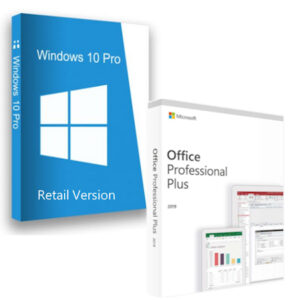
Windows 11 Pro + Word 2024 Bundle

(9 customer reviews)

Original price was: €52.00.Current price is: €46.80.


  • Windows 11 Pro Activation Key
  • Word 2024 Bind to Account Activation Key
  • Fast email delivery, usually within minutes
  • Official download links
  • Easy installation and activation instructions
  • Free 24/7 Customer Support


Secure Payment and Safe Checkout โ€” Buyer Protection Guaranteed

๐Ÿ›ก๏ธ Genuine keys ยท Money-back guarantee ยท 24/7 support. Learn how you're protected โ†’

SKU: 11p+w2024 Categories: , , Brand:

Windows 11 Pro + Word 2024 Software Bundle Box

Upgrade your PC experience with the powerful Windows 11 Pro + Word 2024 Bundle. This exclusive package combines Microsoftโ€™s most advanced operating system with the latest AI-enhanced version of Word โ€” at a discounted price. Ideal for students, professionals, and businesses looking for performance, simplicity, and productivity in one bundle.

Why Choose the Windows 11 Pro + Word 2024 Bundle?

This bundle includes:

  • โœ… Full version of Windows 11 Pro โ€“ with enhanced security, virtualization, and productivity tools

  • โœ… Original Word 2024 for Windows โ€“ bound to your Microsoft account, giving you permanent access and the ability to reinstall at any time

Youโ€™ll receive multiple download options for Windows 11: Installation Assistant, Media Creation Tool, or ISO file (multi-language supported). Word 2024 is redeemed through your Microsoft account for long-term accessibility and support.

๐Ÿ‘‰ Need help? Find full instructions in our Download, Installation & Activation Guides.

Key Features of Windows 11 Pro + Word 2024

๐Ÿ” Next-Gen Security & Flexibility

  • BitLocker device encryption and secure boot

  • Remote desktop, virtualization support, and group policies

  • Word 2024 bound to your Microsoft account for portability and future-proof access

๐Ÿง  AI Writing Tools & Document Creation

  • Smart grammar and style suggestions in Word 2024

  • New voice dictation and accessibility features

  • Modern templates and design tools for polished documents

โšก Performance & Compatibility

  • Faster boot times and seamless multitasking with Snap Layouts in Windows 11

  • Word 2024 optimized for both light use and large professional documents

  • No subscription required โ€” one-time payment, lifetime license

Why Buy the Windows 11 Pro + Word 2024 Bundle from Us?

At Top Key Shop, we specialize in offering unbeatable deals on authentic Microsoft products:

  • Instant Digital Delivery โ€” Receive your product keys within minutes

  • Official Secure Downloads โ€” Download directly from Microsoft

  • Lifetime Activation โ€” No monthly fees, one-time purchase

  • 24/7 Customer Support โ€” Weโ€™re here whenever you need us

  • Thousands of Happy Customers โ€” We have consistently received high ratings on Google and Trustpilot for our products and services.


System Requirements

  • Processor: 1 GHz or faster, 2 or more cores

  • RAM: 4 GB for Windows 11 / 4 GB for Word 2024

  • Storage: 64 GB or larger

  • Graphics: Compatible with DirectX 12 or later

  • Internet: Required for download, activation, and Microsoft account login

Not the Right Combo? Check These Alternatives!

Enhance Your Experience with These Compatible Products

Ready to Upgrade?

Get the Windows 11 Pro + Word 2024 Bundle today and streamline your digital life with powerful, secure, and smart tools โ€” all for a one-time price. Donโ€™t miss this exclusive offer!

Frequently Asked Questions โ€“ Windows 11 Pro + Word 2024 Bundle

What is included in the Windows 11 Pro + Word 2024 Bundle?

The Windows 11 Pro + Word 2024 Bundle includes two separate product keys: one for Windows 11 Pro (retail activation key) and one for Word 2024 for Windows (bind-to-account key). Both are delivered digitally via email, along with official download links and step-by-step activation instructions.

How will I receive my product keys?

After completing your purchase, you will receive your activation keys via email โ€” usually within minutes. The email will also contain official Microsoft download links and easy-to-follow installation and activation instructions so you can get started right away.

Is the Windows 11 Pro + Word 2024 Bundle a one-time purchase?

Yes. The Windows 11 Pro + Word 2024 Bundle is a one-time purchase with no monthly subscription fees. Windows 11 Pro gives you a permanent, lifetime activation on your PC, and Word 2024 is bound to your Microsoft account for lasting access โ€” including the ability to reinstall at any time.

How do I activate Windows 11 Pro?

Once you receive your key, you can activate Windows 11 Pro directly through Windows Settings. Go to Start โ†’ Settings โ†’ System โ†’ Activation, and enter your product key when prompted. You can also download Windows 11 using the Installation Assistant, Media Creation Tool, or an ISO file โ€” all available from Microsoft’s official servers. For full guidance, visit our Download, Installation & Activation Guides.

How do I activate Word 2024?

Word 2024 uses a bind-to-account method. After purchasing, you’ll redeem the key through your Microsoft account at setup.office.com, which permanently links Word 2024 to your account. Once linked, you can download and reinstall it at any time from your Microsoft account portal without needing the key again.

Can I activate both Windows 11 Pro + Word 2024 products at different times?

Yes, absolutely. The two keys are independent โ€” you can activate Windows 11 Pro today and redeem your Word 2024 key whenever you’re ready. Both keys remain valid until you use them, so there’s no pressure to activate everything at once.

Is Word 2024 compatible with Windows 11 Pro?

Yes. Word 2024 is fully compatible with Windows 11 and Windows 10. Together, the Windows 11 Pro + Word 2024 Bundle provides a seamless, high-performance environment for document creation, professional writing, and everyday productivity tasks.

Can I reinstall Windows 11 or Word 2024 in the future?

Yes. Windows 11 Pro can be reinstalled using your product key at any time via Microsoft’s official download tools. Word 2024, being bound to your Microsoft account, can be reinstalled at any time simply by signing into your account โ€” no key needed after the initial redemption.

Do I need an internet connection to install or activate?

An internet connection is required to download both products, activate Windows 11 Pro, and redeem your Word 2024 key through your Microsoft account. A Microsoft account is also required for Word 2024 activation. Once fully installed, Word 2024 can be used offline for most tasks.

What support is available if I need help?

Our team provides free 24/7 customer support. Whether you have questions about activation, installation, or anything else related to your Windows 11 Pro + Word 2024 Bundle, we’re here to help at any time. You can also find detailed guidance in our Installation & Activation Guides.

Looking for a Different Bundle?

If this combination isn’t quite right for you, we offer a range of other software bundles to suit different needs. You might also consider the Windows 11 Pro Retail + Office 2024 Professional Plus Bundle for the full Office suite, or the standalone Word 2024 for Windows if you only need the word processor.

9 reviews for Windows 11 Pro + Word 2024 Bundle

  1. Andrius Petrauskas, Lithuania

    Fantastic bundle. Windows 11 is lightning fast and Word 2024 is perfect for my writing.

  2. Stefano Bianchi, Italy

    Very happy with the purchase. Installation was easy and reliable.

  3. Andrius Petrauskas, Lithuania

    Fantastic bundle. Windows 11 is lightning fast and Word 2024 is perfect for my writing.

  4. Katarina Petrova, Bulgaria

    Quick delivery and smooth installation. Everything activated without problems.

  5. Jonas Nielsen, Denmark

    I mistakenly installed the wrong Word version at first, but support helped me reinstall correctly. Very happy.

  6. Claire Dubois, France

    Good value and quick delivery.

  7. Jonas Nielsen, Denmark

    The license activated in seconds and the software works flawlessly. Excellent value for money.

  8. Jonas Nielsen, Denmark

    I mistakenly installed the wrong Word version at first, but support helped me reinstall correctly. Very happy.

  9. Claire Dubois, France

    Good value and quick delivery.

Only logged in customers who have purchased this product may leave a review.

You may also like…