

OneDrive support ending for older Windows 10 builds is not a distant warning — Microsoft has confirmed that August 15, 2025 is the hard cut-off date for any Windows 10 version earlier than 22H2. If your PC is still running an older build, OneDrive will stop syncing altogether, leaving your files stranded between your hard drive and the cloud. Here is everything you need to know, including which builds are affected, what happens after the deadline, and your clearest path forward.
Why Is Microsoft Ending Windows 10 OneDrive Compatibility?
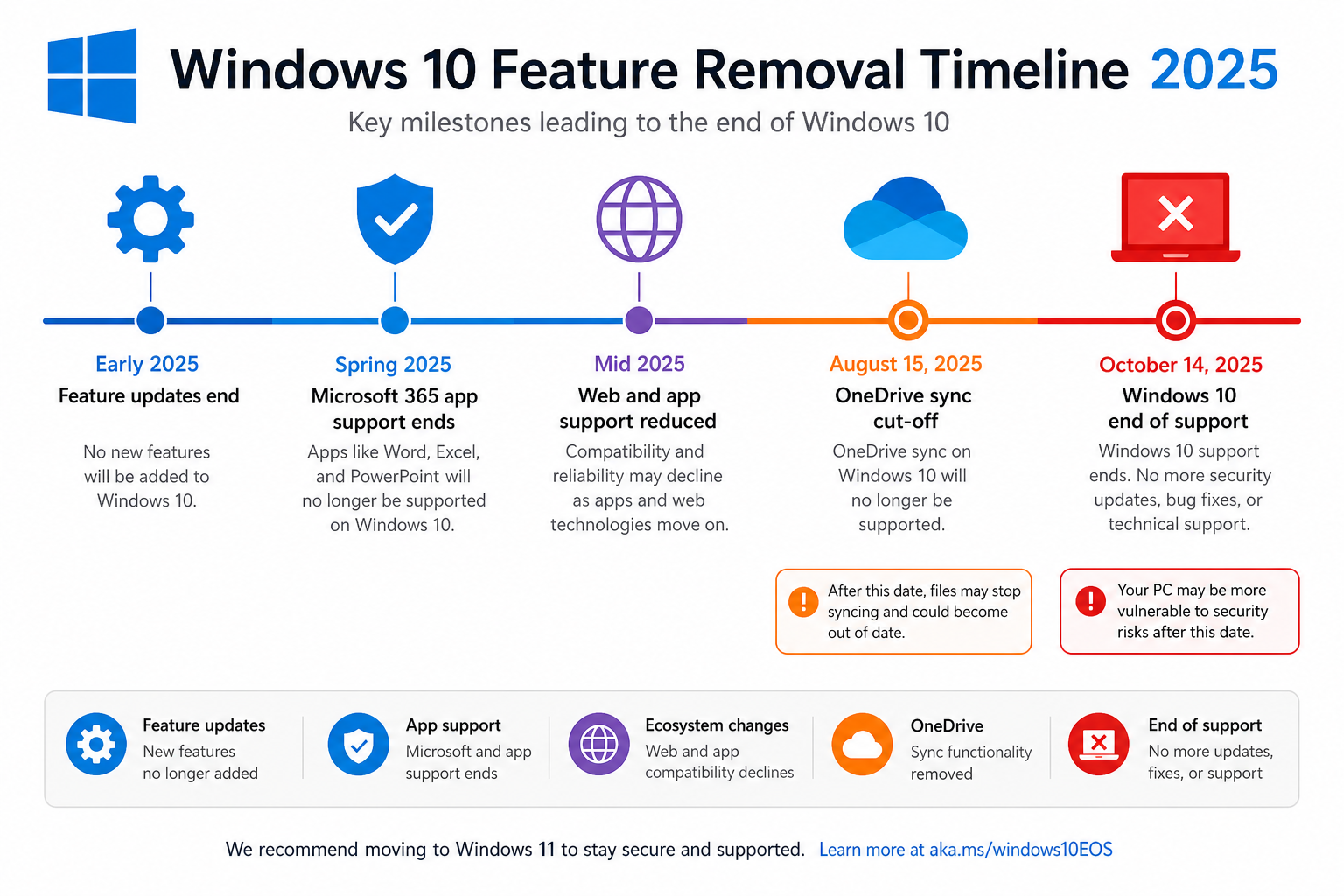
Microsoft has been on a sustained campaign to wind down Windows 10 as a viable daily-use platform. The operating system reached its full end-of-support milestone on October 14, 2025, and well before that date Microsoft began pruning features from older builds piece by piece. OneDrive sync is simply the latest casualty in that process.
The logic is straightforward from Microsoft’s perspective: maintaining two separate sync stacks — one for Windows 11 and one for legacy Windows 10 builds — costs engineering time and introduces security surface area. By dropping support for pre-22H2 builds, the OneDrive team can focus entirely on the current codebase and keep Windows 11 users receiving new features faster. For users still clinging to older builds, however, that business case is cold comfort.
Which Windows 10 Builds Lose OneDrive Sync?
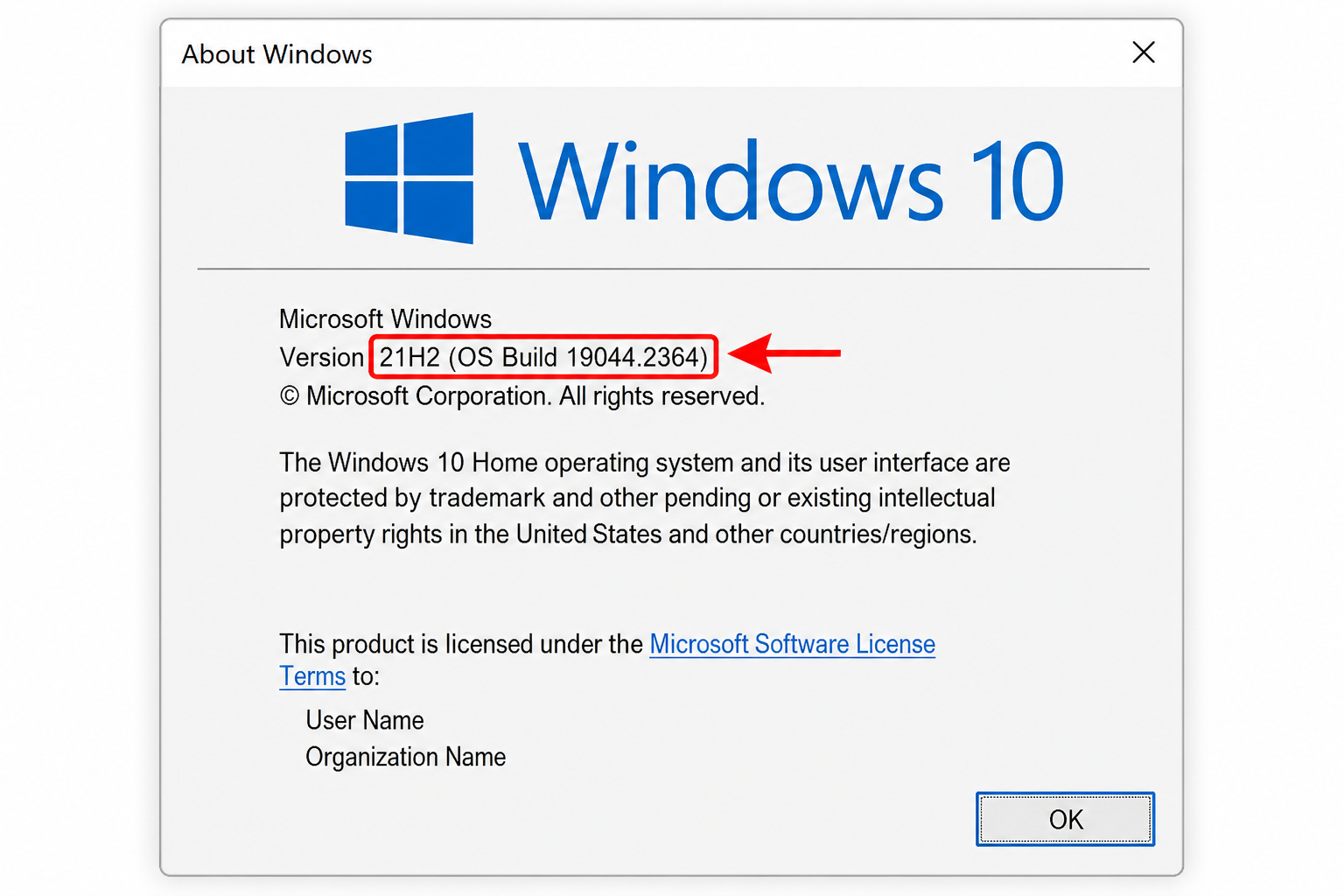
The cut-off is clear: any Windows 10 build older than version 22H2 will lose OneDrive sync and stop receiving OneDrive app updates after August 15, 2025. That includes the following major releases:
- Windows 10 21H2 (Build 19044)
- Windows 10 21H1 (Build 19043)
- Windows 10 20H2 (Build 19042)
- Windows 10 2004 (Build 19041)
- All earlier feature update versions (1909, 1903, 1809, and older)
By contrast, Windows 10 22H2 — the final feature update for Windows 10 — keeps its OneDrive sync support until October 10, 2028, according to reporting by The Next Web. That is a meaningful reprieve, but it still sets a firm long-term horizon for anyone who has not yet considered moving to Windows 11.
How to Check Your Windows 10 Build Number
Not sure which build you are on? It takes about ten seconds to find out. Press Windows key + R, type winver, and hit Enter. The dialogue that appears will show your exact Windows version and build number. If it says anything earlier than 22H2 (OS Build 19045), your OneDrive sync is in the firing line.
Alternatively, head to Settings > System > About and look under the “Windows specifications” section. The “Version” field is what matters here.
What Actually Happens When Windows 10 OneDrive Sync Stops?
This is where the stakes become very practical. When the deadline passes, OneDrive on an affected build will not simply pause — it will stop syncing entirely and will no longer receive security patches or bug fixes for the desktop client. That means:
- Files you add or edit locally will not upload to your OneDrive cloud storage.
- Files shared with you or updated on another device will not download to your PC.
- The OneDrive app itself becomes a potential security liability, running with no further vulnerability patches.
- Collaboration features tied to OneDrive — including SharePoint sync for Microsoft 365 users — will break on those builds.
Your existing files stored in the cloud remain safe and accessible via the OneDrive website or from other synced devices. The problem is the live, two-way sync pipeline from your affected PC, which will go dark.
Your Migration Options: What You Can Do Right Now
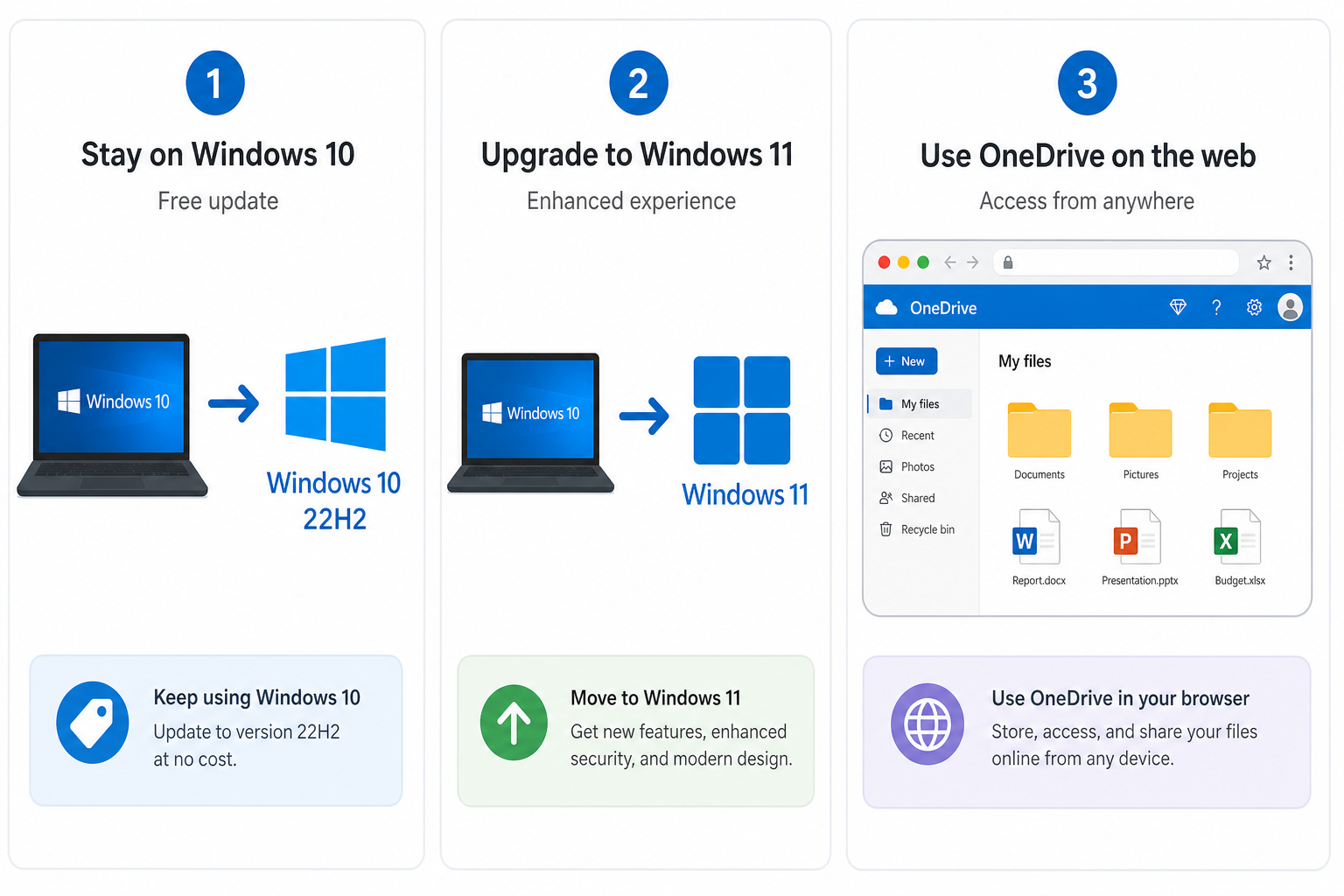
You have three realistic routes, and each is worth considering depending on your hardware and budget.
Option 1 — Update to Windows 10 22H2 (The Free Quick Fix)
If your device is already on Windows 10 and your hardware meets the requirements, updating to 22H2 via Windows Update is free and restores OneDrive compatibility until October 2028. Go to Settings > Update & Security > Windows Update and check for updates. This is the lowest-friction option if you need more time before committing to Windows 11. That said, remember that even 22H2 has a fixed sunset — it buys you time, not a permanent solution.
Option 2 — Upgrade to Windows 11 (The Long-Term Fix)
Windows 10 OneDrive compatibility cut brings the bigger picture into sharp focus: Windows 10 is on borrowed time across the board. Windows 11 is the only version of Windows currently receiving full feature updates and security patches, and its OneDrive client is fully supported well into the future. If your hardware passes the TPM 2.0 and Secure Boot checks, upgrading is the cleanest resolution to every Windows 10 end-of-life deadline at once.
TopKeyShop stocks genuine Windows 11 licences at very competitive prices. The Windows 11 Pro Retail 64-bit key is available for just €9.10, giving you a fully activated, legally genuine copy you can install today. If you want to bundle a productivity suite at the same time, the Windows 11 Pro + Office 2024 Professional Plus Bundle covers both for €19.10 — a sharp deal compared to buying each licence separately.
Option 3 — Use the OneDrive Web Interface as a Stopgap
If upgrading is not immediately possible — say, you are waiting for budget approval or a hardware refresh — you can access OneDrive through a browser at onedrive.live.com. Uploads and downloads work normally via the web app. It is not as seamless as the desktop sync client, but it keeps you productive while you plan your upgrade path. Be aware that this does not address the broader security concerns of running an unpatched Windows 10 build.
Is the Windows 10 OneDrive Cut a Sign of Things to Come?
Yes, frankly. The Windows 10 OneDrive sync cut-off is part of a deliberate, escalating schedule of feature removals that Microsoft has been executing since the OS passed its end-of-support date. Microsoft 365 apps (Word, Excel, Outlook, and the rest) already stopped receiving support on Windows 10 after October 2025. OneDrive sync is next. Other cloud-connected services and co-pilot features will almost certainly follow.
The pattern is clear: staying on any pre-22H2 Windows 10 build means accepting a progressively degraded experience, not just one missing feature. The OneDrive sync stopped scenario is a preview of a broader de-featuring that will intensify over the next 12–24 months.
Windows 10 vs Windows 11: A Quick Reality Check
Some users resist upgrading to Windows 11 because of familiarity, the TPM 2.0 hardware requirement, or a general reluctance to change. Those concerns are understandable, but they need to be weighed against the growing list of things that simply no longer work on Windows 10. Here is a quick comparison of what you get — and lose — on each platform as of mid-2025:
- Windows 10 22H2: OneDrive sync until October 2028, no new features, no security patches after October 2025 (unless enrolled in ESU), increasing Microsoft 365 limitations.
- Windows 11 24H2: Full OneDrive support, active security patches, Copilot integration, updated Microsoft 365 compatibility, and a supported upgrade path well into the 2030s.
The hardware requirement gap is also narrowing. Most PCs manufactured after 2018 meet the TPM 2.0 threshold, and Microsoft has provided workarounds for edge cases. The real barrier for most users is inertia, not hardware.
Frequently Asked Questions
Does Windows 10 OneDrive support ending affect my stored files?
No — files already stored in your OneDrive cloud account remain fully intact and accessible via the web or from other devices. What you lose is the live, two-way sync between your Windows 10 PC and the cloud. Your cloud data is not deleted; it just stops being updated from that device.
Will OneDrive still work on Windows 10 22H2 after August 15?
Yes. Microsoft has confirmed that Windows 10 version 22H2 will continue receiving OneDrive sync support and app updates until October 10, 2028. If you are on 22H2, no immediate action is required — though planning your eventual move to Windows 11 is still wise given the broader end-of-life timeline.
How do I know if my PC can run Windows 11?
Download and run the official PC Health Check app from Microsoft’s website. It checks your CPU, RAM, storage, TPM version, and Secure Boot settings in under a minute and tells you definitively whether your hardware is eligible for Windows 11. Most PCs from 2018 onwards pass the checks.
Is the Windows 10 OneDrive compatibility cut the same as Windows 10 end of support?
They are related but separate events. Windows 10 reached full end-of-support on October 14, 2025 — meaning no more security patches for the OS itself. The OneDrive sync cut-off on August 15, 2025 is specifically about the cloud sync client dropping pre-22H2 compatibility. Both are part of Microsoft’s winding-down of Windows 10 as a supported platform.
Can I still use Microsoft 365 after Windows 10 OneDrive sync is cut?
Microsoft 365 apps stopped receiving support on Windows 10 after October 2025, so you face a compounding problem: both the apps themselves and their OneDrive integration are unsupported on legacy builds. Apps may continue to open, but you risk compatibility issues, missing features, and unpatched security vulnerabilities. Upgrading to Windows 11 is the only fully supported path forward for Microsoft 365 users.
Where can I get a legitimate Windows 11 key at a reasonable price?
TopKeyShop offers genuine, retail-grade Windows 11 licence keys with fast email delivery, official Microsoft download links, and a money-back guarantee. You can pick up a Windows 11 Pro Retail key from as little as €9.10 — a fraction of the price charged through other channels — and be up and running within minutes of purchase.
